

In Constellation's Work Portal, users can add attachments to work objects through by selecting "Add Files" in the Utilities panel. Doing so will open a modal dialog containing a button that allows users to select one or more files from their device's file system. Once uploaded, activating the "Attach files" button in the dialog footer will dismiss the dialog and associate those file to the work object.
In Platform versions prior to Infinity '25, users are not able to navigate to or activate the Attach files button prior to uploading at least one file from their device. The button remains in a disabled state until the user uploads a file.
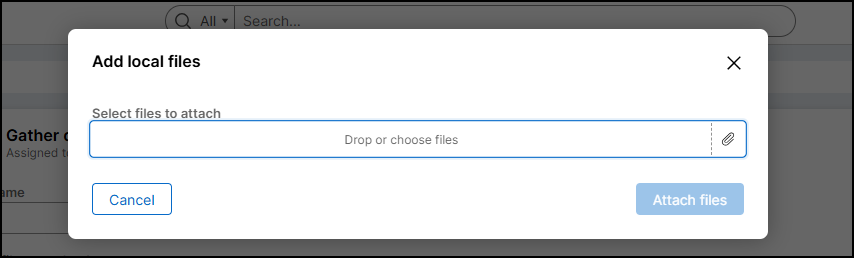
Post-Infinity '25, the user experience is updated such that the Attach files button is never disabled. Instead, the button responsible for selecting a file from the device is configured as a required field (this is possible due to browsers' handling of file upload using <input> tags).
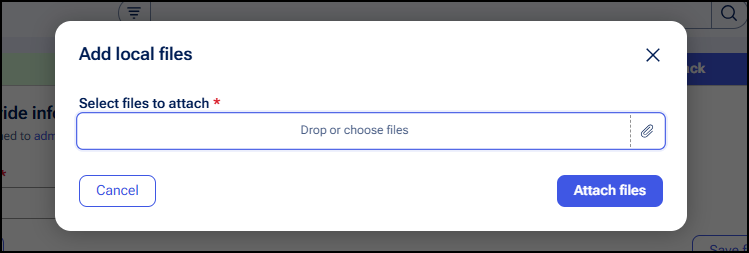
This design aligns closer to a standard web form, where the user enters data in one or more fields and finally submits the form. The "Attach files" button is functionally Submit button, triggering validation errors should the user attempt to submit before uploading.
This approach helps to keep a consistent user interface without needing to modify the state of the Attach files based on user interaction - and subsequently the need to alert screen reader users to content being modified elsewhere in the UI based on their input. Users who wish to first explore the dialog to understand its contents can do so without the uncertainty of how or when a disabled button would become enabled. With the addition of error messages should the user attempt to submit without file upload, the steps to rectify the issue are now clearly stated through form validation.