
Discussion

Pegasystems Inc.
BR
Last activity: 26 Jan 2026 14:37 EST
How to Resolve Duplicate Case ID Issues: A Guide to Updating the Pega Case ID Reserved Numbe
Introduction
A common challenge encountered during application migration, environment refresh, or major version upgrades is the misalignment of the system's Case ID generation seed with the highest existing Case ID in the database. This misalignment can lead to critical runtime errors, specifically duplicate key exceptions, which prevent new cases from being created.
This article provides a comprehensive guide for Pega developers and system administrators on how to correctly identify the highest existing Case ID and update the system's reserved number, ensuring a seamless continuation of case processing in the target environment.
Understanding Pega's Case ID Generation Mechanism
Pega uses the `Data-UniqueID` class to manage the sequence numbers for all work objects. The key property in this process is `pyLastReservedID`, which stores the last number reserved by the system for a specific case type prefix.
Step-by-Step Guide to Update the Case ID Reserved Number
The following process ensures that the system's next generated Case ID is safely beyond the range of all existing IDs.
Step 1: Determine the Highest Existing Case ID
Option 1: Run a database query
You must first query the database to find the maximum numeric part of the Case IDs for the affected work pool. This is not in Pega documentation. The documentation focuses on using Pega activities and methods rather than direct database queries, but it is an easy way to check for all `Sequence Number` at once.
The Case ID format is typically `[Prefix]-[Sequence Number]`. The query must extract the sequence number and find the maximum value.
SELECT
    CASE
        WHEN pyID LIKE '%-%' THEN split_part(pyID, '-', 1)
        ELSE ''
    END AS prefix,
    MAX( substring(pyID FROM '([0-9]+)$')::int ) AS max_sequence_number
FROM your_schema.pc_your_work_table -- e.g., pegadata.pc_htp_howtopega_work
WHERE pyID ~ '[0-9]+$'
GROUP BY 1
ORDER BY 1;
- your_schema.pc_your_work_table: Replace with the actual schema and the specific work table (e.g., `pegadata.pc_htp_howtopega_work`) for the case type in question.
- Safety Margin: Once you have the max_sequence_number (e.g., `25000`), choose a new reserved number with a significant buffer (e.g., `30000`). This buffer accounts for any in-flight cases and the batch size of the ID generation mechanism.
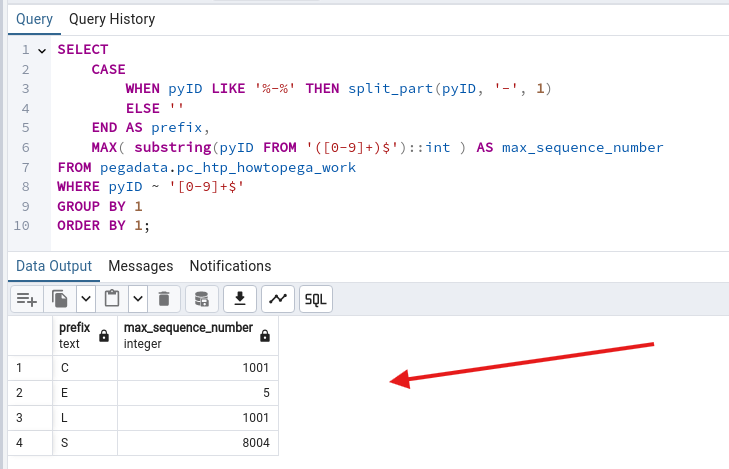
Option 2: Viewing Data-UniqueID Instances in Dev Studio
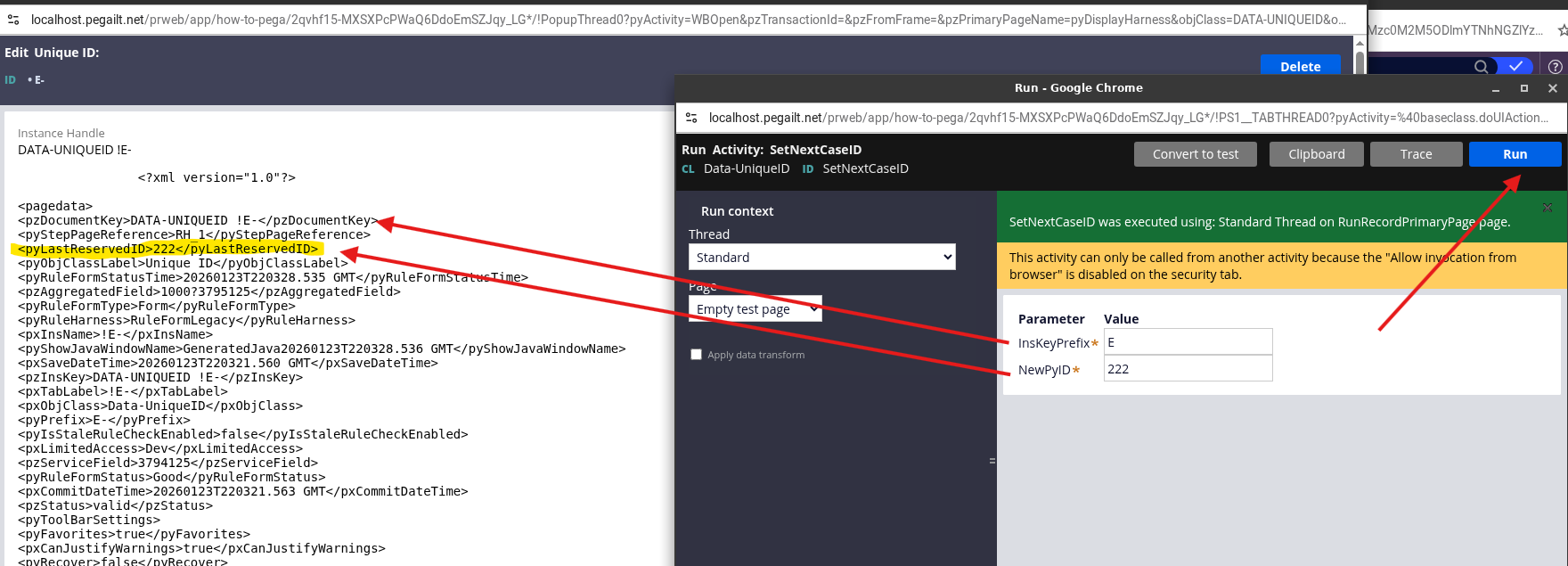
Another way to check the current pyLastReservedID value is to navigate directly to the Data-UniqueID class instances in Dev Studio:
Access App Explorer: In Dev Studio, navigate to App → Classes → `Data-UniqueID`. Select the Data-UniqueID class to view all instances.
Find Your Case Type Prefix: Locate the instance corresponding to your case type prefix (in this case, 'E-'). Each prefix has its own Data-UniqueID instance.
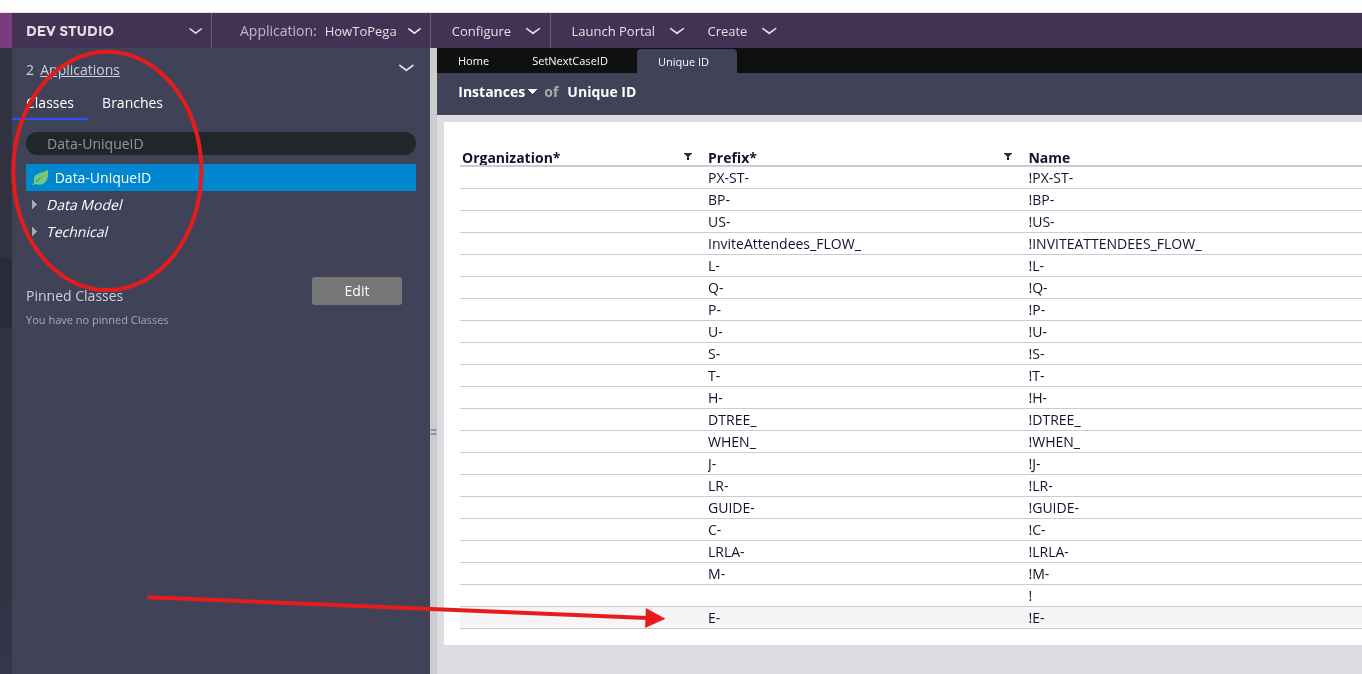
Open the Instance: Click on the instance to open it and view its properties.
Check the `pyLastReservedID` Value: In the instance details, locate the `pyLastReservedID` property. This displays the current reserved number for that case type prefix.
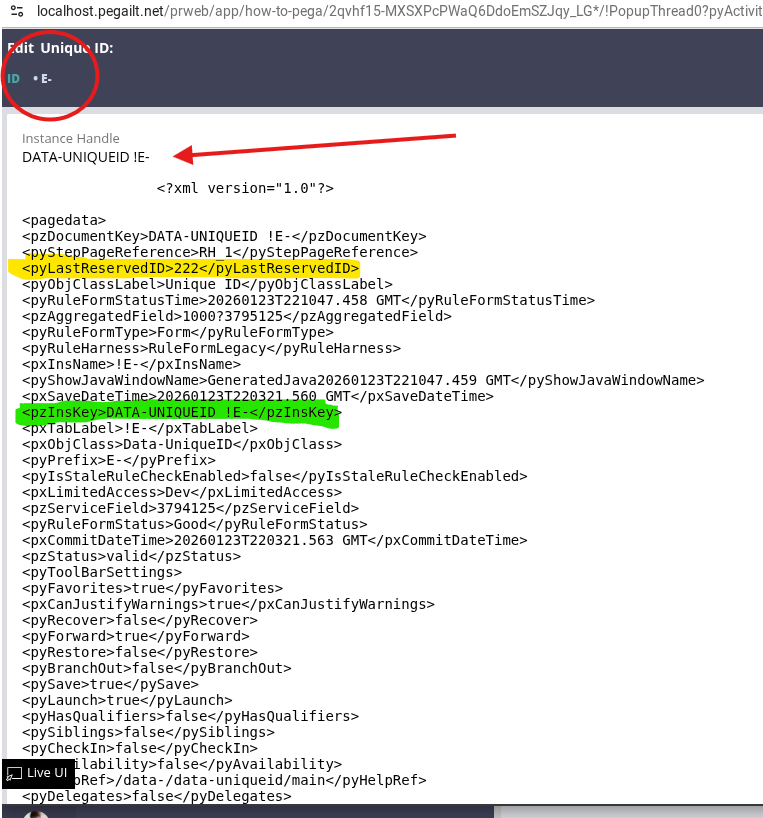
Step 2: Update the `Data-UniqueID` Instance via Pega Activity
Direct database manipulation of the `pr_data_uniqueid` table is strongly discouraged, especially in Pega Cloud environments. The safest and supported method is to use a Pega Activity to update the `pyLastReservedID` property.
1. Create a Activity: In Dev Studio, Create → Technical → Activity in your application's ruleset, using the `Data-UniqueID` class.
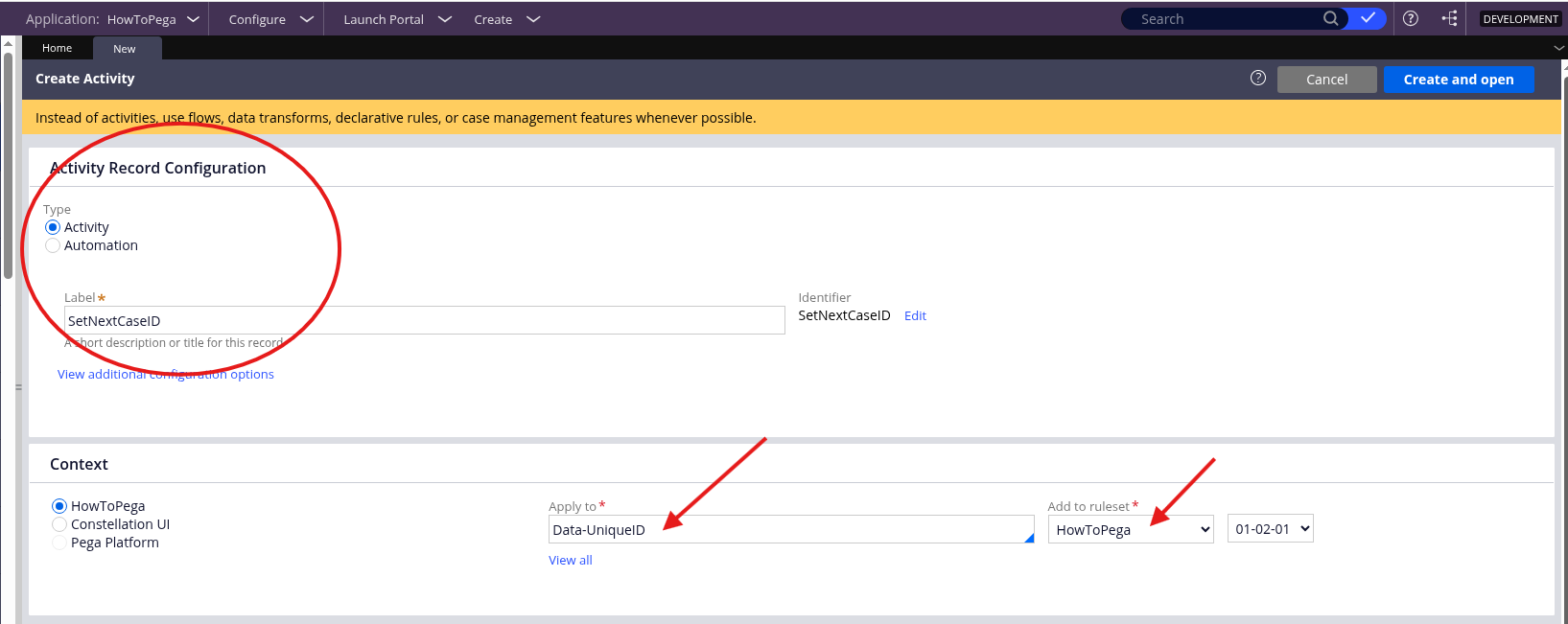
2. Configure the Activity
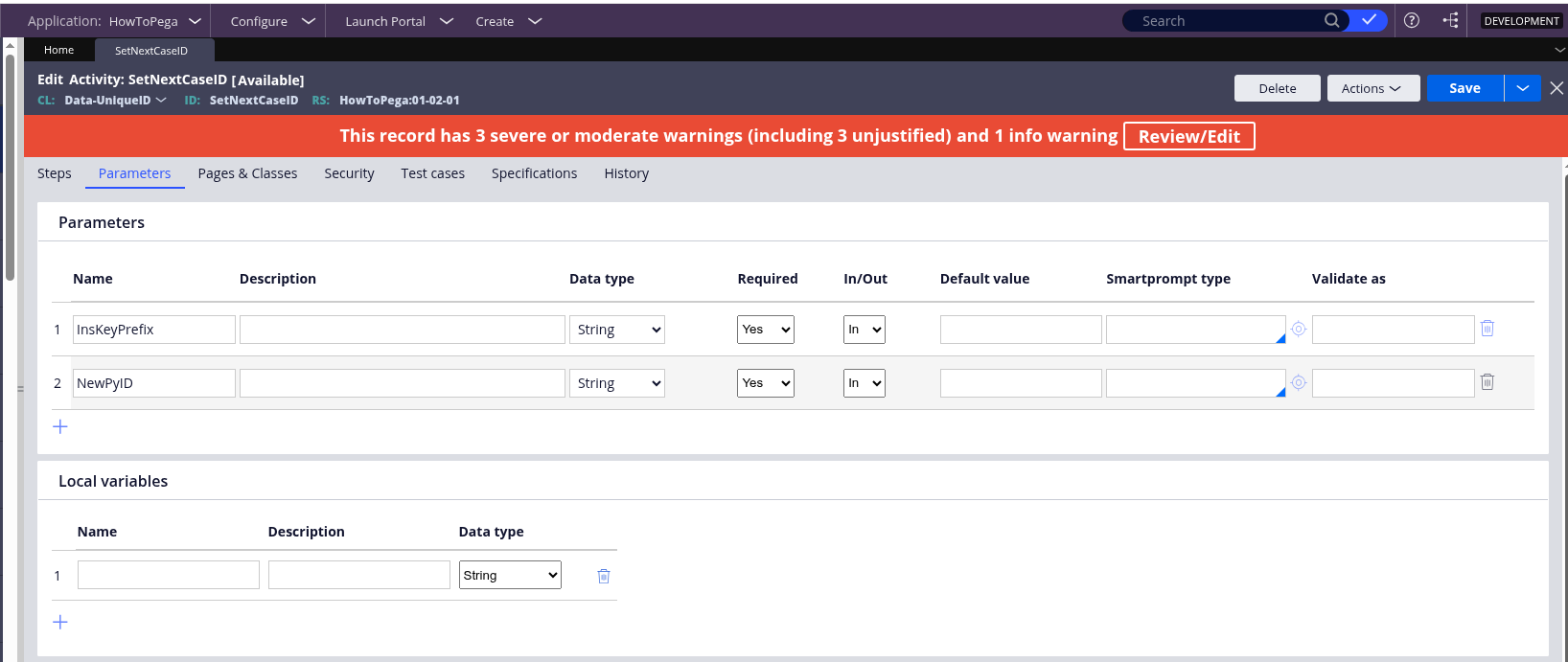
2.1 Add a Parameters:
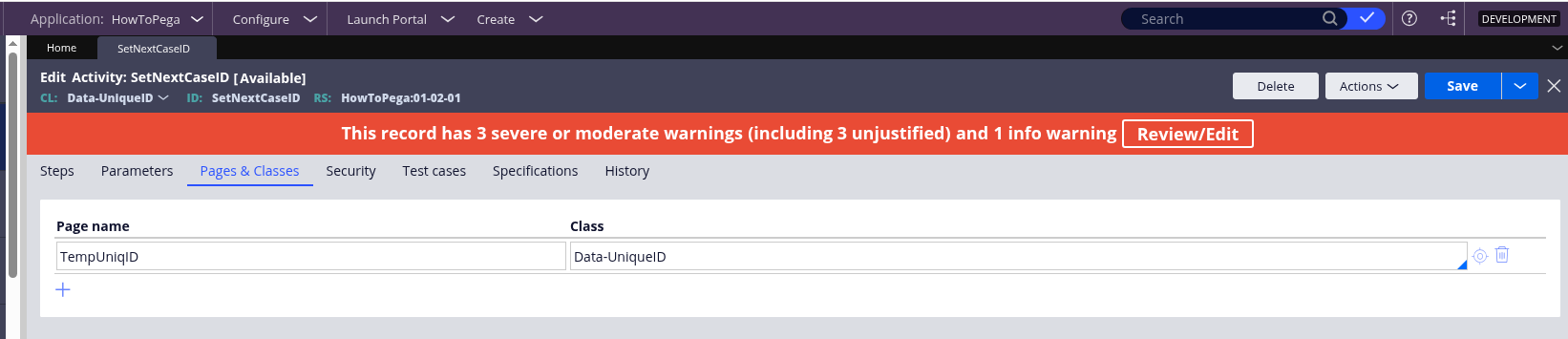
2.2 Add Pages and classes:
2.3 Add Steps:
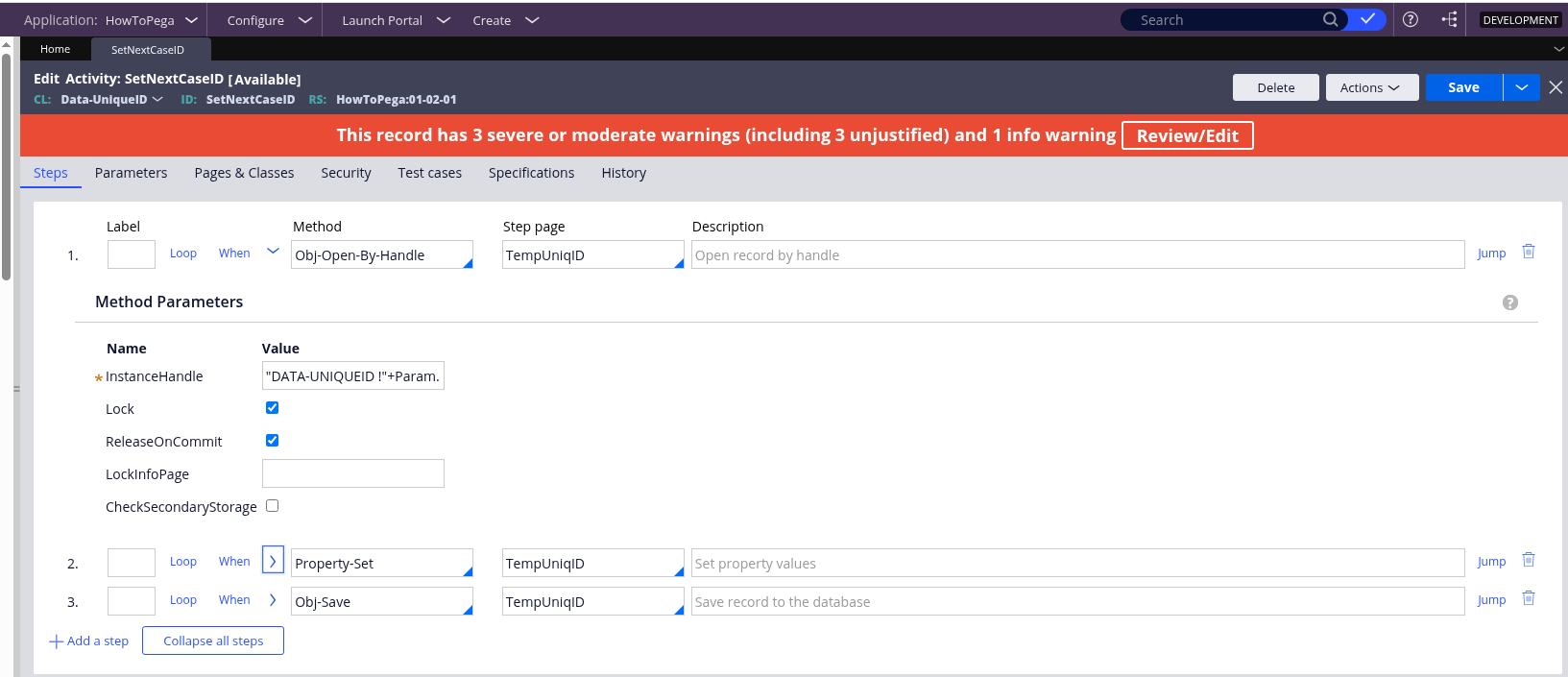
Step 1:
- Method: Obj-Open-By-Handle
- Step page: TempUniqID
- InstanceHandle: "DATA-UNIQUEID !"+Param.InsKeyPrefix
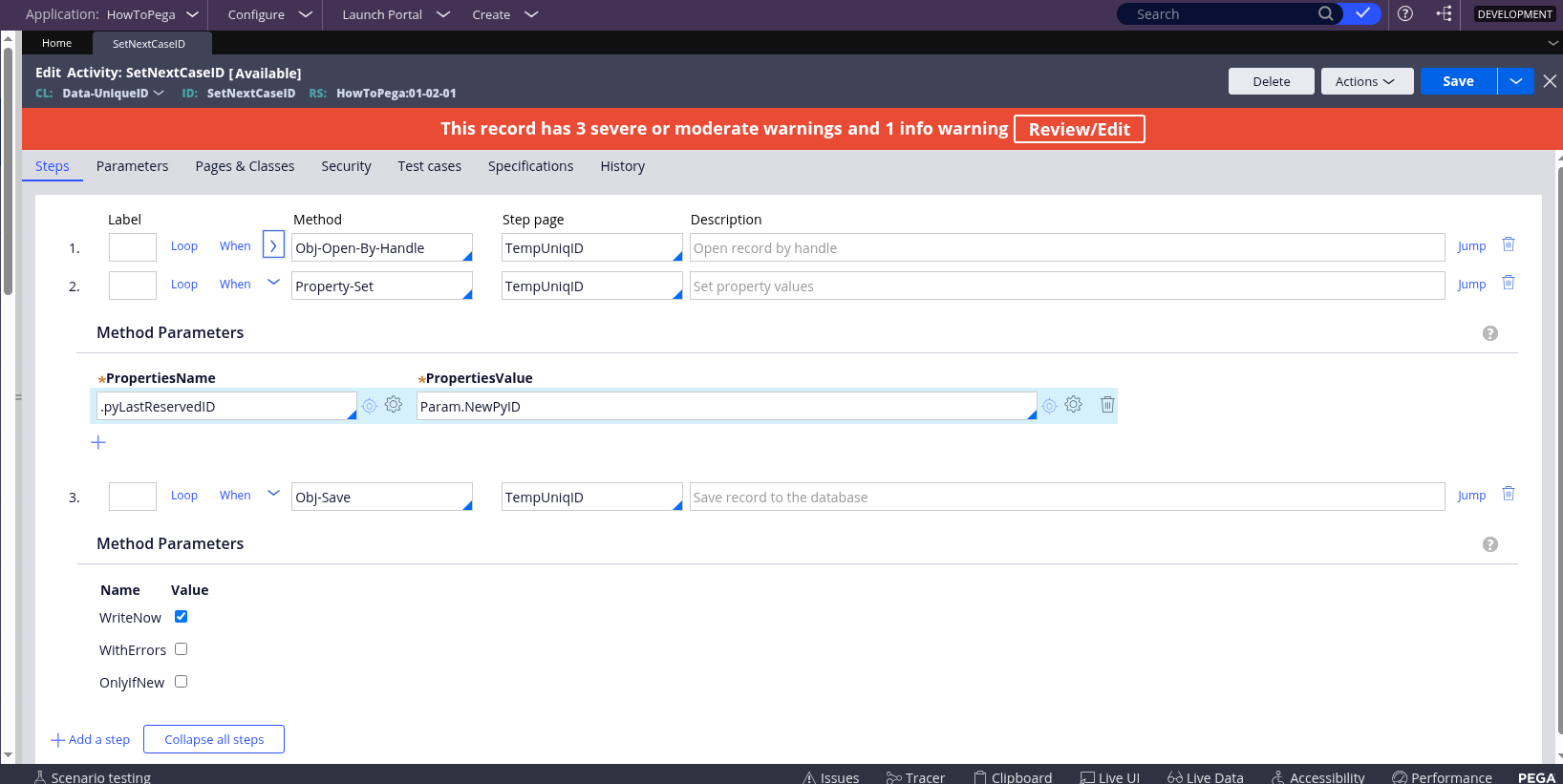
Step 2:
- Method: Property-Set
- Step page: TempUniqID
- PropertiesName: .pyLastReservedID
- PropertiesValue: Param.NewPyID
Step 3:
- Method: Obj-Save
- Step page: TempUniqID
- WriteNow: true
3. Run the Activity: Run the activity once in your target environment after the data migration
Step 3: Post-Update System Actions
After the `Data-UniqueID` instance is updated, the change must be propagated across all nodes in the cluster.
1. Restart Application Servers: It is a best practice to restart all Pega application servers in the cluster. This ensures that all nodes clear their in-memory cache of the reserved ID and pick up the new, higher `pyLastReservedID` from the database upon startup.
2. Verify Case Creation: Create a new case of the affected type. The latest Case ID should start from the number you set (e.g., `MYAPP-30001`) or higher, depending on the batch size.
Best Practices and Modern Considerations
- Pega Cloud and Database Access: Always use the Pega Activity method for updates, is the Pega best practice. The SQL query in Step 1 may need to be executed by the Pega Cloud team or a database administrator with appropriate access.
- Batch Size Configuration: If the non-sequential nature of Case IDs (due to the default batch size of 1000) is a business concern, you can modify the batch size using a Dynamic System Setting (DSS):
- Setting Name: idGenerator/defaultBatchSize
- Owning Ruleset: Pega-RULES
- Value: Set to `1` to revert to sequential ID generation (with a performance trade-off), or a smaller batch size (e.g., `100`) to reduce the jump size.
- Testing: Always perform this procedure in a lower environment (e.g., Development, QA) before applying it to Production.
Conclusion
Updating the Case ID Reserved Number is a critical maintenance task, particularly in migration scenarios, that safeguards the application against data integrity issues like duplicate key exceptions. By following the Pega-recommended approach of first determining the highest existing ID and then safely updating the pyLastReservedID property via a Pega Activity, system administrators can ensure the continuous and correct generation of unique Case IDs, maintaining the stability and performance of their Pega application.
References
- Pega Support Center - How to get next case ID in Pega 8.3 - https://support.pega.com/question/how-get-next-case-id-pega-83
- Pega Support Center - Case ID generation mechanism - https://support.pega.com/discussion/case-id-generation-mechanism
- Pega Support Center - Handling Duplicate Case ID Errors After a Pega Upgrade - ttps://support.pega.com/discussion/handling-duplicate-case-id-errors-after-pega-upgrade
- Pega Community - Increase performance of work ID generation in Pega Platform 8.3 - https://community.pega.com/knowledgebase/articles/whats-new-pega-platfo…