
Discussion

Pegasystems Inc.
BR
Last activity: 4 Feb 2026 15:10 EST
How to Create Parent-Child Case Relationships Across Two Pega Applications
Introduction
This tutorial demonstrates how to establish parent-child case relationships between case types that exist in two different Pega applications. We will build a solution where a parent case in a top-level application can create a child case from a base application using two distinct methods: Class Inheritance and Direct Reuse.
Overview of the Applications
Base Application: `Loan Processing App`
- This application manages the core logic for handling loans.
- Case Type: `Loan Request` (Class: `BBank-LoanProcessing-Work-LoanRequest`)
Top Application: `Customer Onboarding App`
- This application is built-on top of the `Loan Processing App` and manages the customer onboarding process.
- Parent Case Type: `CustomerOnboarding` (Class: `BBank-Customer-Work-CustomerOnboarding`)
- Child Case Scenarios:
- Inherited Child Case: A `LoanRequest` case created within the `Customer Onboarding App` that inherits its structure from the base `Loan Request` case.
- Direct Reuse Child Case: The parent case directly creates an instance of the `Loan Request` case from the `Loan Processing App`.
Step 1: Create the Base Application (`Loan Processing App`)
First, we'll create the base application that contains the reusable case type.
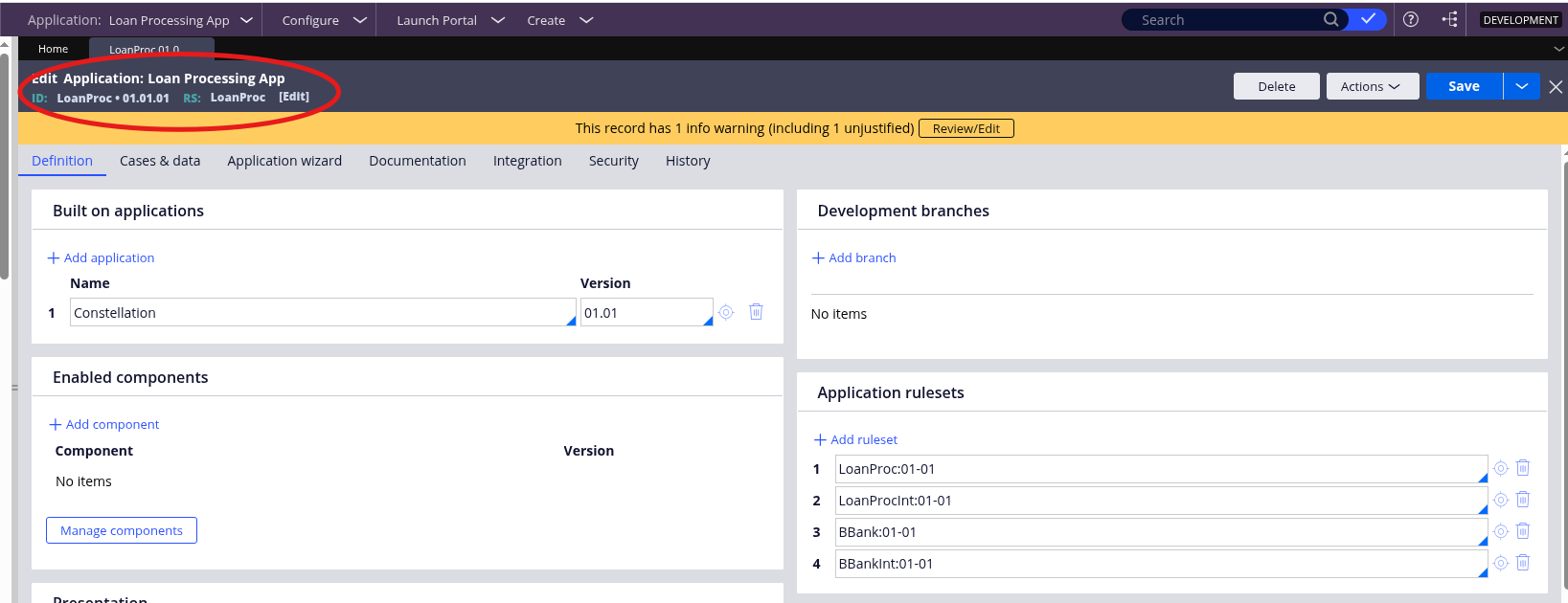
1. In Dev Studio, create a new application named `Loan Processing App`.
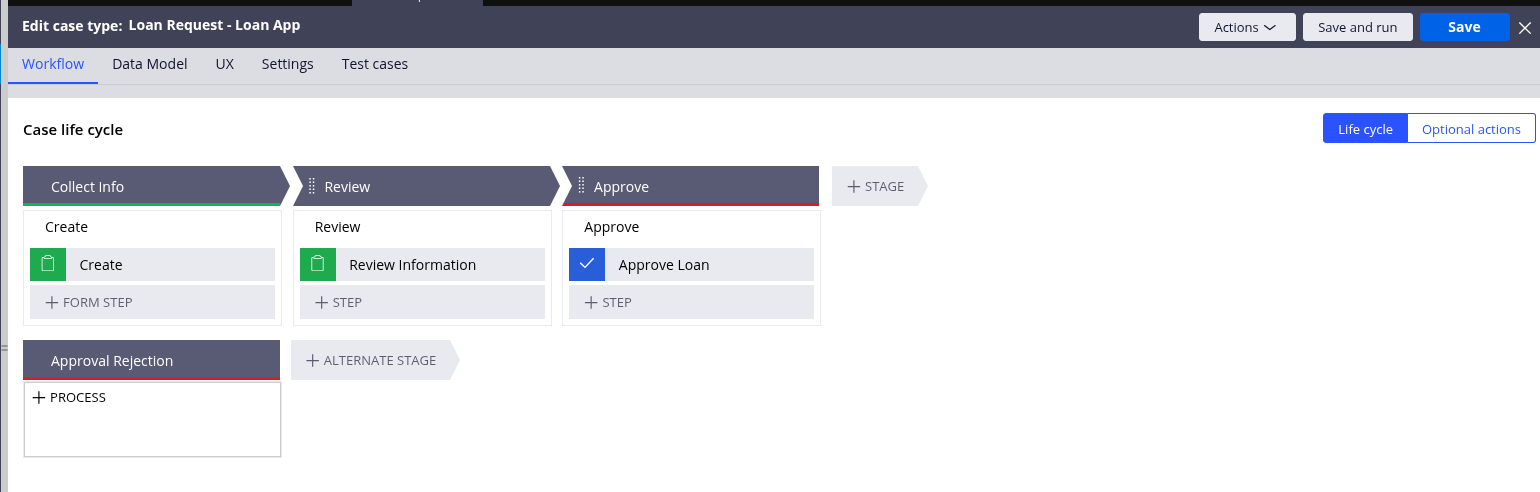
2. Add a Case Type named `Loan Request`. Configure its case life cycle with stages like Collect Info, Review, and Approve.
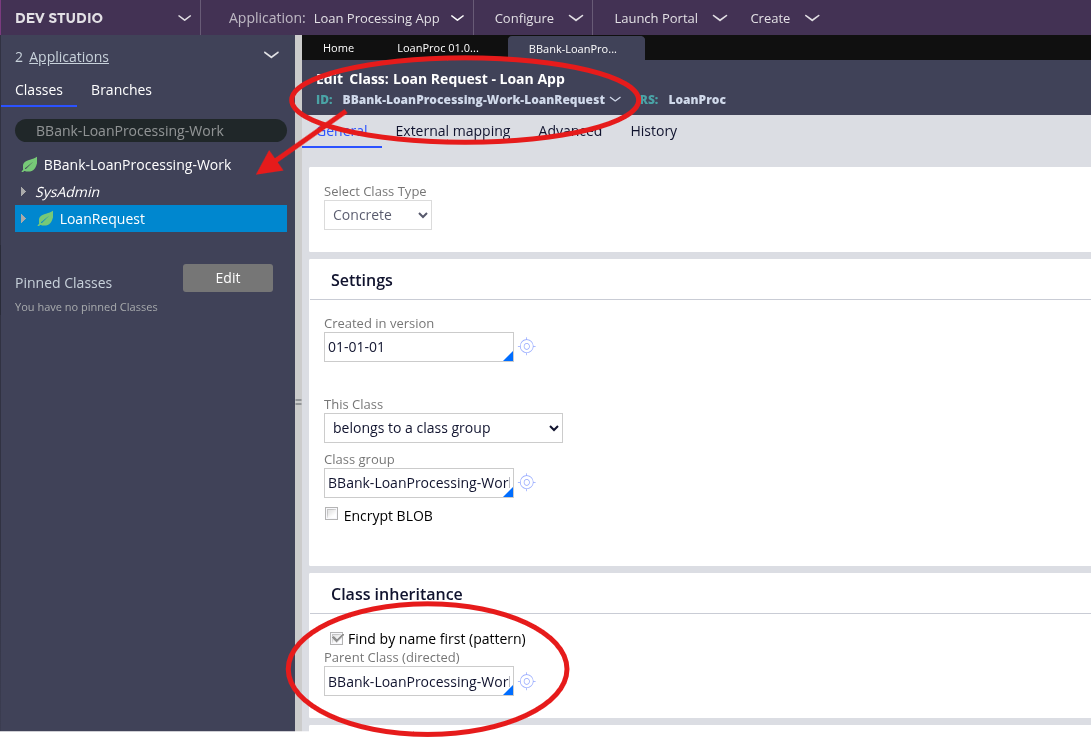
3. The underlying class for this case type will be `[Org]-[App]-Work-LoanRequest`, which in this example is `BBank-LoanProcessing-Work-LoanRequest`.
Step 2: Create the Top Application (`Customer Onboarding App`)
Next, create the main application that will contain the parent case. This application must be built-on the base application to access its rules.
1. Create a new application named `Customer Onboarding App`.
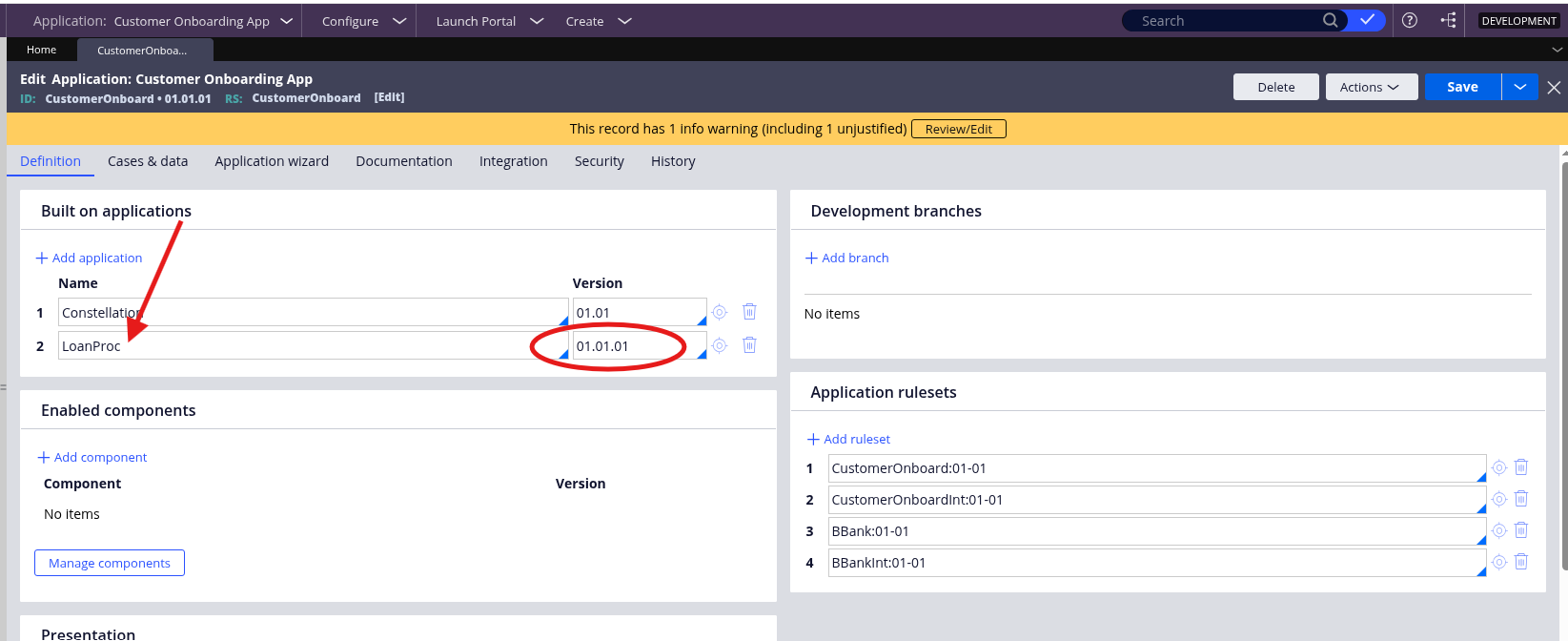
2. In the application definition, add the `Loan Processing App` (`LoanProc`) to the Built-on applications list.
3. Create the parent case type named `CustomerOnboarding`.
Step 3: Configure the Child Case Relationships
Now, we will set up the two different methods for creating a child case from the parent `CustomerOnboarding` case.
Scenario A: Create a Child Case via Class Inheritance
This method involves creating a new case type in the top application that inherits the rules (fields, processes, UI) from the base case type.
1. In the `Customer Onboarding App`, create a new case type and name it `LoanRequest`.
2. Navigate to Dev Studio and open the class rule for this new case type (e.g., `BBank-Customer-Work-LoanRequest`).
3. In the Class inheritance section, set the Parent class field to the class of the base case type. This configures directed inheritance, allowing rules to be reused across different applications: `BBank-LoanProcessing-Work-LoanRequest`.
This ensures your new case type inherits from the base one.
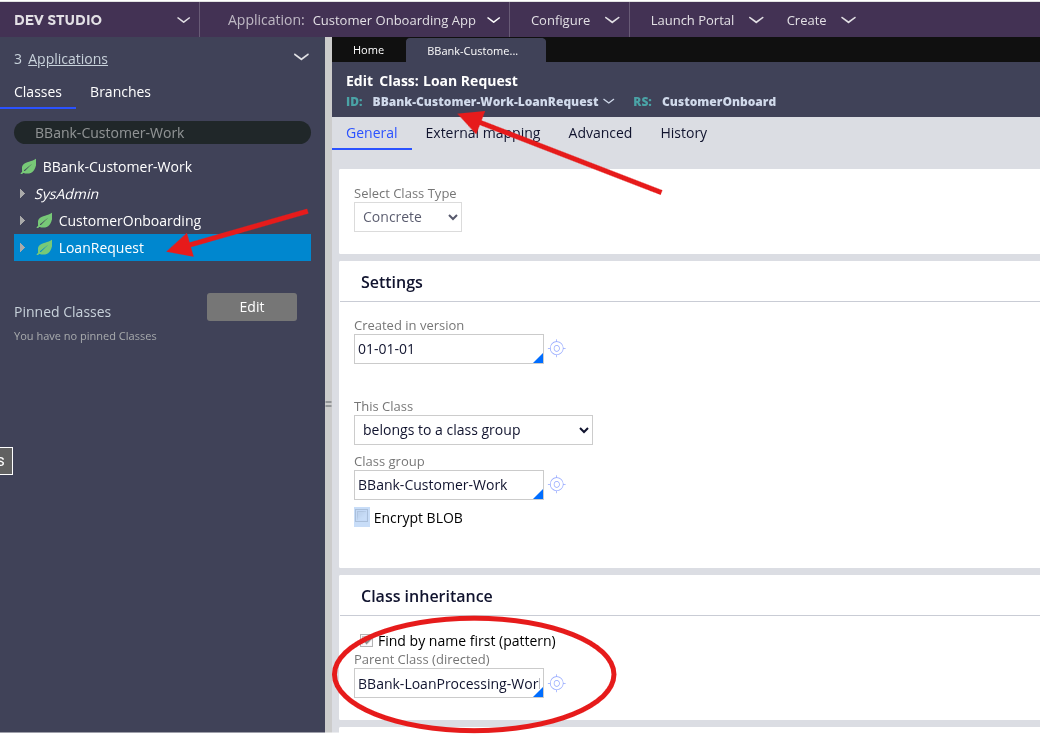
Note: You can also use the "Inherit from existing" option during case type creation in the New Application wizard, which automatically configures the parent class relationship. In this article was demonstrated the manual Dev Studio approach for educational purposes
Scenario B: Directly Reuse the Base Case Type
This method doesn't require creating a new case type. Instead, you directly reference the case type from the built-on `Loan Processing App`.
Pega refers to case types shared across applications as "Remote Case Types" and that this pattern is officially supported for maintaining application continuity across layers.
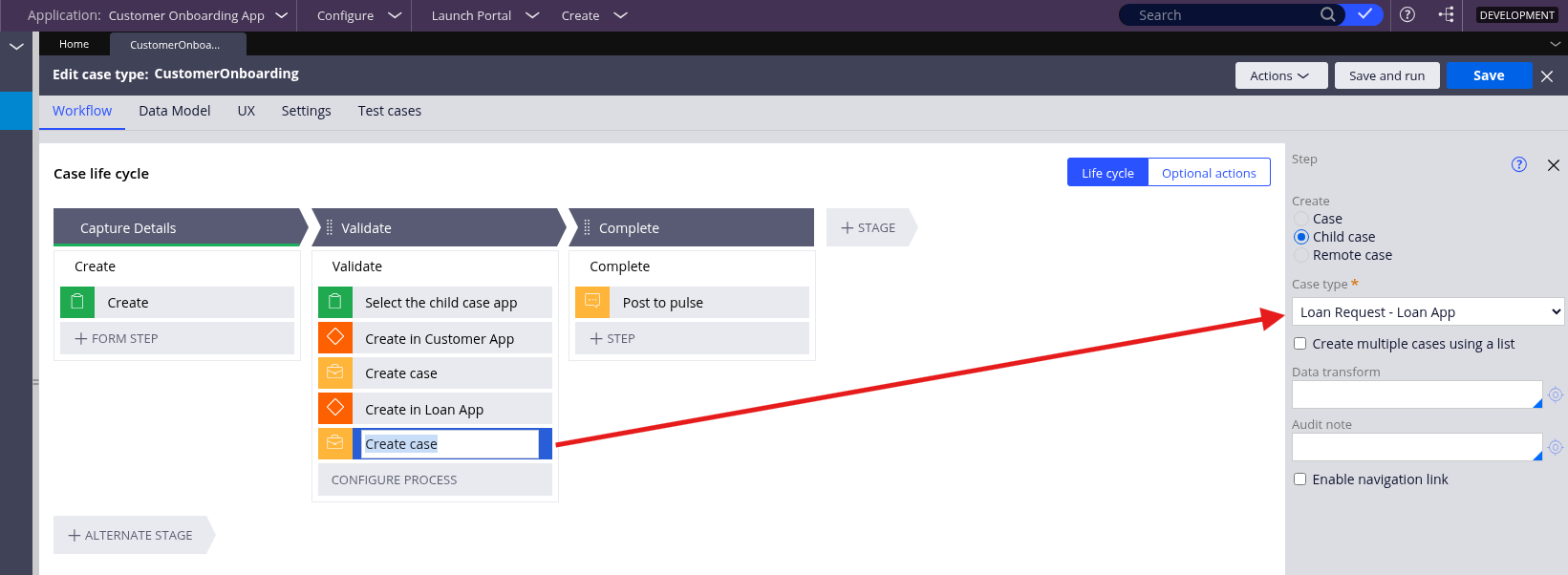
1. Because the `Customer Onboarding App` is built-on the `Loan Processing App`, Pega automatically makes the base case type available.
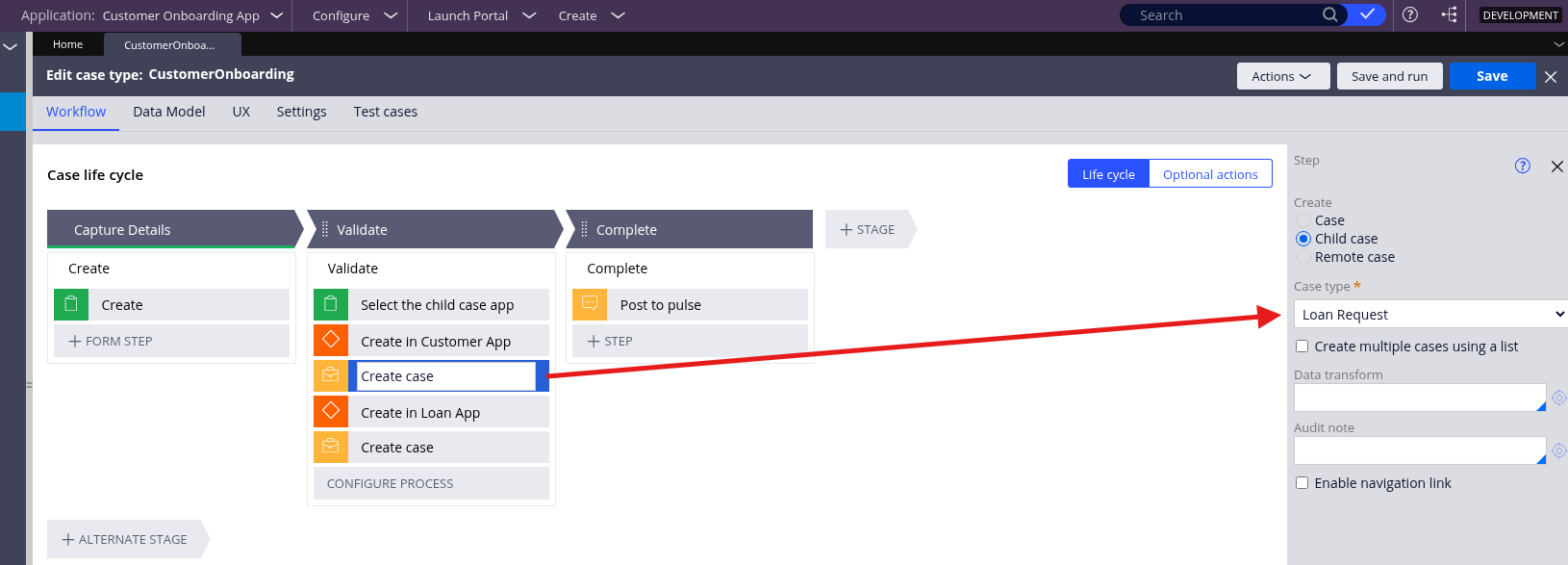
2. In the `CustomerOnboarding` parent case, you can add a Create Case step and directly select the `Loan Request - Loan App` case type.
You can see both the inherited (`BBank-Customer-Work-LoanRequest`) and the base (`BBank-LoanProcessing-Work-LoanRequest`) case types are available to be added as child cases to the parent `CustomerOnboarding` case.
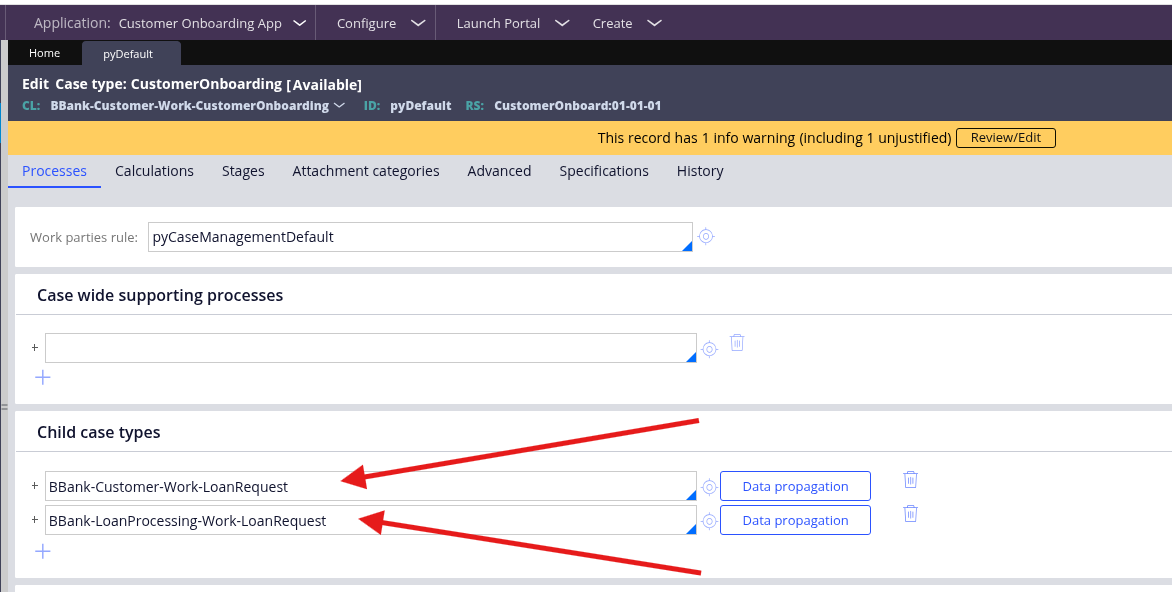
Step 4: Build the Parent Case Logic to Select a Child Case
To demonstrate the flexibility of this approach, we can configure the `CustomerOnboarding` case to allow a user to choose which type of child case to create.
1. In the `CustomerOnboarding` data model, create two Boolean properties to control the logic, for example:
- `CreateLoanCustomerApp`
- `CreateLoanLoanApp`
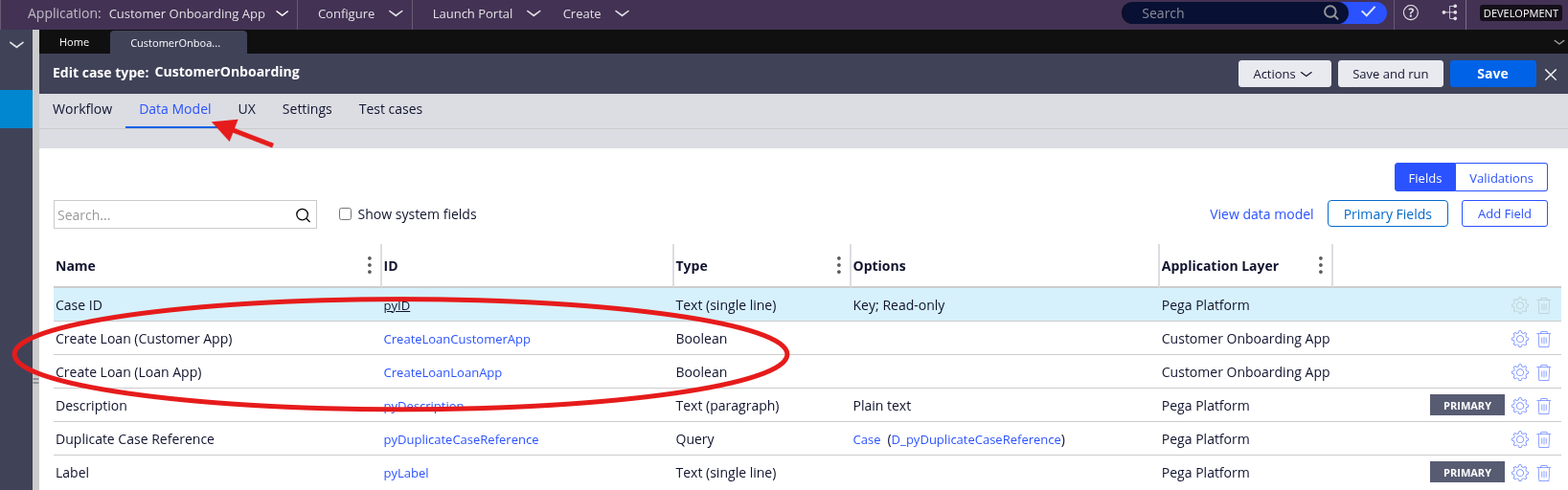
2. In the `CustomerOnboarding` case life cycle, add a step with a form where the user can select which child case to create. This form sets the Boolean properties from the previous step.
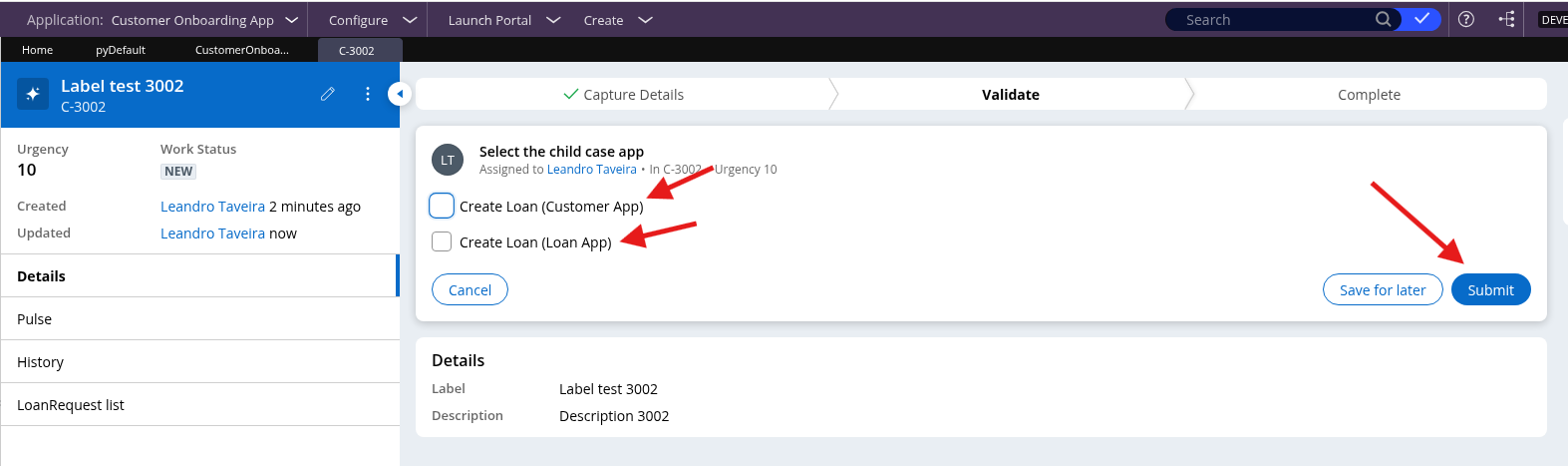
3. Use conditional logic (like a fork in the process) based on the Boolean properties to trigger the correct Create Case step—one for the inherited case and one for the directly reused case.
Step 5: Test the End-to-End Process
Finally, run the `CustomerOnboarding` case to verify that the parent-child relationships work as designed.
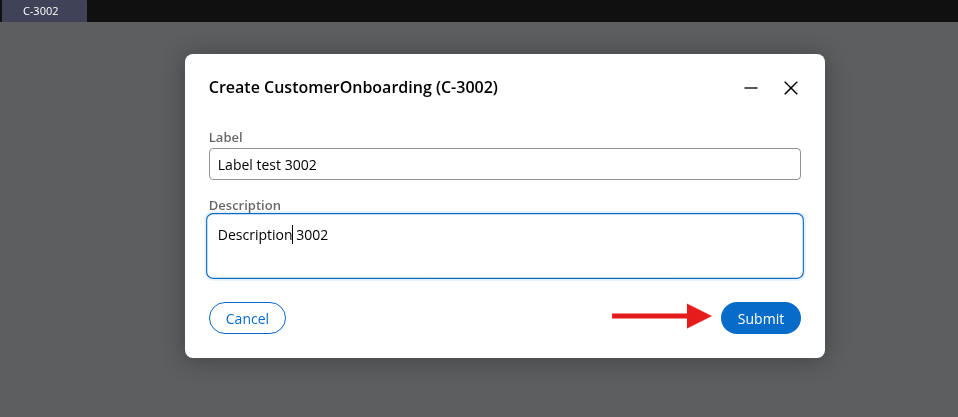
1. Create and submit a new `CustomerOnboarding` case.
2. At the selection step, choose one of the options (e.g., "Create Loan (Customer App)").
3. After the case proceeds, verify that the correct child case is created.
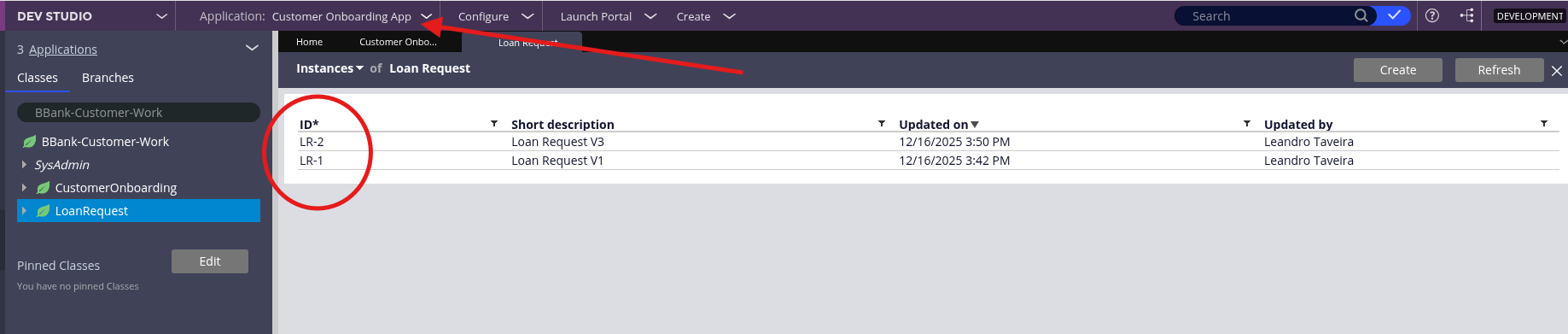
- If you chose the inherited case, a new instance (e.g., `LR-1`, `LR-2`) will appear under the `BBank-Customer-Work` class.
- If you chose the direct reuse case, a new instance (e.g., `LRLA-1`, `LRLA-2`) will appear under the base application's `BBank-LoanProcessing-Work` class.
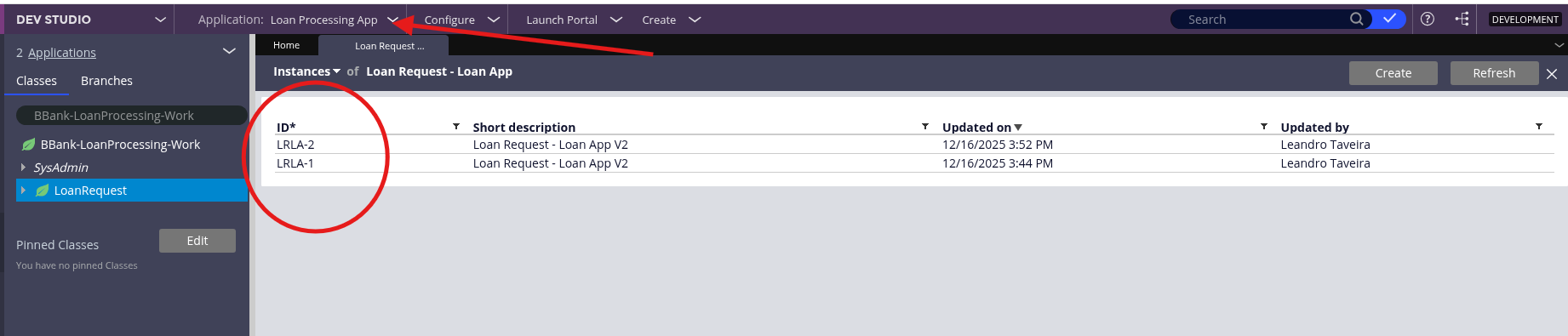 This confirms that you have successfully configured and tested both parent-child relationship patterns across two different Pega applications.
Conclusion
This tutorial demonstrated two powerful approaches for establishing parent-child case relationships across multiple Pega applications using the Constellation architecture. By leveraging the built-on application pattern, you can create sophisticated multi-layered application architectures that promote reusability, maintainability, and clear separation of concerns.
The Class Inheritance approach provides flexibility when you need to extend or customize the base case type's behavior within the context of your top-level application. By creating a new case type that inherits from the base case class through directed inheritance, you gain the ability to add specialized fields, override processes, or customize the user interface while maintaining the core logic from the base application. This method is particularly valuable when your use case requires application-specific variations of a shared case type.
The Direct Reuse approach, leveraging Pega's Remote Case Types pattern, offers maximum consistency when you need to maintain identical behavior across application layers. By directly referencing the base case type without creating a new inherited class, you ensure that all instances share the same rules, data model, and business logic. This approach is ideal for scenarios where standardization and centralized maintenance are priorities, such as when multiple applications need to interact with a common business entity without modification.
Both methods demonstrate the power of Pega's application architecture and the Situational Layer Cake™ pattern. The choice between inheritance and direct reuse depends on your specific business requirements: use inheritance when you need customization and flexibility, and use direct reuse when you need consistency and centralized control.
By understanding these patterns, you can design scalable, maintainable multi-application architectures that align with enterprise governance standards while delivering the flexibility needed to address diverse business scenarios. The techniques demonstrated in this tutorial form the foundation for building complex, interconnected Pega application ecosystems that can evolve with your organization's needs.
References
- Understanding class hierarchy and inheritance - https://docs.pega.com/bundle/platform-241/page/platform/app-dev/underst…
- Adding built-on applications - https://docs.pega.com/bundle/platform-241/page/platform/app-dev/adding-…
- Configuring remote Case Types - https://docs.pega.com/bundle/sales-automation-241/page/sales-automation…
- Case Types - https://docs.pega.com/bundle/platform-241/page/platform/case-management…
- Best practices for using multiple built-on applications - https://docs.pega.com/bundle/platform-241/page/platform/app-dev/best-pr…
- Creating a new Pega Platform application - https://docs.pega.com/bundle/blueprint/page/platform/blueprint/creating…
- Directed inheritance - https://docs.pega.com/bundle/platform-241/page/platform/app-dev/directe…