

Issue
When using a multi-select Data Reference field in the Pega Constellation UI with Card View display mode, the "Select All" checkbox is not available. This limitation forces users to manually select each item individually.
Symptoms
Multi-select data reference fields support both Table and Card Views. Table View includes a "Select All" checkbox for bulk selection, but Card View lacks this feature.
The absence of the "Select All" option in Card View for multi-select data reference fields significantly impacts mobile users, as Card View is the preferred layout on mobile devices due to its better usability compared to Table View. This limitation forces users to manually select each item, increasing effort, and reducing efficiency in bulk operations.
Impact
- Particularly critical for mobile users where Card View is the preferred/primary layout
- Increases manual effort for bulk operations
- Reduced efficiency in field scenarios requiring multiple selections
- Poor user experience compared to Table View functionality
Steps to reproduce
- In App Studio, create or open a Constellation UI case type
- Configure a Data Reference field with the following settings:
- Mode: Multi-select (to enable selection of multiple items)
- Display as: Card View
- Configure the card layout with desired fields (text, images, etc.)
- Run the case and open the assignment. Result: In Table View, the "Select All" checkbox is present and functional
- Switch the field display to Card View. Result: The "Select All" option is not available. Users must manually tap/click each card individually to select multiple items
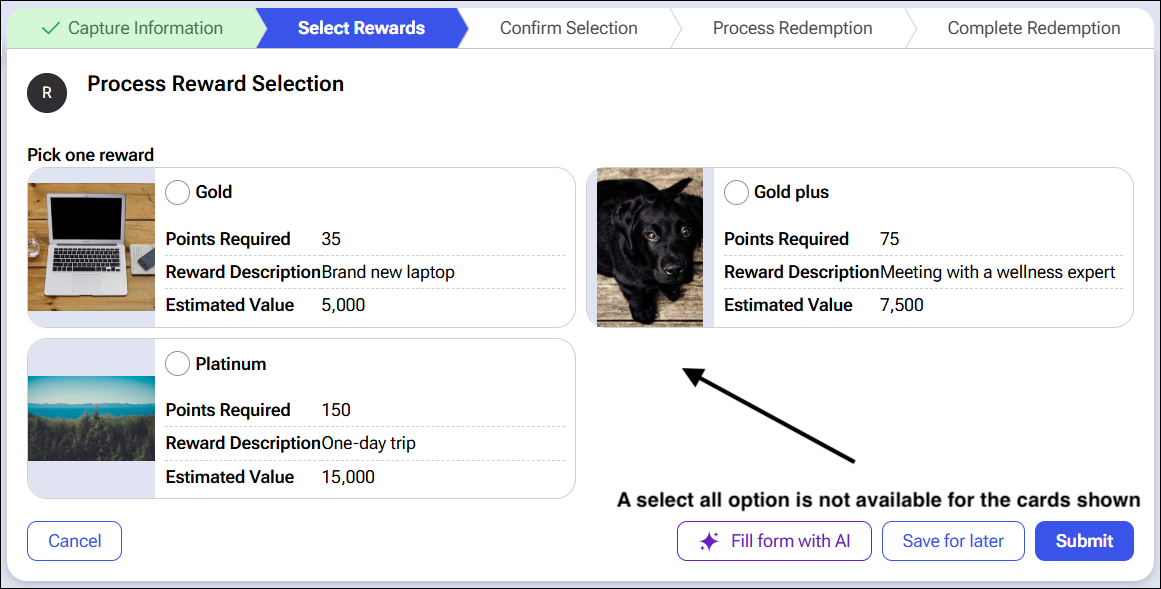
Root Cause
The Card View component was designed with a different interaction model and does not currently include the bulk selection capabilities (Select All checkbox) available in Table View for multi-select Data Reference fields.
Technical Context:
-
Table View: Inherits standard table selection controls including "Select All"
-
Card View: Optimized for visual comparison with image + text layouts, but lacks bulk selection UI controls
Solution
"Select All" will be supported in a future release of Pega Infinity™ ‘27.
Local change
Use Table View for Bulk Operations.
For scenarios requiring bulk selection of multiple records, configure the Data Reference field to use Table View instead of Card View:
Configuration:
-
In the field configuration, set Display as: Table or Simple Table
-
This enables the "Select All" checkbox for bulk operations
This is suitable for desktop and scenarios where visual card presentation is not critical
Related content
Configuring reference field as a card gallery