

Issue
In Pega Infinity™ ‘26.1.0, when a single-page Data Reference property is displayed as a Table or SimpleTable component using radio button selection, the Data Transform configured under the Form Refresh (On Change) action is not triggered when a user selects a radio button. The refreshFor call is not initiated, and the associated Data Transform logic is never executed.
Symptoms
- The expected refresh and data transform execution on radio button selection fails, causing UI updates to be skipped.
- No refreshFor network call is observed in the browser when the radio button is selected.
- The same configuration using a Combo-box (AutoComplete) display type works correctly.
Steps to reproduce
- On Pega Infinity ‘26.1.0, create a single-page Data Reference property that loads records from a Data Page.
- Display the records in a view using a Table or SimpleTable component with radio button selection enabled.
- Configure a Form Refresh (On Change) action on the same property's primary key, using the parameter “.DataReference.pyGUID”” or "Embeddedpage.DataReference.pyGUID”.
- Configure a Data Transform to execute upon selection of a record.
- At runtime, open the form and select a radio button. Result: The Data Transform is not invoked.
Root Cause
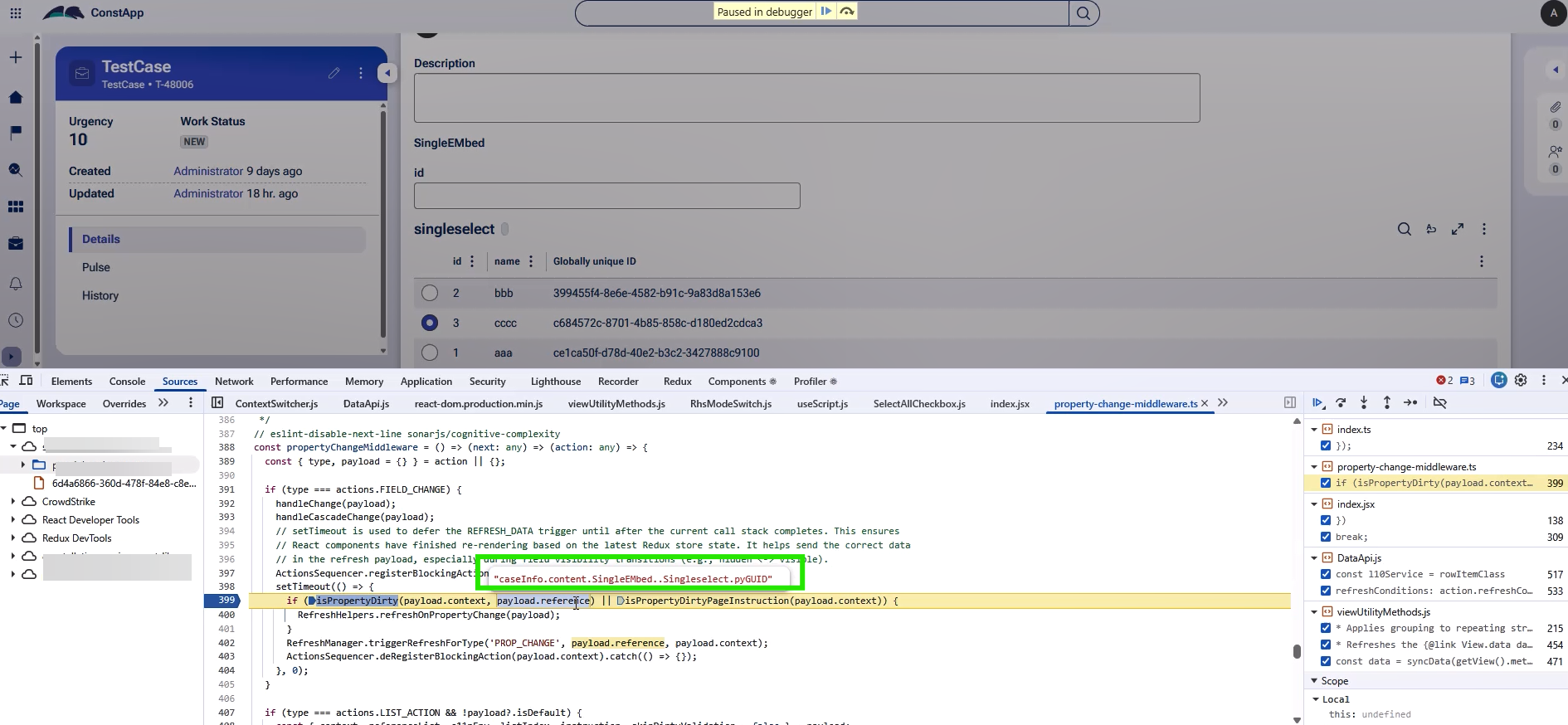
In Pega Infinity ‘26.1, a regression in the ObjectReference component causes malformed property references, preventing refreshOnPropertyChange from triggering.
The ObjectReference component strips the contextPage config ( '@P ') prefix but leaves a leading dot, causing FIELD_CHANGE payload to have double dots, which breaks property change detection and refresh triggers.
Tables created in versions prior to Infinity '26.1.0 are not affected because they continue to use the legacy DataReference table rendering path, which does not have this problem.
Solution
This issue will be resolved in one of the upcoming Infinity ‘26.1 patches where the fix corrects the property reference construction in the ObjectReference React component to prevent double-dot malformation.
Local change
Change the display type of the single-page Data Reference property from Table / SimpleTable to Combo-box (AutoComplete).
The Combo-box component correctly handles the dataRelationshipContext and does not produce a malformed property reference, so the On Change / Form Refresh action and the associated Data Transform execute as expected.
Steps:
- Open the view containing the single-page Data Reference property in App Studio or Dev Studio.
- Change the display type of the property from Table / SimpleTable to AutoComplete (Combo-box).
- Save the view.
- Verify that selecting a record triggers the Data Transform as expected.
References
Updating data in a Case by using savable Data References
Form refresh settings (Pega Forum)