

Issue
Legacy out-of-the-box (OOTB) user reference properties are not available for selection when authoring Pega Constellation Views despite being marked as relevant.
Examples properties are pyUserIdentifier, pxStatusStartOperator, and pxStatusCompleteOperator.
Symptoms and Impact
Users cannot select properties such as pyUserIdentifier, pxStatusStartOperator, and pxStatusCompleteOperator as view columns, promoted filters, or grouping fields in Constellation authoring, causing limitations in view customization.
Steps to reproduce
- Open a Constellation application that contains a legacy OOTB user reference property.
- Examples include:
- pyUserIdentifier
- pxStatusStartOperator
- pxStatusCompleteOperator
- Examples include:
- Mark the property as Relevant.
- Configure a Table View or List View.
- Attempt to add the user reference property as a column.
- Observe that the property does not appear in the authoring interface.
Root Cause
This is a product defect. Constellation uses additional validation logic that checks for required associations before user reference properties are exposed in authoring. Similarly, legacy OOTB user reference properties may not satisfy all the configuration requirements expected by Constellation.
As a result, the properties are excluded from authoring even when they have been marked as relevant.
The exact configuration requirements can vary between properties. In some cases, updating the UI control is required. In other cases, the issue is resolved through association configuration and property qualifiers.
Configuration requirements expected by Constellation:
-
User reference properties are supported only with pxDropdown or pxAutoComplete controls.
-
User reference properties must be backed by an association with Data-Admin-Operator-ID.
-
Required association metadata must be configured under property qualifiers.
-
The association name is required to match the property name.
Additionally, runtime components contain safeguards to resolve usernames, but as we have seen, the authoring layer performs association validation before exposing the property.
Solution
For any affected legacy OOTB user reference property follow the steps below:
- Open the property rule.
- Review the configured UI control.
- If the property uses pxTextInput, update the control to:
- pxDropdown, or
- pxAutoComplete
- Create or verify the required association with Data-Admin-Operator-ID.
- Add the required association under the property qualifiers.
- Verify that the association name matches the property name where required.
- If a Report Definition is used as the source of the Data Page, verify that the required report columns are optimized for reporting.
- Save the configuration changes.
- Reopen the Constellation authoring experience and verify that the property is available for selection.
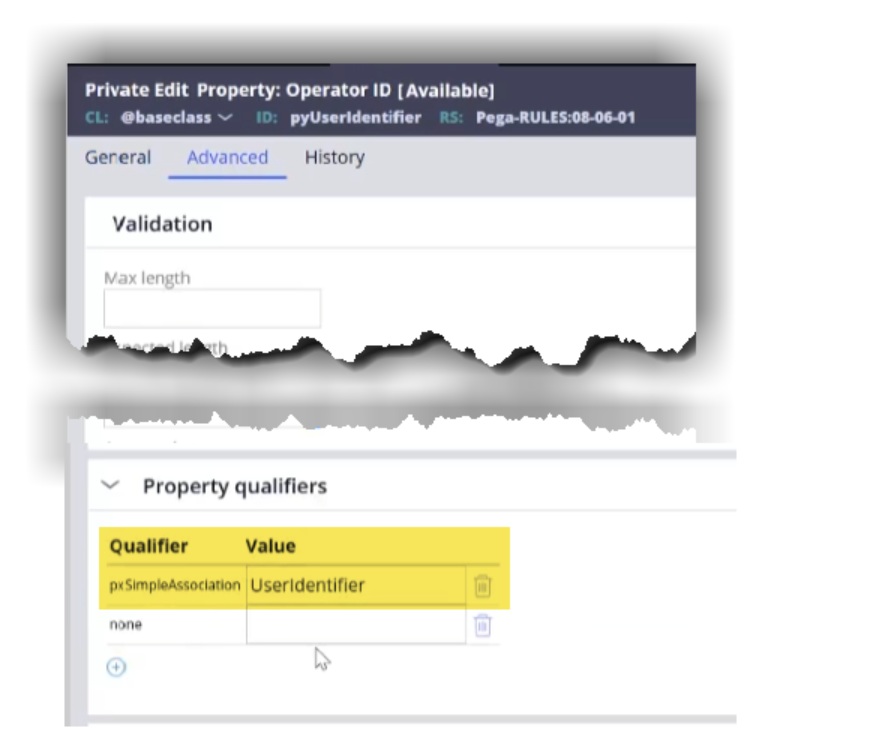
Local change specific to pyUserIdentifier
The following configuration will fix scenarios encountered with pyUserIdentifier:
- Create an association rule named UserIdentifier.
- Open the pyUserIdentifier property rule.
- On the Advanced tab, add the pxSimpleAssociation qualifier.
- Set the qualifier value to UserIdentifier.
- Ensure the association rule name matches the property configuration.
- Save the changes.
- Reopen the Constellation authoring experience.
- Verify that pyUserIdentifier appears as an available field.
- Add the property to the view and verify that User ID values are displayed.
Local change specific to pxStatusStartOperator and pxStatusCompleteOperator
The following configuration will fix scenarios encountered with pxStatusStartOperator and pxStatusCompleteOperator:
1. Open the property rule.
2. On the General tab change the UI control from pxTextInput to pxDropdown or pxAutoComplete.
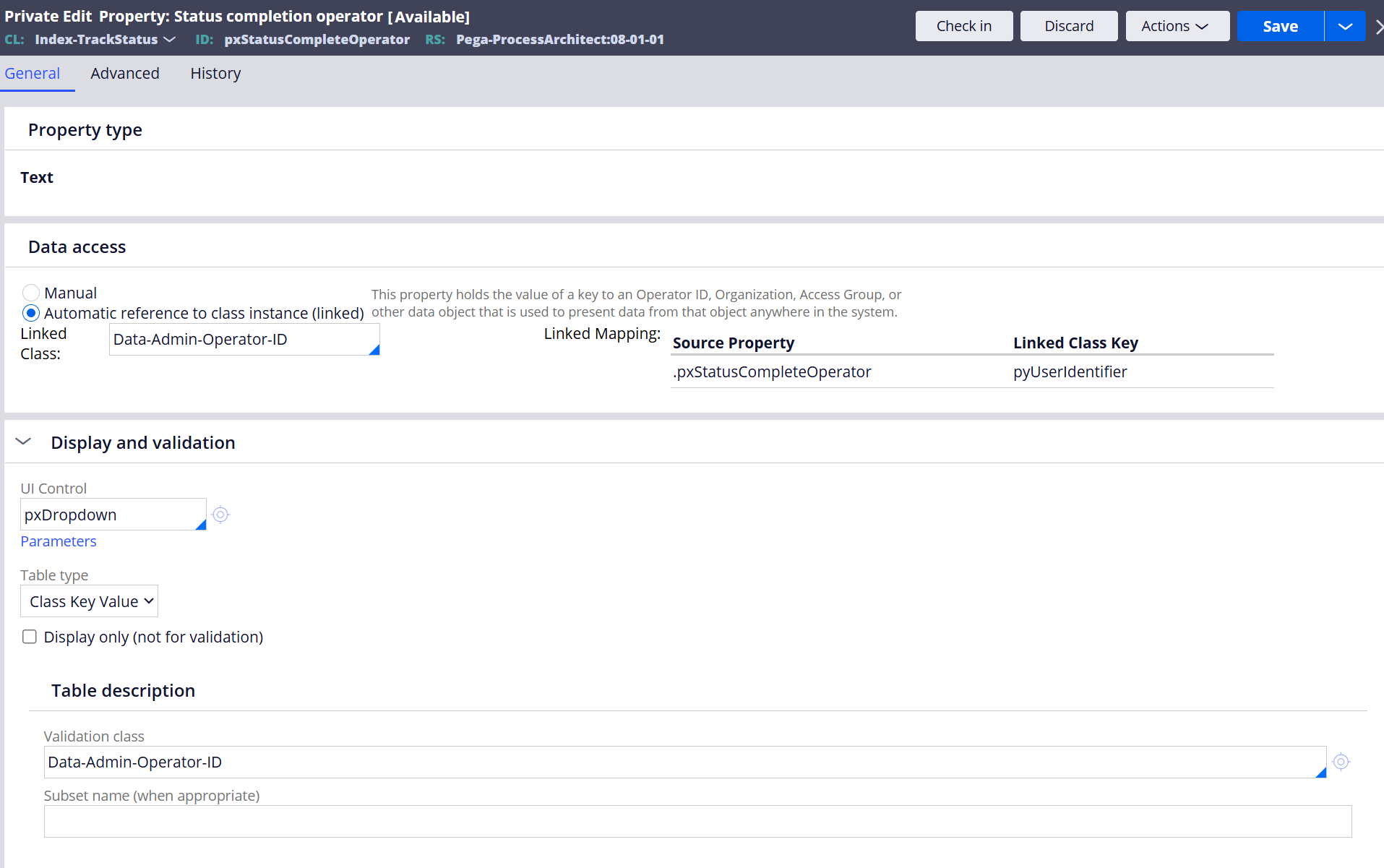
3. Create the required association with Data-Admin-Operator-ID.
4. On the tab add the association under the property qualifiers.
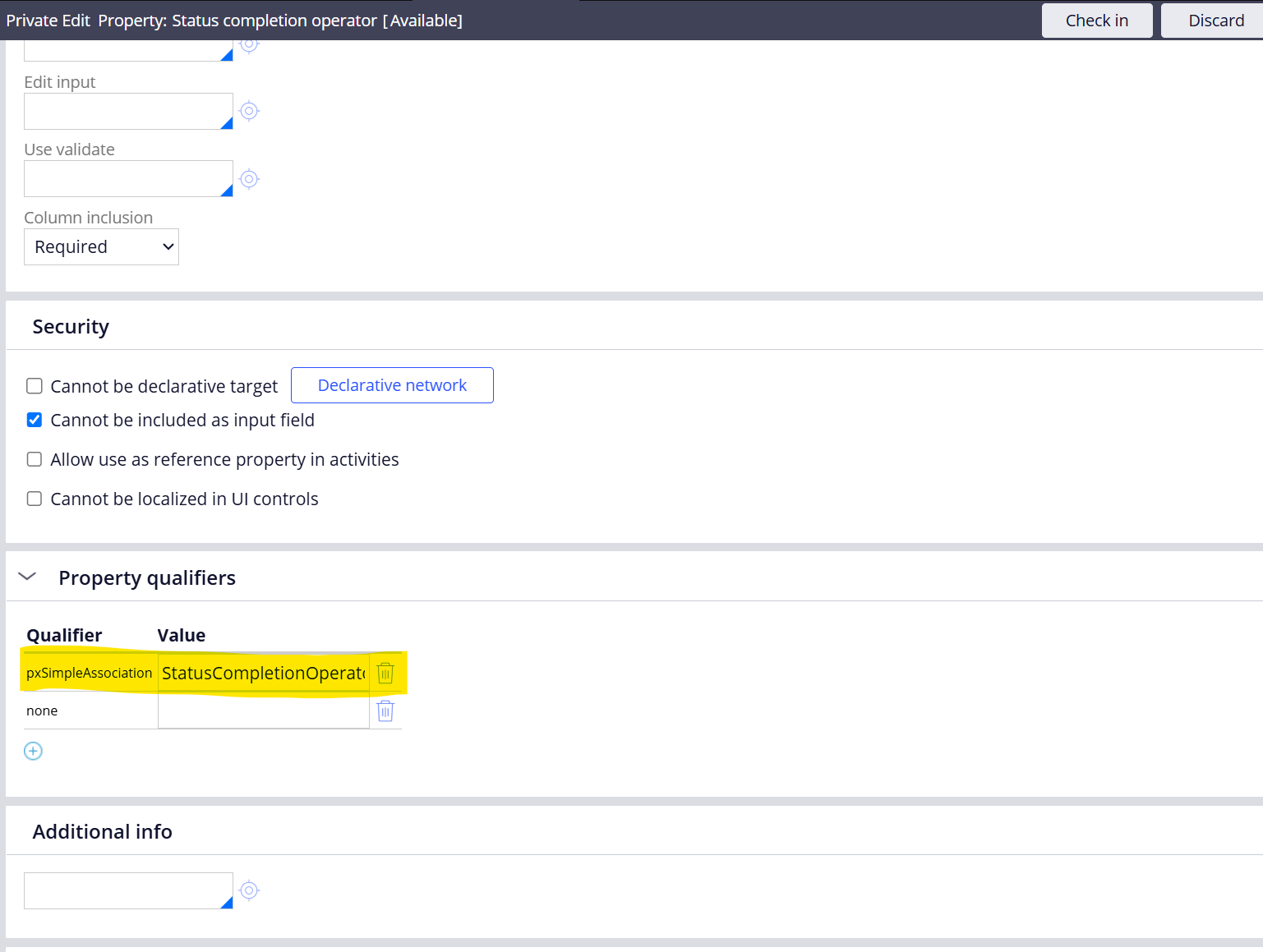
5. Save the configuration.
6. Revalidate authoring visibility and runtime population.
These changes restore visibility of the properties in authoring.
This issue is addressed in Pega Platform™ '25.1.4 and '26.1. The request to implement a generic solution that addresses all properties has been logged as a future enhancement request.