

Issue
In a Traditional UI application using the UI Kit design system, Pega charts (FusionCharts) fail to render.
Symptoms
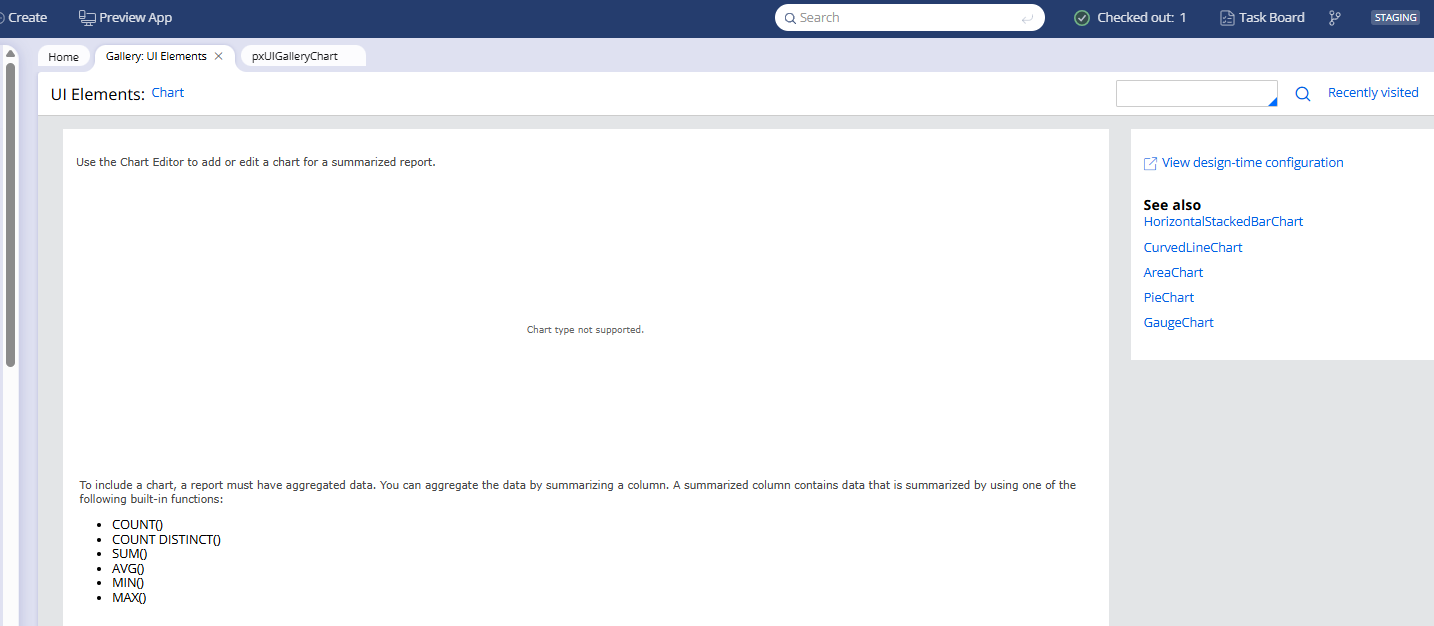
- Charts do not render. The UI displays "Chart type not supported" in place of the chart.
- The browser developer console shows the following repeating JavaScript error:
- Uncaught (in promise) TypeError: this.thenCore is not a function at c.then (pzpega_chart_scripts_...!pyfusioncharts.theme.default_....js)
- The AppDynamics Browser Real User Monitoring (ADRUM) agent script appears in the browser console call stack at the point of chart initialization failure.
- Disabling or removing the AppDynamics browser monitoring script reference from the application resolves the rendering failure immediately.
- The issue does not occur when the AppDynamics ADRUM agent is not present on the page.
Impact
Affects both custom case types and the out-of-the-box UI Gallery Charts control.
Steps to Reproduce
- Update to Pega Platform ‘26.1 with an application using the UI Kit design system and the AppDynamics ADRUM browser monitoring agent loaded via an HTML Fragment rule (for example, referenced from a UserWorkForm rule or equivalent header rule).
- Open the application and navigate to a case type or view that contains a chart control. Result: The chart does not render and that the error "Chart type not supported" is displayed.
- To confirm the issue is not isolated to a custom implementation, navigate to Configure → User Interface → Gallery → UI Elements and select Charts under . Result: The same error is displayed.
Root Cause
A JavaScript conflict introduced by the AppDynamics ADRUM agent (version Proprietary information hidden0 and later), overrides the browser's global Promise object and breaks the FusionCharts library that Pega charts depend on.
The Pega chart control in Traditional UI applications uses FusionCharts as its rendering library. FusionCharts relies on the standard browser Promise object for its internal rendering sequence.
The AppDynamics ADRUM agent (adrum- Proprietary information hidden8.js) overrides the browser's global Promise object as part of its instrumentation for Single-Page Application (SPA) and Fetch API monitoring.
After the override, the Promise object no longer conforms to the standard specification that FusionCharts expects. Specifically, this.thenCore is not present on the patched Promise, which causes chart initialization to throw a TypeError and abort rendering.
This conflict was present in the agent but was tolerated in earlier platform versions. The version of FusionCharts shipped with Pega Platform 26.1.0 has a stricter dependency on standard Promise behavior, which surfaces the conflict at runtime.
This is not a defect in the Pega Platform chart control. The out-of-the-box chart control renders correctly in isolation. The failure is caused by the AppDynamics ADRUM agent modifying a browser API that the chart library depends on. The resolution is on the AppDynamics configuration side.
Solution
Configure the AppDynamics ADRUM agent to operate in no-conflict Promise mode.
This is achieved by adding the following settings to the adrum-config configuration object in your AppDynamics browser monitoring setup:
config.spa = {"spa2": true};

config.isZonePromise = true;
If the error persists after applying config.spa and config.isZonePromise, also add the following setting:
config.noConflictPromiseMode = true;
The noConflictPromiseMode setting instructs the ADRUM agent not to override the browser's native Promise object in a way that conflicts with other libraries.
Important notes:
-
This is a configuration change applied to your AppDynamics deployment — it is not a change to Pega rules or to the AppDynamics script file itself. Coordinate with your AppDynamics administrator to apply the setting in the adrum-config initialization block before the ADRUM agent script loads.
-
Deferring or repositioning the ADRUM script (for example, moving it from a header rule to pega_ui_harness_deferred) does not resolve the conflict. If the ADRUM agent loads on the page without noConflictPromiseMode, it will patch the Promise object for the entire page, regardless of load order.
-
If the AppDynamics script is currently loaded as an HTML Fragment rule (containing <script> tags), do not reference it directly from pega_ui_harness_deferred. The pega_ui_harness_deferred rule concatenates raw file content into a single JavaScript bundle — HTML markup including <script> tags will cause an Unexpected token '<' parse error that breaks the entire JavaScript bundle for the application. If a deferred load approach is explored, the AppDynamics initialization code must be restructured as pure JavaScript.
Immediate workaround (if AppDynamics configuration cannot be changed):
Temporarily disable the AppDynamics browser monitoring script reference in the application (for example, by commenting out the <pega:include> tag that references the AppDynamics HTML Fragment rule from UserWorkForm). Charts will be rendered correctly once the script is removed from the page. AppDynamics browser monitoring will not collect data while the script is absent.
References
"this.thenCore is not a function" error in Chrome/Chromium based browsers in adrum-latest.js versions Proprietary information hidden0+ - AppDynamics/Splunk community thread
Disable Monitoring of Fetch API Calls - AppDynamics configuration documentation