

Issue
Data reference selection controls such as checkboxes, radio buttons, and other single-select or multi-select controls do not behave as expected when configured against legacy, migrated, or externally sourced data.
Examples include:
-
Selecting a row has no visible effect.
-
Previously selected values are not shown as selected.
-
Selecting one record causes multiple records to appear selected.
-
Selection state is lost following refresh or re-rendering of the view.
Description
When data objects are created in App Studio, the platform automatically provisions a globally unique identifier (pyGUID) and generates supporting artifacts, including correctly configured data pages that enable data references to resolve records.
Data references rely on two data pages working together:
-
List Data Page - Returns the available selections displayed in the UI. This data page must expose the unique identifier value for each record.
-
Single Record Data Page - Configured on the data reference definition. This data page must be able to return exactly one record when provided with the unique identifier value from the selected row.
Data references rely on two data pages working together and require a unique identifier that can be used to locate and retrieve an individual record. This identifier does not need to be the Pega class key (for example, pzInsKey or pyGUID). It simply needs to be a value, or set of values, that uniquely identifies a record and can be passed from the list data page to the single-record data page.
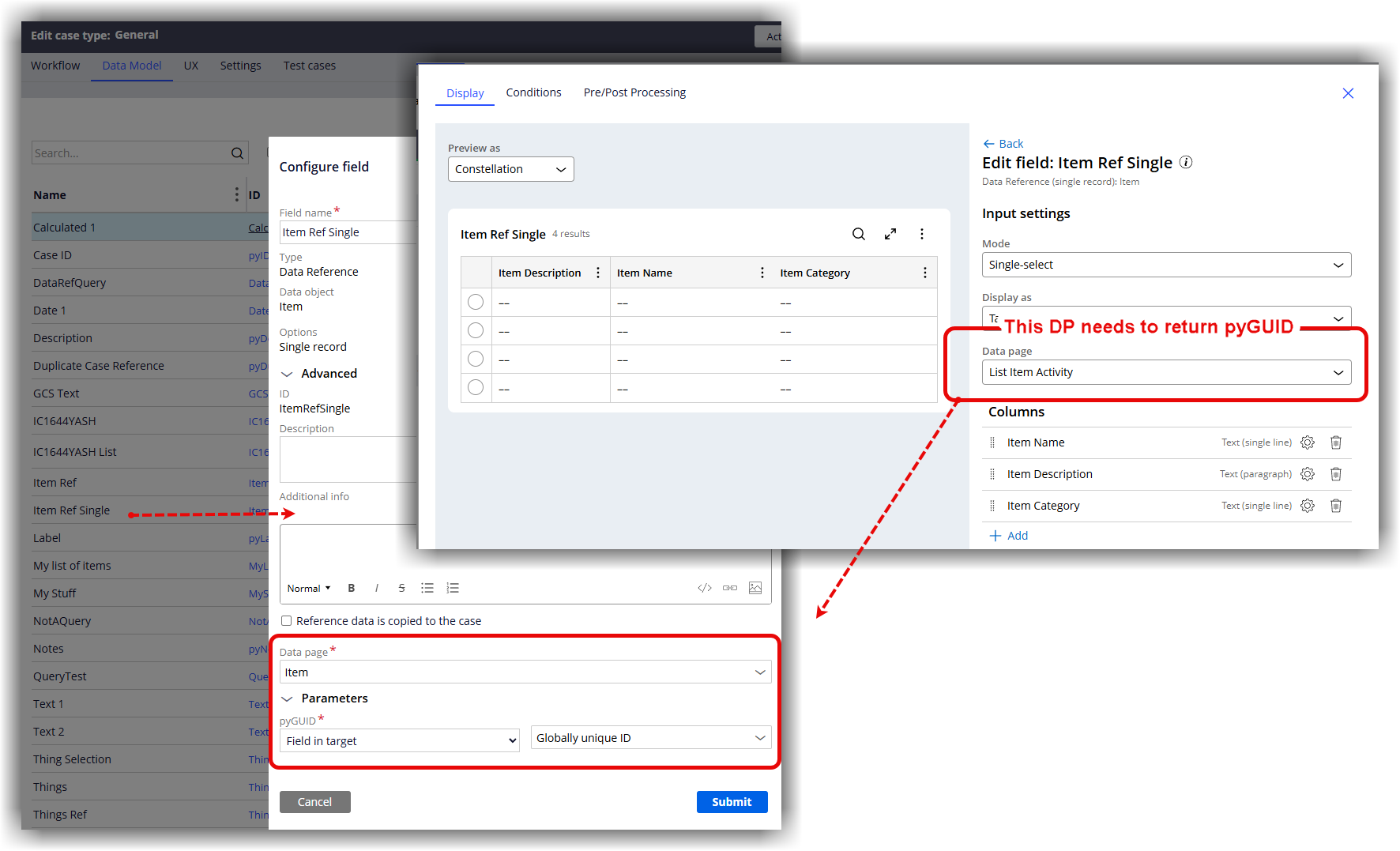
Figure 1. Relationship between the List Data Page and Single Record Data Page used by a data reference.
Legacy applications, migrated applications, Traditional UI implementations, and externally sourced data often do not use pyGUID and may not be configured with an alternative unique identifier. In these situations, the data reference may not be able to reliably resolve the selected record.
Explanation
A common misconception is that data references operate solely from the List type of Data Page structure.
In actual fact, the selected value must also be resolved by the associated single-record data page.
The data reference therefore requires a unique identifier that can be passed from the List data page and used by the single-record data page to retrieve a unique record.
As part of troubleshooting:
-
Verify that the List data page returns a unique identifier for every record.
-
Verify that the single-record data page accepts that identifier as a parameter.
-
Verify that the single-record data page returns exactly one record for the supplied value.
-
Confirm that the same identifier values are available in both data page configurations.
In instances where the source data does not use pyGUID, the single-record data page can be configured to use alternate keys by enabling "Is this page used for alternate key storage?" on the Parameters tab and mapping the field or fields that uniquely identify a record.
Although the platform supports composite keys in some scenarios, a single stable unique identifier is the recommended configuration and provides the most predictable behavior across Constellation controls.
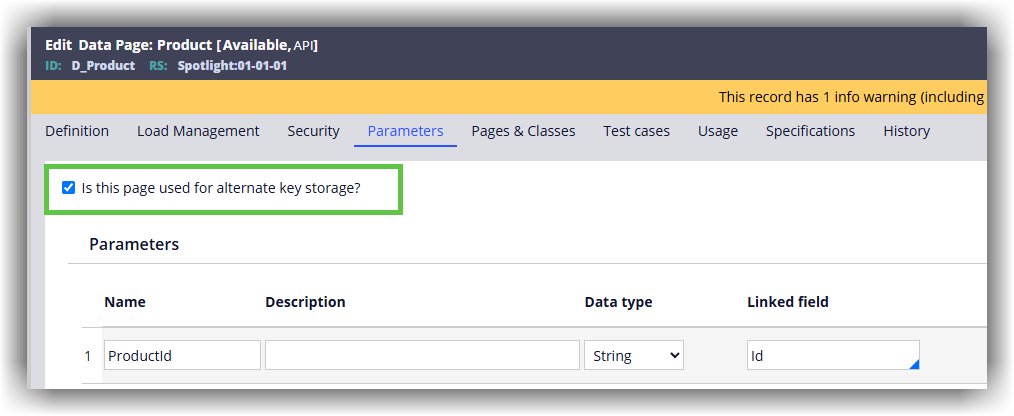
Figure 2. Configuring alternate key storage on the Single Record Data Page.
In the above example, the data object is sourced from an external system that identifies records using ProductId rather than pyGUID. Alternate key storage is enabled on the Single Record Data Page, allowing the external ProductId value to be mapped to the data object's ID field. This enables the data reference to resolve and retrieve the correct record when a selection is made.
Recommended validation steps
-
Review the data reference configuration to identify the associated single-record data page.
-
Confirm the list data page returns the unique identifier value for each selection.
-
Run the single-record data page independently and verify that the supplied unique identifier returns exactly one record.
-
Check whether alternate key storage is configured when pyGUID is not available.
-
If multiple fields are required to identify a record, verify whether the selected Constellation control supports the required composite-key configuration.
Recommended Design
-
Use a single stable unique identifier whenever possible.
-
Ensure the same identifier is returned by the List data page and used by the single-record data page for lookup.
-
Avoid relying on display values or other non-unique fields to identify records.
-
Although composite keys are supported in some scenarios, a single unique identifier is the preferred and recommended approach for data references. It provides the most consistent behavior across Constellation controls and simplifies troubleshooting and maintenance.
References
Adding alternate keys for external reference fields
Configuring fields associated with Case and Data Objects