

Issue
Pega has identified and addressed an issue related to record retrieval through Lookup Data Pages.
Prior to this fix, Lookup Data Pages retrieving records from the Pega database did not enforce RBAC (Role-Based Access Control) and ABAC (Attribute-Based Access Control) authorization checks during database open operations. This behavior was inconsistent with other platform record access mechanisms, including Obj-Open and Report Definitions, which enforce RBAC and ABAC controls.
To ensure consistent authorization enforcement across the platform, Lookup Data Pages now honor RBAC and ABAC security checks when retrieving records from Pega database.
What is Changing?
As part of this update, Lookup Data Pages will now perform the same authorization checks that are already enforced by Obj-Open and Report Definitions.
Applications that previously relied on Lookup Data Pages accessing records without the required RBAC and ABAC privileges may experience authorization failures after upgrading to a release containing this change.
Impact
Clients may be affected if their applications use Lookup Data Pages to access Pega database records and users do not have the required RBAC and ABAC permissions for those records.
After upgrading, unauthorized record access requests will be denied. Clients may observe authorization errors or application flows that no longer return data until the appropriate access controls are configured.
Required Action
Clients should audit applications that use Lookup Data Pages to retrieve records from the Pega database and:
- Identify Lookup Data Pages that perform record lookups against Classes stored in the Pega database.
- Review the Access Role to Object configuration (RBAC) for the target classes and verify that the affected access roles have the required Open permissions.
- Review any applicable ABAC policies for those classes to ensure the intended users are authorized to access the records being retrieved.
- Review class inheritance to confirm permissions are not being unintentionally inherited or denied through parent-class configuration.
- Validate critical application flows that depend on these Lookup Data Pages after upgrading.
Example scenarios:
- Example of authenticated user encountered Authorization error after Data Page Lookup security hardening:
After update to 25.1.3 or higher versions, as an authenticated user, you experience the following error related to Data Page Lookup:
You are not authorized to open instance OOSJOD-Feedback-Work-FeedbackSubmission {Instance name}
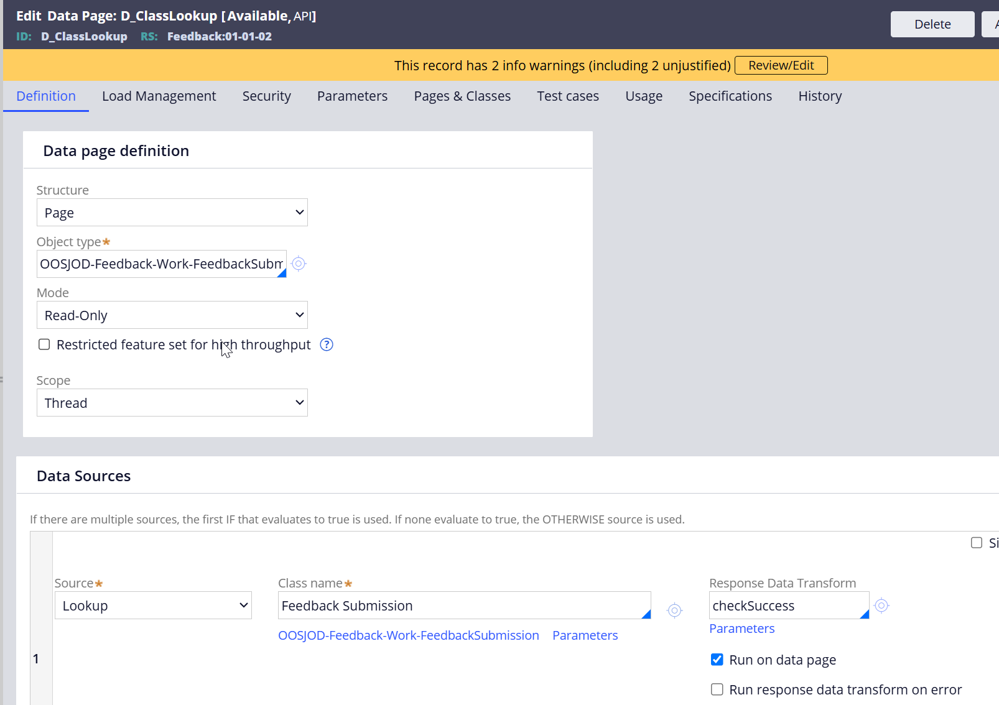
Your Data Page configuration:
1. A data page configured with data sources as Lookup on class OOSJOD-Feedback-Work-FeedbackSubmission
2. The Lookup data page will fail if its associated class is not configured as an Available Role Object (ARO) for at least one of the available roles.
Or,
3. User access role has the ARO defined on the same class (OOSJOD-Feedback-Work-FeedbackSubmission) with an Access When rule
4. If the Access When has a property reference that belongs to Data Page Lookup class, Access is not granted after security fix.
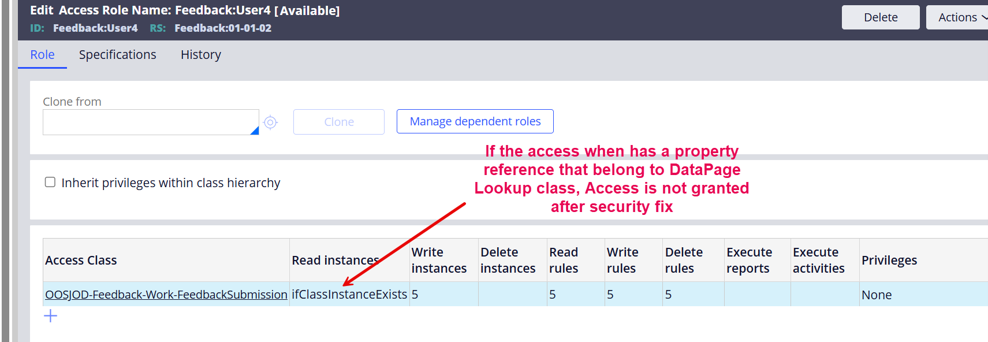
Resolution:
Review the Access When condition and ensure the condition check doesn't reference a property that belongs to the lookup class
Alternatively, set the Read Access to 5 for full access:
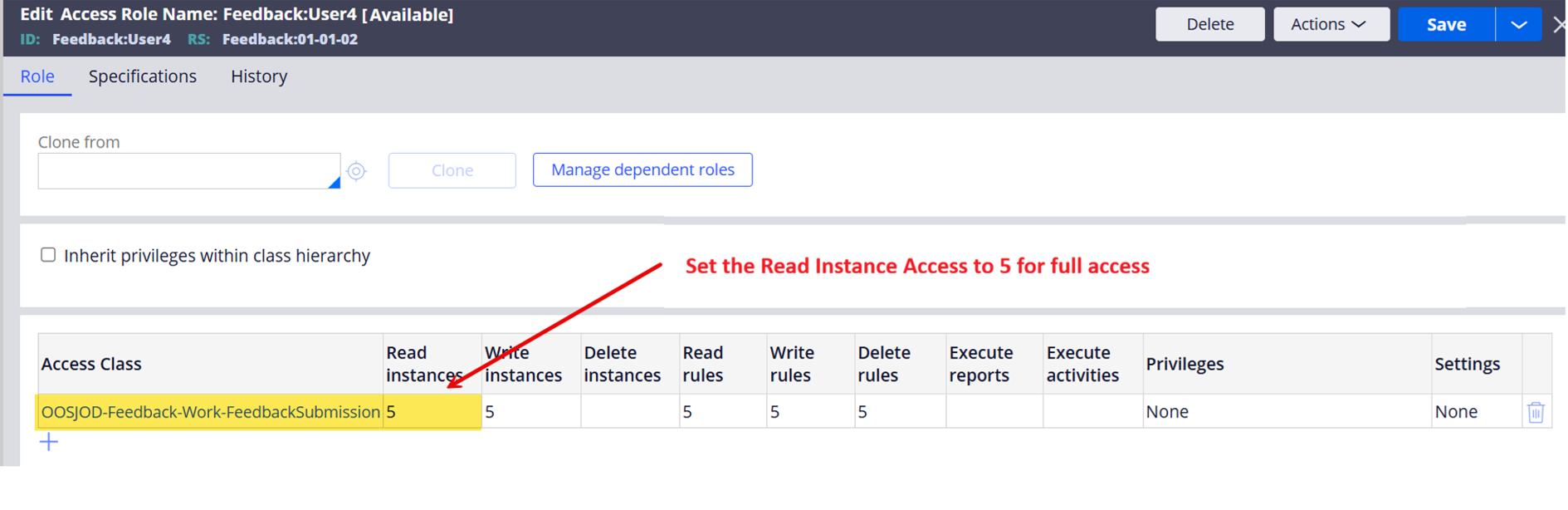
- Example of an Unauthenticated user encountered Authorization error after Data Page Lookup security hardening:
Error message experienced: You are not authorized to open instance OOSJOD-Feedback-Work {Instance name}
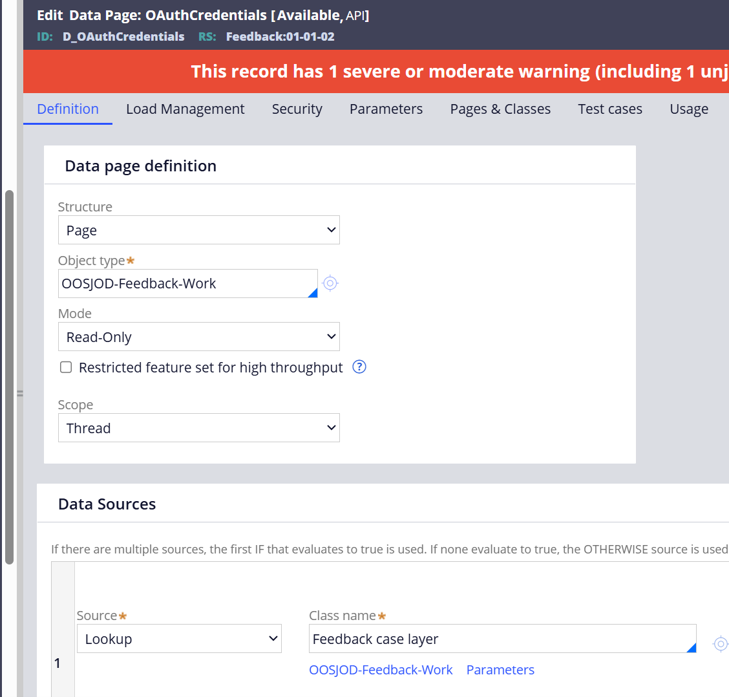
Your Data Page configuration:
1. A data page configured with data sources as Lookup on class OOSJOD-Feedback-Work
2. Authentication Service (SAML/OIDC) Mapping tab or Model Operator provisioning has been configured to set certain property from same Lookup class (e.g. UserName)
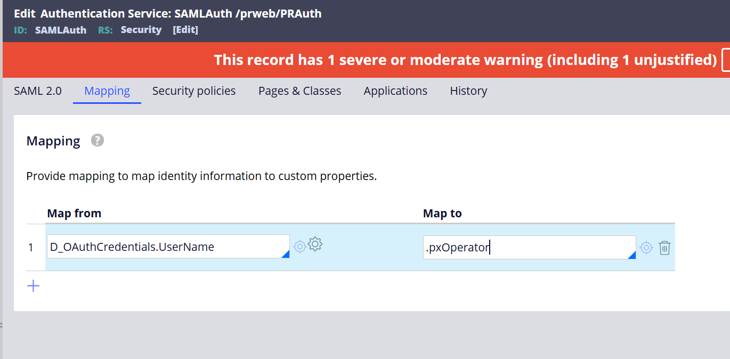
Resolution:
Review the Available Roles for default Unauthenticated Access Group mapped to browser requester type and add the required ARO on Lookup class i.e. OOSJOD-Feedback-Work in this case, with Read Instance, Read Rules etc. to 5 or with conditional Access When (ensure the condition doesn't reference a property that belongs to the lookup class).
Availability
This security fix is available in the following releases:
|
Release |
Reference |
|
Infinity 25.1.1 Hotfix |
HFIX-D965 (INC-D14223) |
|
Infinity 25.1.3 and later patches |
Included in product codebase |
|
Infinity ‘26 and later releases and patches |
Included in product codebase |
The fix is incorporated into Pega Infinity 25.1.3 release and higher patches, and in Infinity '26 and all subsequent releases.
Release Note Communication
Since this change introduces a behavioral difference that may impact existing applications, it will be documented in the release notes of all future releases that contain this fix.
Clients should review their applications prior to update and ensure appropriate RBAC and ABAC permissions are configured for all Lookup Data Page access paths.
Why We Are Making This Change
This update ensures that Lookup Data Pages enforce the same RBAC and ABAC authorization checks already applied by other record retrieval mechanisms such as Obj-Open and Report Definitions.