

Issue
Field validation rules referenced in a property are not triggered in the Search and Select component.
Symptoms and Impact
In a Pega Constellation application, a property configured with an Edit Validate Rule and then used as a search field within the Search and Select component will not trigger the warning message when invalid values are entered.
Steps to reproduce
In a Constellation application:
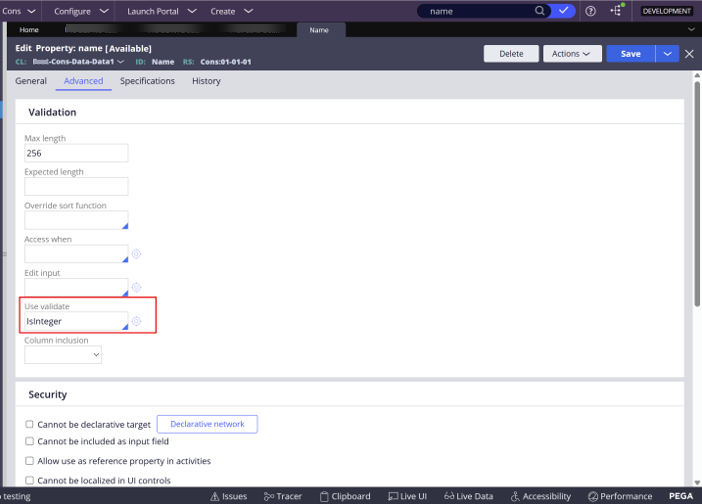
- Create a property ‘name’ and configure an Edit Validate Rule for a format limitation.
- On tab > > select IsInteger.
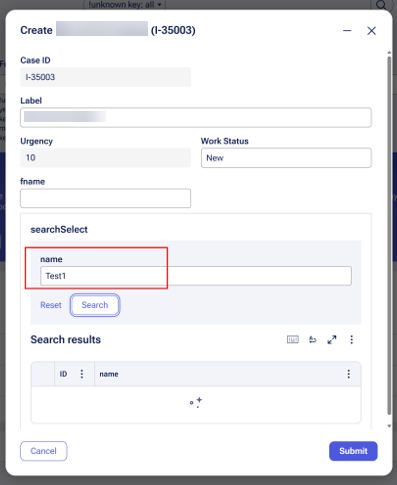
- Add the property as a search field in a component.
- Enter an invalid Text value that violates the configured IsInteger validation rule.
- Click . Result: No validation error is displayed, and the Search and Select operation continues without displaying any validation message. Expected: The configured validation rule is triggered and prevents invalid input from being processed.
Root Cause
This product limitation exists because field validation is client-side validation, and this functionality is not available in the Search and Select component in current Pega Platform™ releases.
The Search and Select form uses a transient container to build the interface. Because this container is transient, the fields do not participate in the main case payload, and therefore Edit Validate rules are not executed.
Solution
This issue has been identified as a product limitation that requires a platform enhancement.
Custom Validation Implementation (Advanced)
As of Pega Infinity™ ‘25 there is a new feature to add warning messages to input fields. It allows server-side validations for Edit Validate through the Use Validate option in the property's Advanced tab.
A custom solution involves using a Constellation DX Component with a SearchGroupValidator type.
For more information refer to the following conversation on the User Experience ExpertCircle:
Custom Form Validation for Search and Select | Pega Community
References
Validations for ensuring data integrity
Configuring reference field as search and select
Search and Select forms now support complex field types
Search and Select and Reset /Clear button behaves incorrectly
Search and select duplicates across multiple search groups