

Issue
When using the Search and Select / Advanced Search control, the Reset link clears only the user entered search criteria in the form. It does not clear selected records, applied table state, or the displayed result set.
Users may report as the following:
- Clicking Reset does not clear selected records
- The result list remains populated after Reset
- Previously applied selections display as ‘persist unexpectedly’
- Navigating away and returning to the screen displays ‘filters and results still applied’
- Perception that Reset is ‘not working’ or ‘incomplete’
The following figure illustrates the reported issue:
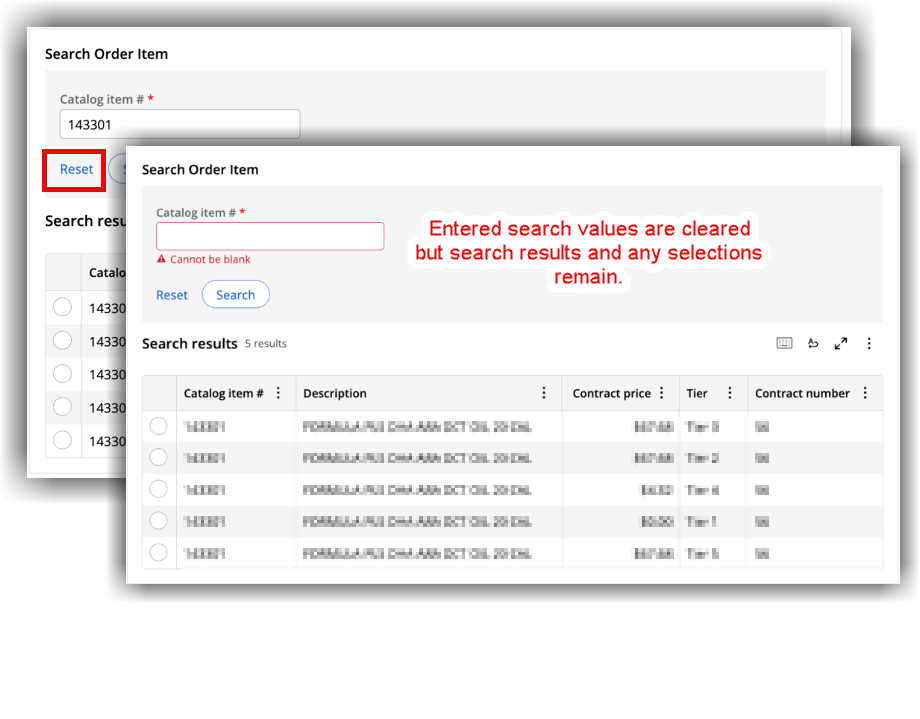
Steps to reproduce
- Perform a search using the Search and Select control.
- Make a selection from the results that render.
- Click Reset.
Root Cause
The reported behavior is intentional and is as per the design.
- The button is designed to clear only the Search form values.
- The table data, selections, and result state are intentionally preserved.
Solution
Reset action is intentionally scoped to the Search form only, and there are no plans to change this behavior via the Reset control. The perceived limitation has been captured as a future product enhancement.
References
Configuring a single-record reference field