

Issue
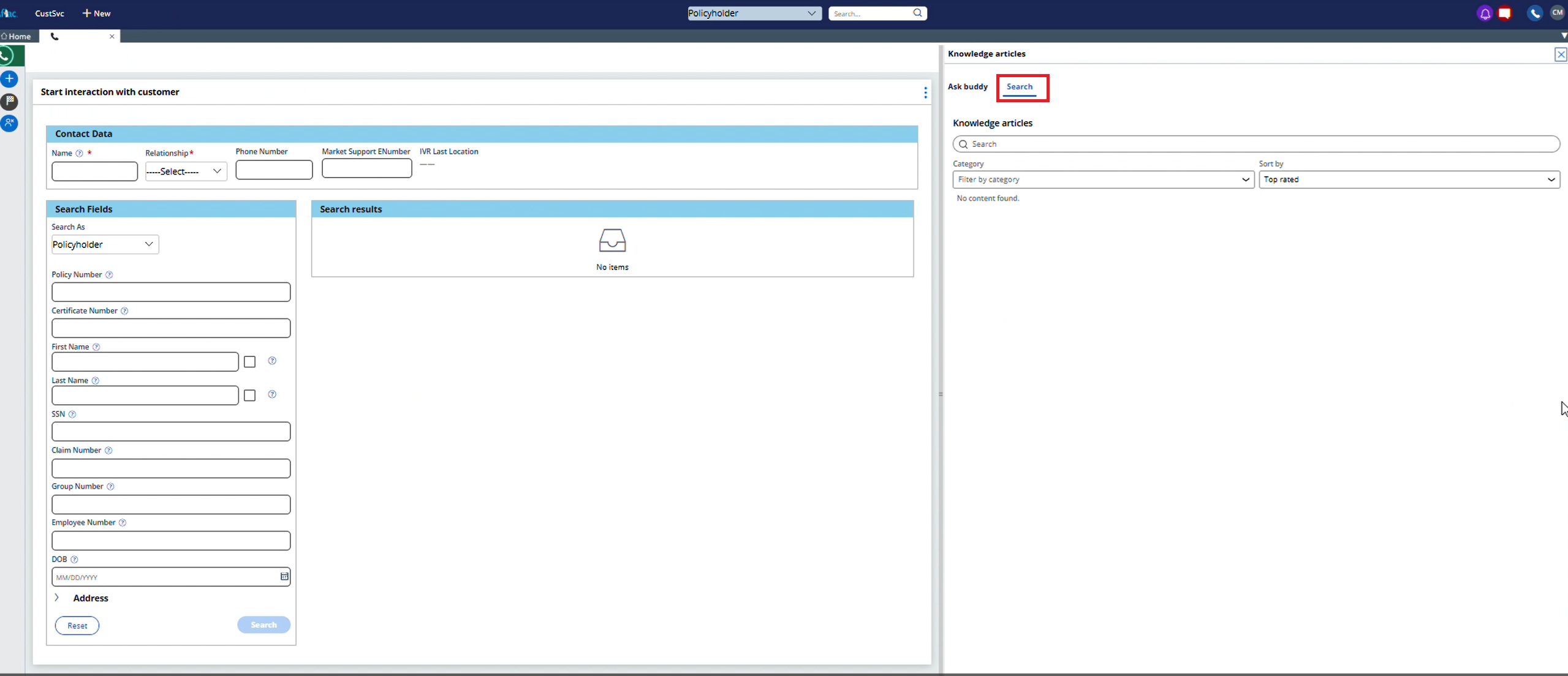
When using the Pega Knowledge Buddy widget within a UIKit-based portal (specifically in the InteractionPortalRightPaneWrapper), the system defaults focus to the Search tab when the pane is opened.
This occurs even if the Ask Buddy tab is configured to be the first tab in App Studio.
The visual order of the tabs is correct, but the default active tab is not, which prevents Ask Buddy from being the initial user experience.
Steps to Reproduce
-
In the left navigation pane of App Studio, click > .
-
On the page, locate the - Configuration set.
-
Configure the available option Display Knowledge Buddy as default :

-
Open the widget. The focus is on the second tab, which is the Search tab.
Root Cause
This behavior is a known limitation of the legacy Pega Knowledge widget for UIKit. The definitive troubleshooting step is to determine if you are using this legacy component or the modern Constellation component.
This issue has been resolved in the latest Constellation Knowledge Management component.
How to Troubleshoot the issue
Follow these steps to diagnose the problem. The primary goal is to confirm the configuration and identify whether a legacy or modern component is in use.
1. Verify the Tab Order Configuration
-
In App Studio open the InteractionPortalRightPaneWrapper or the relevant portal section.
-
In the editor, verify the order of the tabs. The Ask Buddy tab should be listed before the Search tab.
2. Reproduce the Behavior
-
Launch the Interaction Portal.
-
Open the right-hand pane where the Knowledge Buddy is hosted. Observe that the Search tab is active by default, not the Ask Buddy tab.
3. Identify the Component Type
-
In Dev Studio open the application.
-
Search for the section rule that contains the tab group (for example, InteractionPortalRightPaneWrapper).
-
Examine the properties and metadata of the included Knowledge widget. Legacy components will have different class names and design templates than modern Constellation-ready components. If the component is not based on the Constellation design system, it is a legacy component.
Solution
The issue is resolved by migrating from the legacy UIKit widget to the modern Constellation Knowledge Management component, which respects the tab order configuration and provides an improved user experience overall.
There is no recommended workaround for the legacy component. Any attempt to control the default tab using custom scripts (for example, JavaScript) is not supported, may introduce instability, and could break any future platform updates.
Note: There is an open enhancement request to improve product documentation regarding the migration process from the legacy Knowledge Management widget to the Constellation Knowledge Management component. Refer to the latest Pega Knowledge documentation for guidance on this upgrade.
References
Configure the D_KnowledgeBuddy_Search Data Page
Knowledge Buddy with Pega CRM (UI Kit)
Adding the Constellation component to UI Kit applications
Setting up authentication and adding the component in UI Kit
Configure the Knowledge component