

Issue
When a Pega application is configured with a non-USD locale (for example, es_ES with Europe/Madrid time zone and EUR as the intended currency), currency values displayed inside an Insight component default to US $ regardless of the operator's locale settings.
The same currency field displays correctly as € in:
- Standalone report execution
- Table views
Only the Insight component is affected.
Symptoms and Impact
Organizations frequently deploy applications in regions where the default currency is not USD.
While operators, localization settings, and data records may be configured appropriately, Insights can continue to display currency values using US $ when no application-level currency configuration has been defined.
Steps to reproduce
- Configure an operator with locale es_ES and time zone Europe/Madrid.
- Configure the application localization to Spanish (Spain).
- Configure an Insight component that displays a currency property from a report-backed data source.
- Open the landing page containing the Insight component.
- Review the displayed currency value.
- Expected Result: The currency value is displayed using the € symbol according to the configured locale and localization settings.
- Actual Result: The currency value is displayed using the US $ symbol in the Insight component.
Root Cause
This behavior is by product design.
The Insight component does not support column-level currency formatting in the same way that table views do. It reads the application-level default currency from the pyAppFieldDefaults rule. This rule contains a Currency section that must use the exact property name currencyISOCode to be recognized by the Insight rendering engine.
When the property is configured with an incorrect or non-standard key name — the most common example being ISOCode instead of currencyISOCode — the Insight engine cannot locate the currency configuration and silently falls back to its hard-coded default: US dollars (US $).
Incorrect configuration (causes US$ fallback):
"Currency": {
  "ISOCode": "EUR"
}
Correct configuration (recognized by Insight):
"Currency": {
  "currencyISOCode": "EUR"
}
Solution
Step 1 — Locate the pyAppFieldDefaults rule
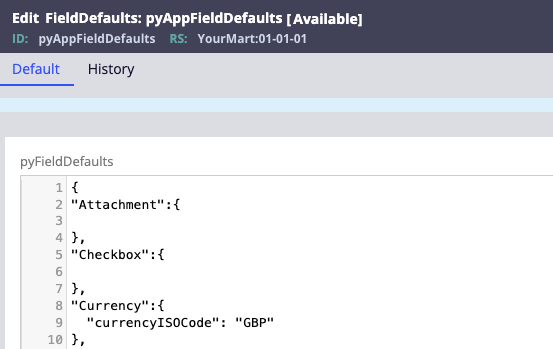
In App Studio or Dev Studio, navigate to the pyAppFieldDefaults rule in your application ruleset.
Step 2 — Update the Currency configuration
In the Currency section, ensure the property name is exactly currencyISOCode (case-sensitive). Set its value to the ISO 4217 three-letter currency code for your required currency. In our example, it would need to be set to ‘EUR’.
Once configured, Insights use this value when displaying currency-based measures and fields.
Examples of commonly used ISO currency codes include:
|
Currency |
ISO Code |
|
Euro |
EUR |
|
US Dollar |
USD |
|
British Pound Sterling |
GBP |
|
Canadian Dollar |
CAD |
|
Australian Dollar |
AUD |
|
Japanese Yen |
JPY |
Example configuration:
"Currency": {
  "currencyISOCode": "GBP"
}
Step 3 — Save and test
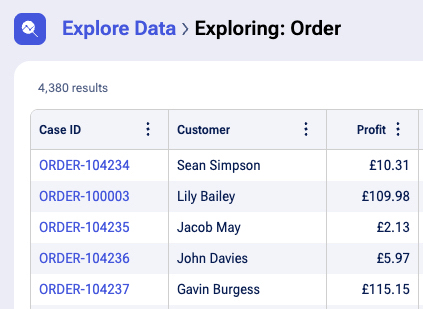
Save the rule to your application ruleset. Open the portal and navigate to the page containing the Insight component. Verify that currency values now display with the correct symbol (e.g., £ for GPB).
Step 4 — Confirm behavior scope
This configuration applies at the application level. Field-level currency settings in Views (where available) will override this value for those specific fields. The Insight component will use the application-level value defined in pyAppFieldDefaults.
Additional Considerations
-
If the pyAppFieldDefaults rule does not exist in your application ruleset, create a local copy by saving the Pega base version into your application layer before modifying.
-
The Local Settings panel in the operator profile (Base currency field) does not persist across sessions in some configurations — use pyAppFieldDefaults as the authoritative configuration point for application-wide Insight currency display.
-
This configuration applies consistently across all Insight components within the application. Per-Insight or per-column dynamic currency based on row-level data is not supported in the current architecture.
References
Decimal property configured with Currency format displays values only in upper case