

Duplicate ID attributes in OOTB portals
In a standard end-user portal for a Pega application built in section-based UI (UIKit/Theme-Cosmos), automated accessibility testing tools may pick up on several duplicate ID attribute values in the Document Object Model (DOM), such as “TABSPAN”, “PEGAGADGET”, "RULE_KEY" or "EXPAND-OUTERFRAME.”
The values of these IDs are internally used in Pega code for necessary functionalities in the section-based UI. The scope of addressing these IDs would require a redesign of current architecture and cause issues with backwards compatibility, so as such the product team is confident that any such elements containing a duplicate ID will not have an impact on individuals using assistive technologies. Any interactive elements and form fields that users directly interact with such as text inputs, radio buttons, checkboxes, etc. will all have their own unique id value generated.
In terms of WCAG, success criteria 4.1.1 Parsing is now obsolete. WCAG 2.2 indicates it as 4.1.1 Parsing (Obsolete and removed), along with a note. WCAG 2.1 and WCAG 2.0 now include this note from a conformance perspective: This Success Criterion should be considered as always satisfied for any content using HTML or XML.
Configuration issues with duplicate IDs
While the presence of duplicate IDs no longer constitutes a WCAG violation, issues with proper label association can arise from incorrect configuration.
For labels on form controls, Platform will generate a <label for="[form field ID]"> to serve as the visible and programmatic label of the field. The ID value generated for the form field is a random string of characters and digits.
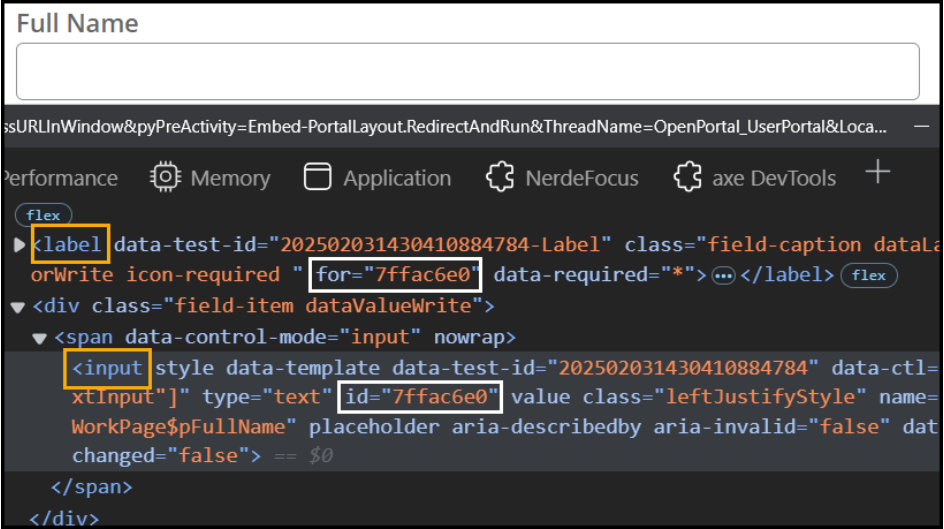
The random ID value is generated on a per-property basis. This means that each form control assigned the same property will generate the same ID value for each instance of the <input> in the DOM. This can introduce issues with how assistive technologies perceive the relationship between label and form field as the ID will no longer be unique.
As a best practice, avoid configuring the same property multiple times on the same page. This is also applicable if using visibility conditions to hide a second field with the same property on a given page. Should this configuration be necessary for business requirements, make sure to disable the "run visibility condition on client" configuration to ensure that the second instance of the ID is not loaded into the DOM until absolutely necessary.