

Issue
PDF documents fail to display in the Preview pane of OOTB attachments when viewed in the Edge browser.
Symptoms and Impact
Users experience the inability to preview PDF attachments within the Pega Constellation application, impacting usability and document access.
This is only happening for Edge browser. In Chrome it works fine.
Steps to Reproduce
1. In the Dev Studio header, click Application name > .
2. On the form, click the Security tab.
3. In Content Security Policy, select pyConstellationSecured.
4. Click .
5. the OOTB pyConstellationSecured CSP in application ruleset and make the below changes:
- Uncheck ‘None’ from ‘Object-Source’ directive.
- Select ‘Self’ and 'Data’ in ‘Object-Source' and ‘Child Frame-Source' directive.
6. Save the changes.
7. Launch the Work portal in Edge browser.
8. Create a case and attach a PDF attachment to the OOTB attachment utility.
9. Click the uploaded attachment to preview the file. Result: A half preview of the PDF will be displayed. CSP errors are displayed in the console.
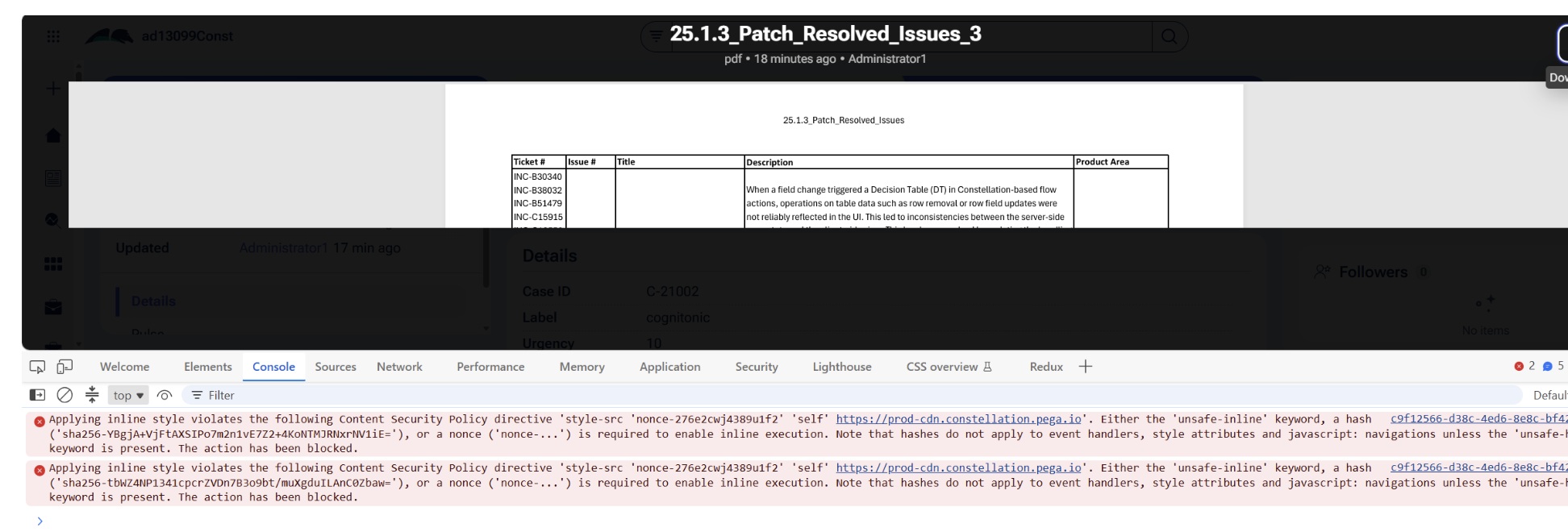
Error
The following error is observed in the console:
Applying inline style violates the following Content Security Policy directive: 'style-src 'nonce-lcp5ms165gw4k1pz' 'self' https://release.constellation.pega.com'. Either the 'unsafe-inline' keyword, a hash ('sha256-YBgjA+VjFtAXSIPo7m2n1vE7Z2+4KoNTMJRNxrNV1iE='), or a nonce ('nonce-...') is required to enable inline execution.
Root Cause
The issue arises from Microsoft Edge's handling of nonce-based style-src directives in Content Security Policy (CSP). When CSP is configured with 'Reject and Report' mode, Edge's built-in PDF viewer blocks inline styles despite a valid nonce, causing PDF previews to fail.
Chrome does not exhibit this behavior due to differences in its PDF viewer implementation.
Pega's CSP configuration is correct and compliant with industry standards.
Solution
To work around the third-party limitation, carry out a local change:
Option 1: Update the CSP configuration to 'Report Only' mode, which logs violations without enforcing them, thereby preserving PDF preview functionality.
Option 2: Update the style-src directive to enable 'unsafe-inline' and disable the nonce, allowing the PDF viewer to apply inline styles without being blocked.
Option 3. Educate users regarding the issue and instruct them to download the PDF for viewing.
The Pega security team recommends the second option for better security.
Our future documentation will be updated to inform users about this Edge limitation. Content security policies
References
Only Partial PDF is visible in Edge with CSP nonce