

Issue
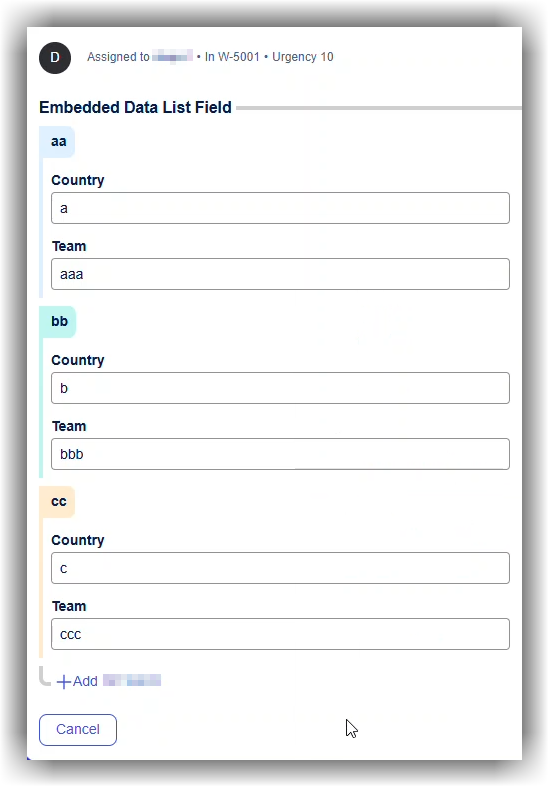
Repeating views in Constellation display a colored left border for each row header.
Symptoms and Imact
Symptoms that manifest include the following:
-
The colored bar is visible only in editable repeating views.
-
Read‑only repeating views behave differently.
-
There are no explicit theme controls to remove or configure this behavior.
-
Colors vary per row item, giving the impression of semantic meaning.
The coloring logic differs between read-only and editable repeating views and is implemented at the UI component level. Theme settings such as borders and separators or App background indirectly influence these colors but also affect broader portal styling, making them unsuitable for targeted control.
Steps to Reproduce
1. Create a repeating view for the page list.
2. For each row header, provide a property for each record.
3. At run time, different colors are added for the row header.
Root Cause
The color behavior is hardcoded in Constellation UI components.
-
Read‑only repeating views
- Border color is derived from Borders & Separators theme settings.
- A single calculated color is applied consistently.
-
Editable repeating views
-
Border color is derived from App background theme settings.
-
Each row receives a distinct color.
-
Colors are generated from a predefined palette using an accessibility-focused algorithm.
-
Logic is implemented directly in Constellation React components.
-
There is currently no dedicated configuration or theme control for repeating View border colors.
The colored borders on repeating views were introduced as part of an effort to modernize the Constellation UI and improve usability when working with large or complex forms. The primary goal is to provide a clear visual distinction between grouped sections of repeating data, similar in intent to alternating row colors in tables.
By extending the color down the left border and associating it with the section header, the UI helps users quickly understand which fields belong together within a given group. This addresses earlier feedback where users complained that they were losing track of field ownership when multiple repeating sections appeared visually identical.
Solution
There is no supported local action that can be applied to remove this behavior.
One workaround is to use a custom CSS override (for example using pyC11nCustomFonts) to hide or neutralize the colored borders entirely. This approach is unsupported, may break during upgrades, and requires client acceptance of the risks.
Pega Platform enhancements are in the pipeline to make these colors customizable.
The new design in Pega Infinity™ '26 now has a toggle in theme authoring for repeating view colors to disable the colors so that the borders are the same. Supplemental colors control data visualization color series and table grouping indicators.
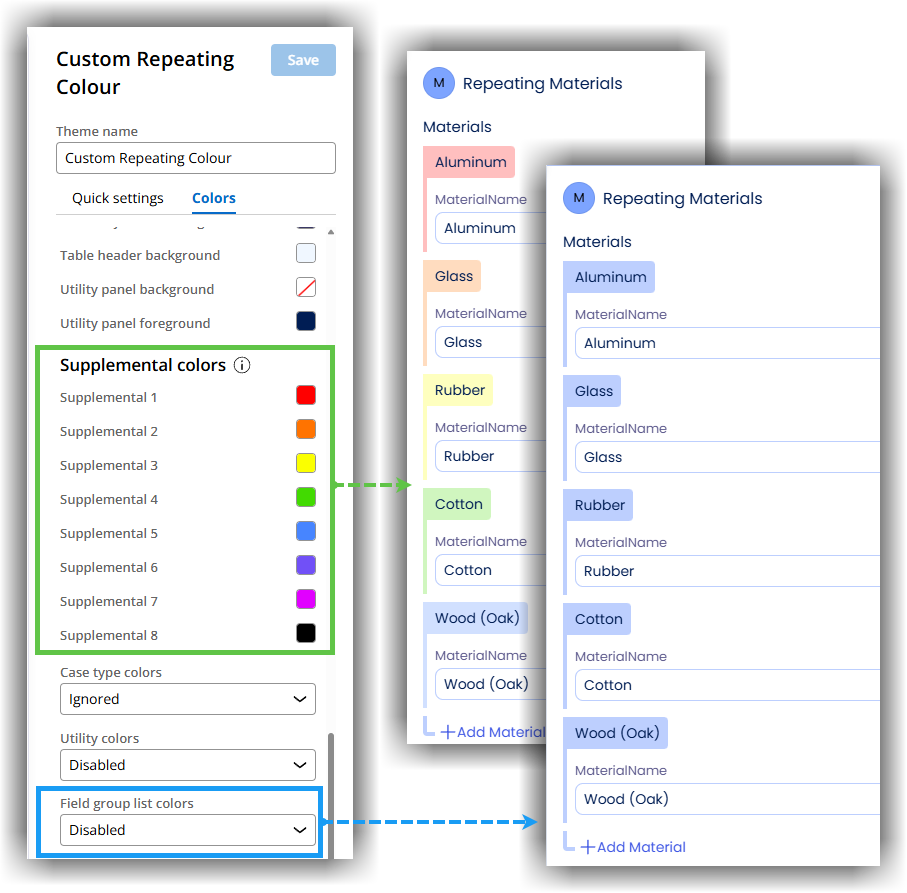
Additionally, if enabled in this theme, they may also affect Cases and Data Objects, Field group lists, and Utility widgets. Utility colors are relevant for the utilities section in a case view. For example, the Attachments "paper-clip" icon, the Followers icon, the Tags icon, etc. These inherit from supplemental colors.