

Issue
Currency control displays a double currency sign in Theme Cosmos UI after a Pega Platform™ 25.1.1 upgrade.
Symptoms
After upgrading a Theme Cosmos application to Pega Platform '25.1.1 users observe an issue with editable currency fields: the currency sign is rendered twice when the screen is initially opened with a prefilled value.
This behavior did not occur before the upgrade with the same rule configuration.
When the screen first renders and the currency value is already populated, the UI displays a duplicated currency sign (for example: 100.000,00 €€).

After the user sets the focus on the input field, the display is correct (single currency sign).

The display is correct until the screen is refreshed. The duplicate symbol appears after the field loses focus.
Steps to reproduce
-
Create a section with a cell that contains an editable currency input.
-
The property uses UI Control pxCurrency and type Currency. The input is editable and is configured to display the currency sign as Other Currency with "EUR" hardcoded in it.
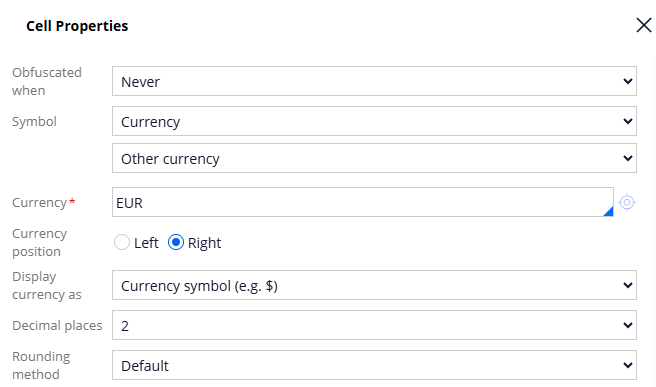
-
Ensure the property has a prefilled value.
-
Open the relevant UI (section / view). The currency sign appears twice against the value (€€).
-
Click on the field to focus on the input. The value is now displayed correctly with one currency sign (100.000€).
-
Refresh / re-open the screen - the issue returns.
Root Cause
This is a product defect in the Currency Control presentation tab, specifically when the Symbol is set as the currency along with a action.
Solution
This issue has been resolved in Pega Infinity '25.1.3 and Pega Infinity '26.1.
In the latest releases the alternate-symbol branch has been removed during display formatting and always renders using pyCurrencySymbol, which prevents duplicate symbol output for the affected scenario.
For users on earlier releases:
To mitigate the issue on releases without the fix, users can implement a workaround by updating the Currency Control presentation tab Symbol value to be a constant e.g. €.