

Issue
After updating from Pega Infinity™ ‘23.1 to '24.1.1, blank or null values in the application's PDF outputs no longer display the placeholder dashes ("--") but instead display as empty fields.
Symptoms and Impact
The application update to release '24.1.1 introduced a change in how blank values are rendered in PDFs, empty spaces display instead of the previously used dashes placeholder "--".
This change affects the visual consistency and may impact user interpretation of reports or documents generated from the application.
Steps to reproduce
1. Create a section and have properties which do not have a value.
2. Generate the PDF. Result:
- When PDF is generated from Pega Infinity ‘23.1 these display with double dashes (--)
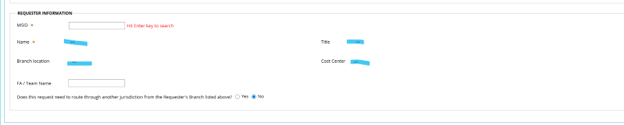
- When PDF is generated from Pega Infinity ‘24.1.1, these display with no values.

Root Cause
The removal of double dashes for empty text fields is an intentional accessibility enhancement introduced to improve compatibility with screen readers.
For more information see PDF displays blank value as text no value.
Solution
To restore the previous behavior where blank values will display as '--' in the PDF file, users can implement a local change which involves modifying the markup passed to HTMLToPDF activity.
This can be done in two ways:
1. Do a Save As of the activity pyAttachAsPDF to the application Ruleset and add the below Java step in step 4 of the activity to pre-process the HTML markup before it is passed to the HTMLToPDF conversion function.
String html = tools.getParamValue("Markup");
if (html != null && !html.isEmpty()) {

String regexDiv =
   "(\\s*"
 + ")(\\s*)(\\s*)";

String regexTd =
   "(]*\\bclass='[^']*\\bdataValueRead\\b[^']*'[^>]*>\\s*(?:\\s*)?"
 + ")(\\s*)(\\s*(?:\\s*)?)";

html = java.util.regex.Pattern.compile(regexDiv).matcher(html).replaceAll("$1--$3");
html = java.util.regex.Pattern.compile(regexTd).matcher(html).replaceAll("$1--$3");

tools.putParamValue("Markup", html);


}
2. Write a custom wrapper activity using the above java code before calling activity HTMLToPDF. The wrapper activity will pre-process the HTML markup before it is passed to the HTMLToPDF activity.
References
PDF displays blank value as text no value