

Issue
Manual JSON modifications made outside the Localization Wizard do not reflect localized values in the UI.
Symptoms
Users who created localization Rules for components not yet referenced in their application find that after updating to Pega Infinity™ ‘25.1 the translations are not displayed.
When exporting the translation package as Excel/JSON after manual edits, previously added custom translations are missing from the export, even though they exist in Rule-UI-Localization instances.
Prerequisites contributing to these scenarios:
-
Use an open ruleset or enable branching during localization work.
-
Verify the top-most ruleset in the application stack exists and is available.
-
Ensure language rulesets are added to the application ruleset stack for runtime resolution.
-
For built-on applications, use Re-translate all layers = true when generating translations from the top-most application.
Impact
Users updating from Pega Infinity '24 or earlier must run the migration activity for each language. Manual translation workflows (direct JSON editing) are no longer supported. Teams must re-train on using the Localization Wizard exclusively. Custom localization automation scripts that edit JSON files directly will fail.
Steps to Reproduce
-
Create a translation package in Constellation by following steps in Creating a translation package in Constellation.
-
Import the package to your application. For more information, see Importing a translation package in Constellation
-
Update to Pega Infinity ‘25.1 using the steps outlined in Localization on Constellation fails after update to Pega Infinity '25
-
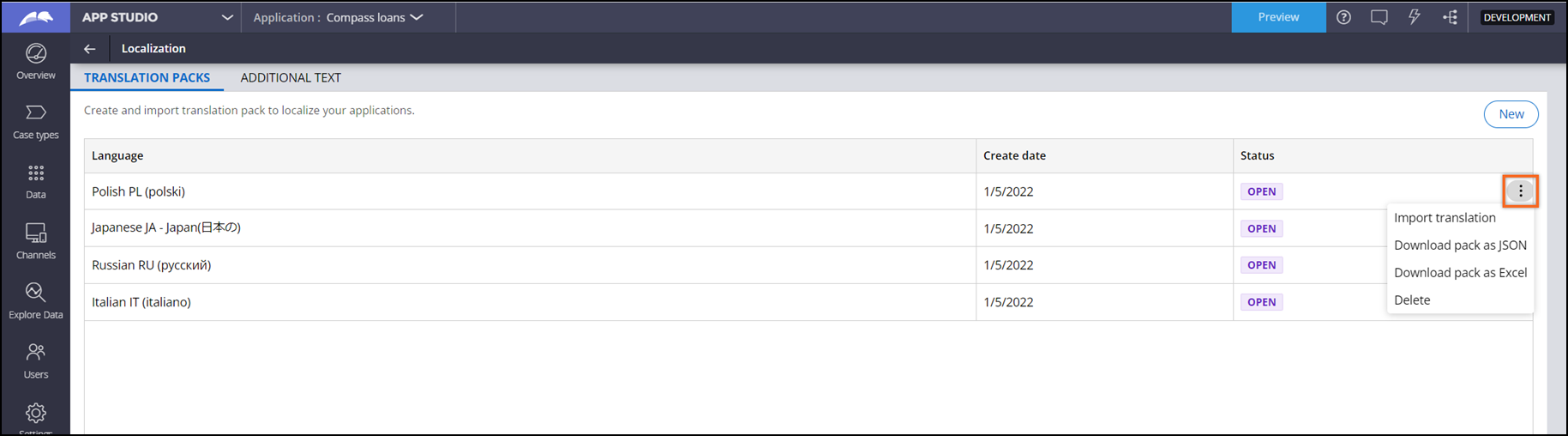
In the navigation pane of App Studio, click .
-
On the Translation packs tab, in the row that represents the language of your translation, in the Status column, click the More icon.
-
Click Download pack as JSON.
-
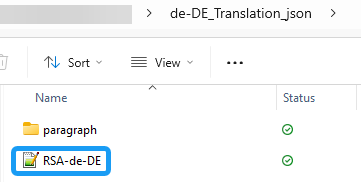
The resulting folder structure is:
-
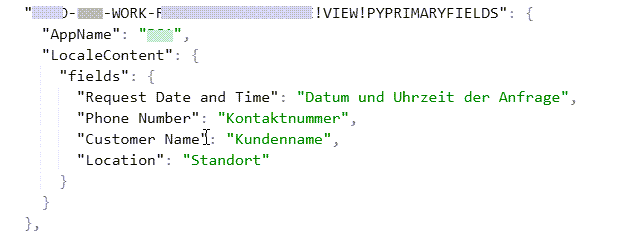
Unzip json/excel file and proceed to add translations for application-specific localization. For example, the following View was modified in the RSA-de-DE.json file:
-
Repackage the translation folder and import using the localization wizard.
-
Save the localized Ruleset. You do not need to add the imported Ruleset to the application stack.
Note: User expects that importing the translation zip file will automatically create a ruleset containing the localization rules for imported package, for example RSA_de-DE, being aware that the ruleset will not be included in application ruleset stack.
-
Add locale to testing Operator ID, i.e. de_DE, for German language.
-
Switch to App Studio and preview the localization:
-
Expected: Manually added translations appear in the UI when the operator locale is set to the target language (e.g., de_DE).
-
Actual: Translations do not render; UI displays either English defaults or blank values.
Root Cause
The issue occurs due to Key Architectural Change in Pega Infinity ‘25.
Infinity 25 changed localization architecture from individual JSON files per view to a unified bundle approach using Rule-UI-Localization instances. The base bundle is system-generated and should not be manually edited.
The new locale-based store replaces that architecture with a single unified bundle per locale, fetched once per session. Each Built-on application now also carries its own independent bundle, enabling proper inheritance across the application hierarchy. Locale naming conventions have changed — from standard codes like fr-FR to ruleset-suffixed formats like ruleset_fr.
In Pega Infinity ‘24 and earlier, developers could directly edit JSON localization files. This workflow is no longer supported in Pega Infinity ‘25. Manual JSON edits may not sync properly to the Constellation AppStatic Service or reflect in the UI.
See Updating Constellation rules in an application.
In versions prior to Pega Infinity '25, Constellation used individual localization stores per view/component. If custom implementations still reference these individual stores instead of the unified bundle architecture, translations will not render. Ensure all localization references use the new bundle-based approach via the Localization Wizard.
If the unified bundle has not been generated (or the system cannot locate a valid locale-based .json), you get 400 errors on locale synchronization.
Starting in Pega Platform ’25, Pega no longer requires the Constellation AppStatic Service. The system now provides custom-authored UI static content (for example, images, custom components, and localization files) directly in Pega Platform.
Solution
There is no product-level fix.
Users must manage all translations exclusively through the official Localization Wizard.
The latest documentation Updating Constellation rules in an application makes users aware of the importance of running the pxMigrateToLocalizationV2 activity post-upgrade to ensure existing localization data is properly migrated to the new unified bundle infrastructure.
See Overriding localized labels.
References
Localization on Constellation fails after update to Pega Infinity '25
Constellation application localization now uses a single locale file