

Issue
When using Insights on Explorer or other landing pages, system-generated, out-of-the-box (OOTB) fields such as Obj Class and pzInsKey are visible.
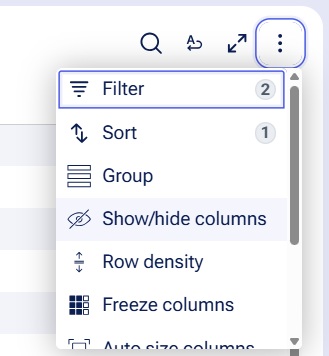
Although these fields are not displayed by default within Insights, they are accessible through the and Grouping options.
The availability of these system fields negatively impacts the overall usability of Insights, as they are not relevant for users and may lead to confusion.
Symptoms and Impact
Pega Platform currently lacks the capability to selectively hide certain system fields from the Insights UI.
Steps to reproduce
1. Depending on the portal in which you want to create Insights, perform one of the following actions:
-
To create an Insight from Pega Infinity Studio, in the header of Pega Infinity Studio, click > > .
-
To create an Insight in your application, in the navigation pane of your application, click .
2. In the upper-right corner of the application, click , and then select specific types of data for which you want to create an Insight.
3. Customize the column selection in the Insight based on your business requirements.
4. In the upper-right corner of the screen, click .
5. Click the Insight in .
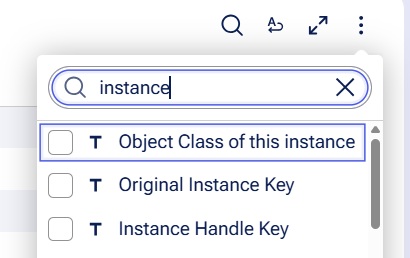
6. Click . Result: The option displays columns including Label, Object Class of this instance, and Instance Handle Key. The column also displays these columns.
Root Cause
This is a technical limitation in current system design.
In Pega Constellation Insights, out-of-the-box (OOTB) columns such as Label, Object Class of this instance, and Instance Handle Key are intentionally designed to appear in both the options and the options.
This design serves a specific purpose: it enhances user experience by providing essential data visibility and allows users to customize their Insights views according to their business requirements. The inclusion of these OOTB columns in both filtering and column management options ensures that users can effectively tailor their Insights interface to access relevant information as needed.
Suppressing these system fields would break critical functionality including work links, row actions, and other essential features.
Solution
No immediate fix or local change is currently available.
This issue has been identified as a product limitation that requires a platform enhancement.
This enhancement will enable selective configuration of field visibility in the Insights UI while preserving the necessary functionality for work links, row actions, and other dependent features.
Issues are prioritized based on impact, severity, and capacity. The specific release for the fix has not yet been determined. This section will be updated with release details when the fix for this issue is available.