

Issue
Lifecycle stages displayed in a case show progress but cannot be made clickable to allow direct navigation between stages.
Explanation
The Case Lifecycle component in Constellation displays the current stage and overall progress of a case.
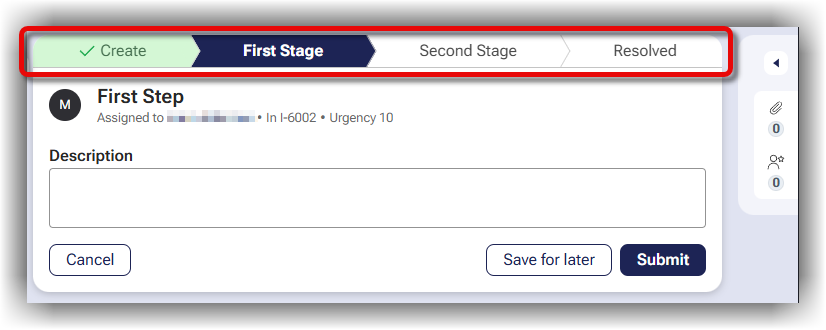
The lifecycle indicator is intentionally designed as a visual representation of progress and is not intended to function as a navigation control.
The primary reason lifecycle stages are not clickable is to preserve process integrity. While users may wish to move freely between stages, stage transitions are often tightly coupled to business rules, validations, data dependencies, and reporting requirements.
Case stages frequently represent significant milestones within a business process and may:
-
Execute required validations.
-
Collect mandatory information.
-
Enforce business rules.
-
Establish data dependencies used by downstream processing.
-
Support operational reporting and audit requirements.
Allowing users to jump directly between stages could bypass these controls and lead to inconsistent or incomplete case data. This compromises data quality and process integrity.
Solution
If movement between stages is required, the supported mechanism is the Change stage action available from the case Actions menu.
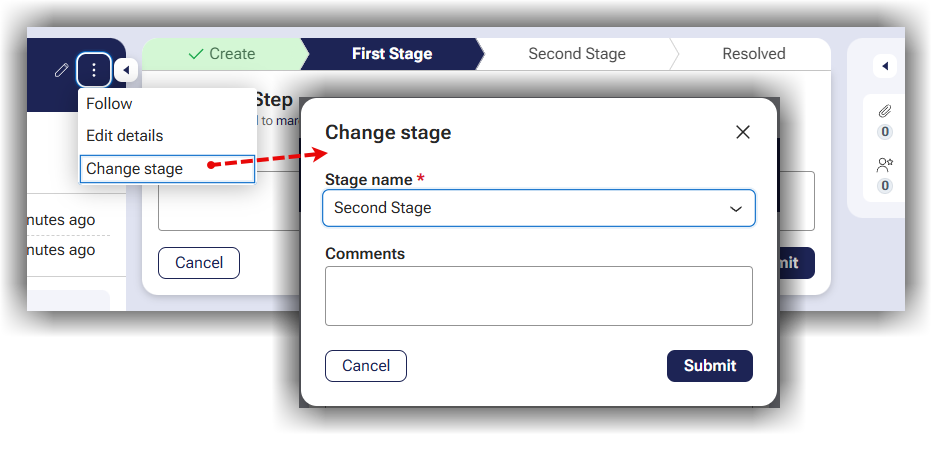
In many situations, the underlying business requirement is not actually stage navigation, but rather a need for greater flexibility in how users enter or complete work. For those scenarios, the following design approaches are recommended:
Multi-step Forms
Allow users to navigate between multiple screens within a single assignment while maintaining stage-level controls.
Hierarchical Forms
Provide flexibility in the order that information is entered without requiring stage changes.
Parallel Processing Patterns
Patterns such as Split-For-Each and Split-Join can support parallel work execution while preserving lifecycle governance.
When evaluating requirements that appear to need direct stage navigation, first determine the business outcome being sought. Often, one of the supported design patterns above provides the desired flexibility while maintaining platform safeguards.
References
Adding Multi-Step Form Stage Documentation