
Question

Swift
BE
Last activity: 25 Oct 2018 9:42 EDT
HTTP 403 Error in REST and SOAP connectors
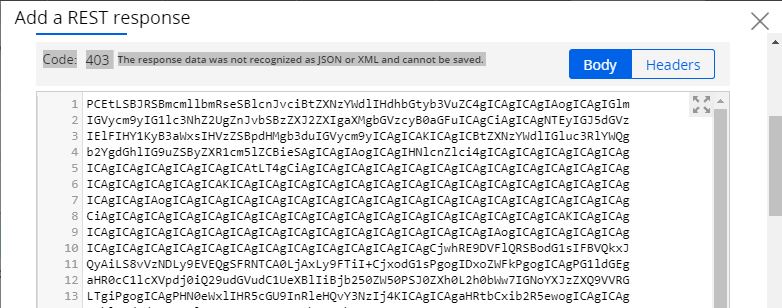
When trying to create and test any connector rule, say Connect-SOAP or Connect-REST, a HTTP 403 error comes up.
When trying to create and test any connector rule, say Connect-SOAP or Connect-REST, a HTTP 403 error comes up.
Accepted Solution
Swift
BE


Pegasystems Inc.
IN
Hi,
As per the pyStatusMsg property there is issue in response data.Could you please share sample request and response data.Webservice is sending response in which format?
Thanks,
Abhinav
Swift
BE
Web service is configured to respond with json, which I am very well seeing when testing using SOAP UI.
Connector to OOTB Pega API services are also failing. So I don't think that response might be the issue. The same Pega API is working using SOAP UI as well.
Accepted Solution
Swift
BE
Issue Resolved.
Below is the resolution:
The response hash we were getting is Base64 encoded.
We decoded it found it that Jboss was configured with a proxy setting.
<system-properties>
<property name="http.proxyHost" value="XX.XXX.XXX.XXX"/>
<property name="http.proxyPort" value="XXXX"/>
<property name="jboss.as.management.blocking.timeout" value="3000"/>
</system-properties>
So we added a new non proxy setting with the url of our environment.
<property name="http.nonProxyHosts" value="localhost, XX.XXX.X.XXX"/>
Now the connectivity works fine.
Issue Resolved.
Below is the resolution:
The response hash we were getting is Base64 encoded.
We decoded it found it that Jboss was configured with a proxy setting.
<system-properties>
<property name="http.proxyHost" value="XX.XXX.XXX.XXX"/>
<property name="http.proxyPort" value="XXXX"/>
<property name="jboss.as.management.blocking.timeout" value="3000"/>
</system-properties>
So we added a new non proxy setting with the url of our environment.
<property name="http.nonProxyHosts" value="localhost, XX.XXX.X.XXX"/>
Now the connectivity works fine.