
Question

TCS
IN
Last activity: 10 Feb 2021 13:37 EST
Robot start failed. Timeout waiting for robot to register.
We have configured 2 Robots which were up and running. We stopped then started but Robots are not getting started.
Tried starting from Robot manager and VM.
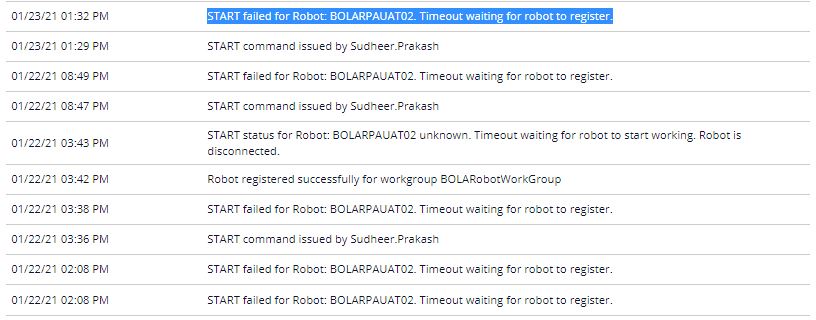
getting below message message in audit.
START failed for Robot: Timeout waiting for robot to register.
I see below messages in Pega.ProductLoader:
INFO | 2021-01-22 01:36:22.995 PM | 1 | 6372 | Product Loader | Starting Package Downloader - 'C:\Program Files (x86)\Pegasystems\Pega Robot Runtime\Pega.PackageDownloader.exe'
INFO | 2021-01-22 01:36:25.073 PM | 1 | 6372 | Product Loader | No package manifests returned. Loader will exit without loading Runtime
INFO | 2021-01-22 01:36:25.073 PM | 1 | 6372 | Product Loader | Suppressing no package dialog, ShowNoPackageDialog setting is false.
WARN | 2021-01-22 01:36:25.073 PM | 1 | 6372 | Product Loader | Load was NOT successful
Any idea on this issue?
Regards,
Sudheer Prakash
We have configured 2 Robots which were up and running. We stopped then started but Robots are not getting started.
Tried starting from Robot manager and VM.
getting below message message in audit.
START failed for Robot: Timeout waiting for robot to register.
I see below messages in Pega.ProductLoader:
INFO | 2021-01-22 01:36:22.995 PM | 1 | 6372 | Product Loader | Starting Package Downloader - 'C:\Program Files (x86)\Pegasystems\Pega Robot Runtime\Pega.PackageDownloader.exe'
INFO | 2021-01-22 01:36:25.073 PM | 1 | 6372 | Product Loader | No package manifests returned. Loader will exit without loading Runtime
INFO | 2021-01-22 01:36:25.073 PM | 1 | 6372 | Product Loader | Suppressing no package dialog, ShowNoPackageDialog setting is false.
WARN | 2021-01-22 01:36:25.073 PM | 1 | 6372 | Product Loader | Load was NOT successful
Any idea on this issue?
Regards,
Sudheer Prakash
***Edited by Moderator Kayla to update Platform Capability tags****

Digital Fast Forward
US

Pegasystems Inc.
US
Based on the log record above, Runtime is not able to receive a package, but this is caused by unsuccessful robot registration.
Please double check if you have performed all configuration steps required for robot registration: https://community.pega.com/knowledgebase/articles/pega-robot-manager/852/robot-registration-and-work-group-assignment-rpa-unattended-robots
If you don't see any problems with configuration, next step would be studying RPAService log and PegaRULES log right after unsuccessful registration attempt.

Pegasystems Inc.
US
Hey @sudheerprakash
You should also look to make sure that your work group has a package assignment associated with it.
@sudheerprakash Hi Sudheer, it looks like you are trying to load the project to Robot Manager. Based on the file that you've shared there's an issue with your project package that Robot Manager is expecting to pull your project from. A few ideas that you may want to try, if you are not selecting the option to also deploy your project to the server in Robot Studio, you may want to clean, build and re-deploy your project. Once your project has been re-deployed, you can check it's directory, usually "C:\\project folder\bin\Debug\" and see if you find a file there ending in .manifest. If you see this file, you can try launching runtime again. If you are trying to deploy your project and also connect to the server during your deployment, you may want to double check your Pega Server url and make sure that the deployment is successful from Pega Robot Studio when the connect to server checkbox is also selected on the deployment window.