
Question

Pegasystems Inc.
US
Last activity: 30 Oct 2018 13:15 EDT
Work Queue Calendar
Hi,
I'm trying to assign Calendar for a Robotic Work Queue.
https://community.pega.com/sites/default/files/help_v74/procomhelpmain.htm
I have created new Calendar instance and removed "Business" check box for Thursday (today):
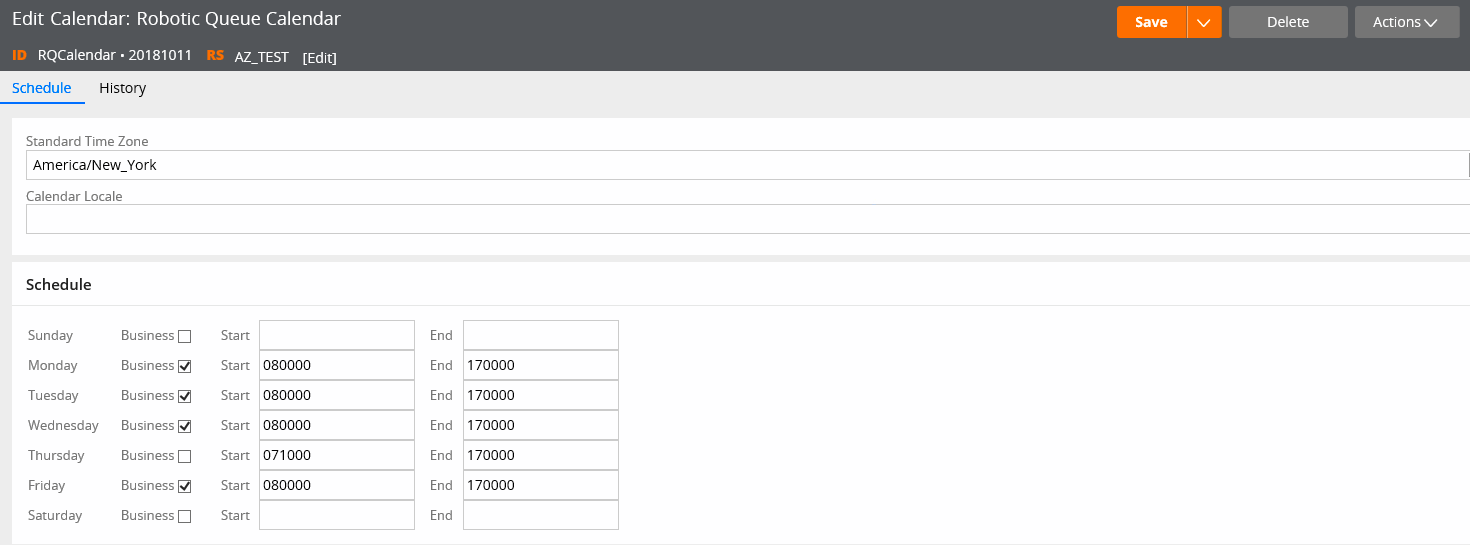
Then I have assigned this Calendar for Work Queue where case is routed:

I have clicked Save on both items. However, I don't see any effect of this. New cases are still routed to AZWB queue as before and immediately available for robots for processing.
I also tried to switch type or queue from Robotic to Standard, but it doesn't help. New cases are still routed normally.
Hi,
I'm trying to assign Calendar for a Robotic Work Queue.
https://community.pega.com/sites/default/files/help_v74/procomhelpmain.htm
I have created new Calendar instance and removed "Business" check box for Thursday (today):
Then I have assigned this Calendar for Work Queue where case is routed:
I have clicked Save on both items. However, I don't see any effect of this. New cases are still routed to AZWB queue as before and immediately available for robots for processing.
I also tried to switch type or queue from Robotic to Standard, but it doesn't help. New cases are still routed normally.
What I'm missing here? Should I restart application server to apply new calendar?
Should it work for Robotic queues or it is intended to work only for standard queues?
Thank you!
***Edited by Moderator: Pallavi to update platform capability tags***
Accepted Solution

Pegasystems Inc.
US
Pegasystems Inc.
US
Konstantin,
Your issue is a misunderstanding of what the calendar does. The calendar is used by the SLA rule for goal and deadlines when they say to only count work day, as far as I know that is all they are used for.
I am curious what use case you are trying to implement? If an assignment is sent to the Queue when it is not working hours what would you like to have happen?

Pegasystems Inc.
US
Hi, Cecil - thank you for clarification! The desired behavior is to accumulate cases in the work queue during "non-working" times and not give them out to Robots (who are constantly pinging the queue when they are up) to accommodate downtimes of legacy applications where robots are processing the assignments. Interestingly, this can be currently achieved by manually "starting" and "stopping" work queues by an Admin. What we are trying to achieve for large scale usage is to utilize this functionality more automatically as a schedule. Do you think this can be achieved by any other platform features, if not the calendar?
Accepted Solution
Pegasystems Inc.
US
Two possible solutions, the first two assume you are able to create a calculated property that will have contain a datetime property where the robot should be allowed to start processing:
If you are manually "starting" and "stopping" work queues (wondering exactly what you mean by this) now you could just automate doing this on a schedule using an Agent Rule.
Use an SLA rule with "Assignment Ready" set to be dynamically set with property. I am pretty sure the robot is calling the get next work activity which won't return work that isn't "ready" so this should work. But once the assignments are ready they will be processed and this doesn't give you a way to stop processing if app is going down and there is work still in the queue.
Pegasystems Inc.
US
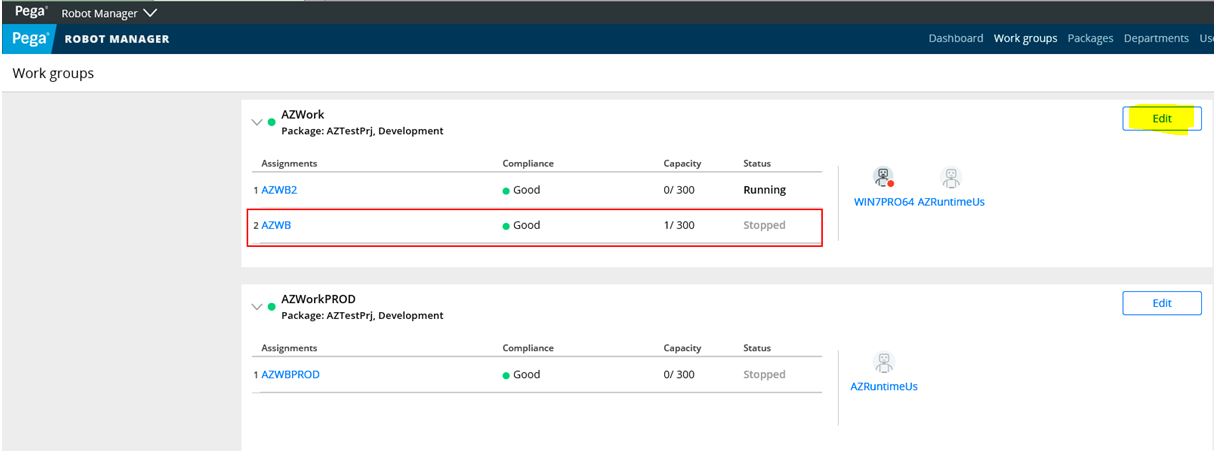
Hi, Cecil - thank you for suggesting the options. We will explore them. What we are doing manually is described here (bookmark is a bit south of the paragraph, so scroll just a tad up) and the screen of Robot Manager that provides the UI to change work queue state manually is below.
https://community.pega.com/knowledgebase/articles/using-pega-robot-manager-version-5#startstopqueue
Two possible solutions, the first two assume you are able to create a calculated property that will have contain a datetime property where the robot should be allowed to start processing:
If you are manually "starting" and "stopping" work queues (wondering exactly what you mean by this) now you could just automate doing this on a schedule using an Agent Rule.
Use an SLA rule with "Assignment Ready" set to be dynamically set with property. I am pretty sure the robot is calling the get next work activity which won't return work that isn't "ready" so this should work. But once the assignments are ready they will be processed and this doesn't give you a way to stop processing if app is going down and there is work still in the queue.