
Discussion

Pegasystems Inc.
BR
Last activity: 16 Dec 2025 9:21 EST
How to Implement Skill-Based Routing in Pega
Introduction
Pega's intelligent routing capabilities are a cornerstone of building efficient, logic-driven applications. By directing work to the most appropriate destination, you can significantly improve process quality, reduce handling times, and increase overall efficiency. This article provides a detailed walkthrough of three fundamental routing configurations: skill-based routing, routing that balances skill and workload, and direct-to-work-queue routing.
1. Foundational Environment Setup
Effective routing relies on a well-defined organizational structure within Pega. This structure provides the necessary context for the routing engine to make accurate decisions.
Operator Configurations
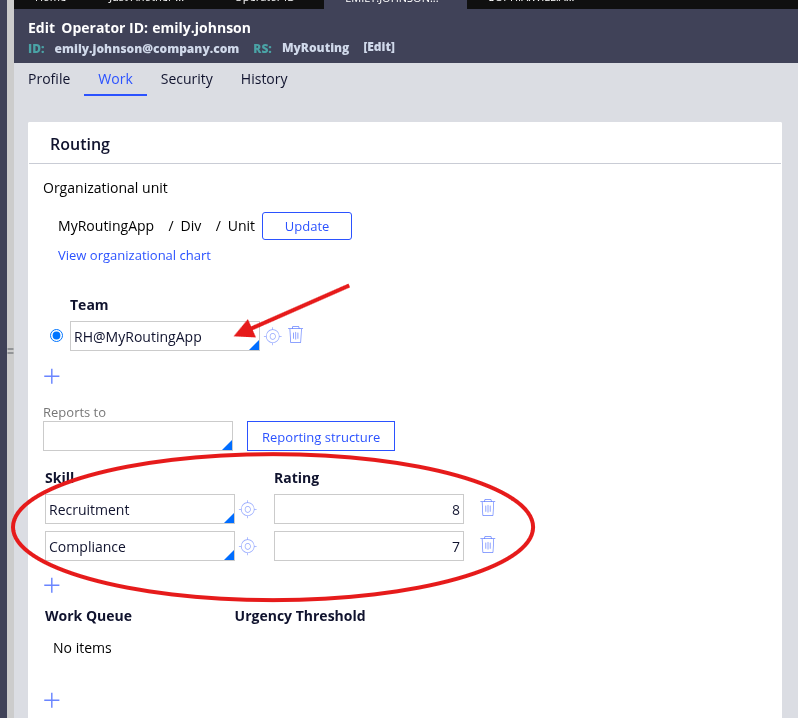
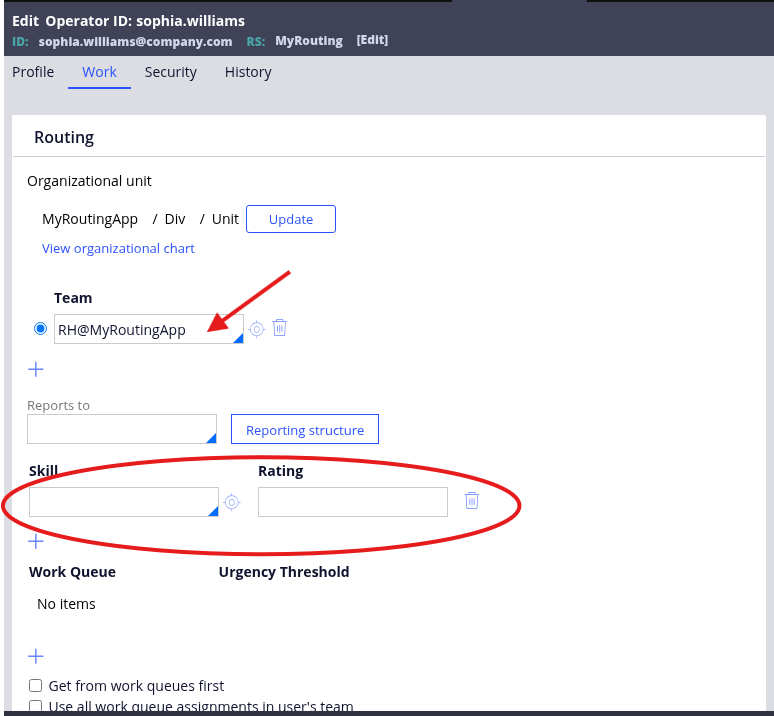
Operators are the individuals who perform the work. Their profiles must be configured with their relevant skills, proficiency levels, and team structure. The proficiency level is a crucial integer value (typically 1-10) that quantifies an operator's expertise in a given skill.
| Full Name |
Username |
|
Role |
Access Group |
Skills |
Team (Work Group) |
|---|---|---|---|---|---|---|
|
Emily Johnson |
emily.johnson |
Proprietary information hidden |
HR Specialist |
MyRouting:RH |
Recruitment (8), Compliance (7) |
RH@MyRoutingApp |
|
Sophia Williams |
sophia.williams |
Proprietary information hidden |
HR Specialist |
MyRouting:RH |
No skill listed |
RH@MyRoutingApp |
|
Michael Carter |
michael.carter |
Proprietary information hidden |
Operations Manager |
MyRouting:Manager |
English language skill (10), ApprovalLevel1 (10) |
Manager@MyRoutingApp |
|
Laura Mitchell |
laura.mitchell |
Proprietary information hidden |
Operations Manager |
MyRouting:Manager |
RiskManagement (7), ApprovalLevel1 (10) |
Manager@MyRoutingApp |
|
Sarah Thompson |
sarah.thompson |
Proprietary information hidden |
Director of Technology |
MyRouting:Diretor |
No skill listed |
Diretor@MyRoutingApp |
Work Groups and Work Queues
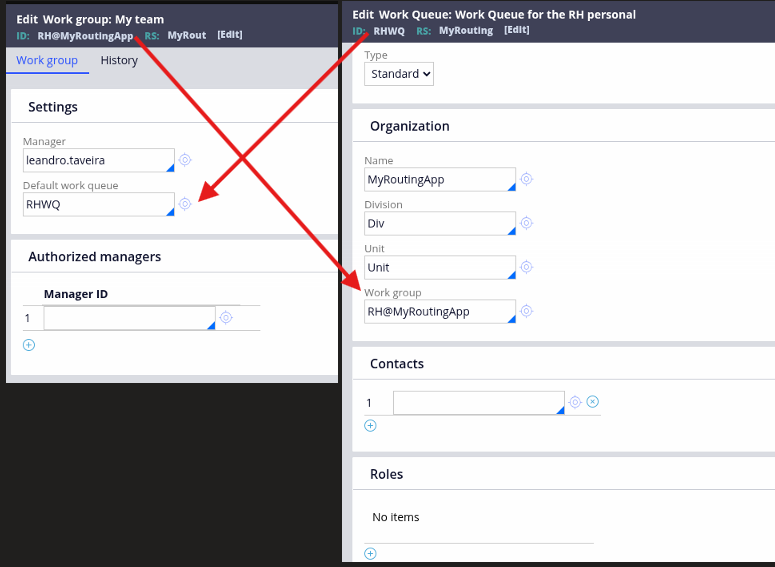
Work Groups represent teams or organizational units, while Work Queues (often referred to as Workbaskets in older Pega versions) are shared backlogs where assignments are pooled for a team to pick up.
- Work Groups:
RH@MyRoutingApp,Manager@MyRoutingApp,Diretor@MyRoutingApp. - Work Queues:
RHWQ,ManagerWQ,DiretorWQ.
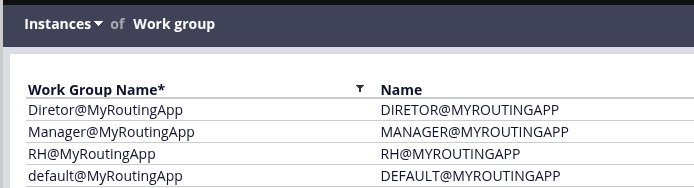
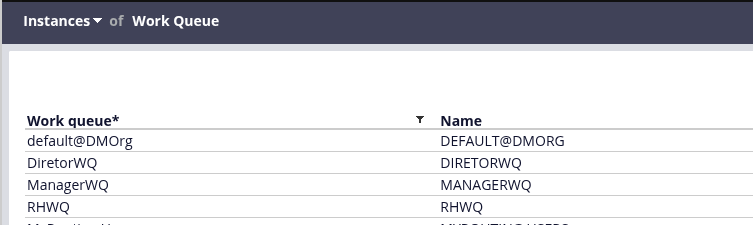
In this example implementation, each Work Group is associated with its corresponding Work Queue in a one-to-one relationship: RH@MyRoutingApp routes to RHWQ, Manager@MyRoutingApp routes to ManagerWQ, and Diretor@MyRoutingApp routes to DiretorWQ. This straightforward mapping simplifies the routing configuration and makes it easy to trace assignments through the system. Note that Pega supports more complex configurations where multiple Work Groups can share a single Work Queue, or where a Work Group routes to multiple queues based on business rules, but for clarity and simplicity, this tutorial uses a one-to-one mapping.
2. Configuring Skill-Based Routing (OOTB)
This is the standard method for specialized work, directing a task to an operator by matching one or more required skills and a minimum proficiency level.
Why choose this method? Skill-based routing is ideal for specialized tasks that demand a specific level of expertise. It ensures that complex or critical work is handled only by qualified individuals, which improves first-pass quality, reduces rework, and enhances customer satisfaction. Use this when the who (the expert) is more important than the when (immediate availability).
Implementation Steps:
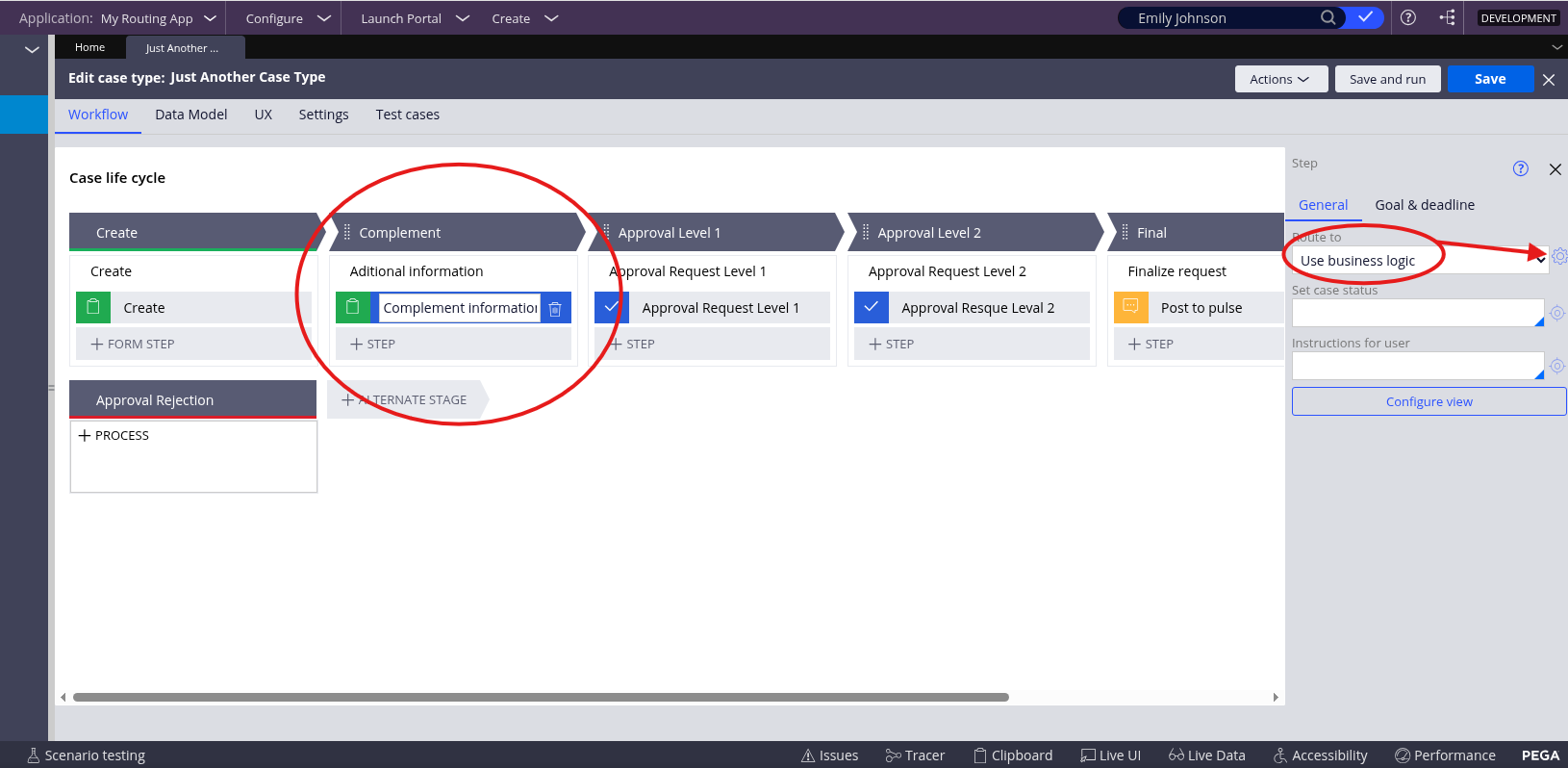
- Select the Step: In the case type, select the assignment step (e.g., "Complement information").
- Choose Business Logic: Set the Route to field to Use business logic.
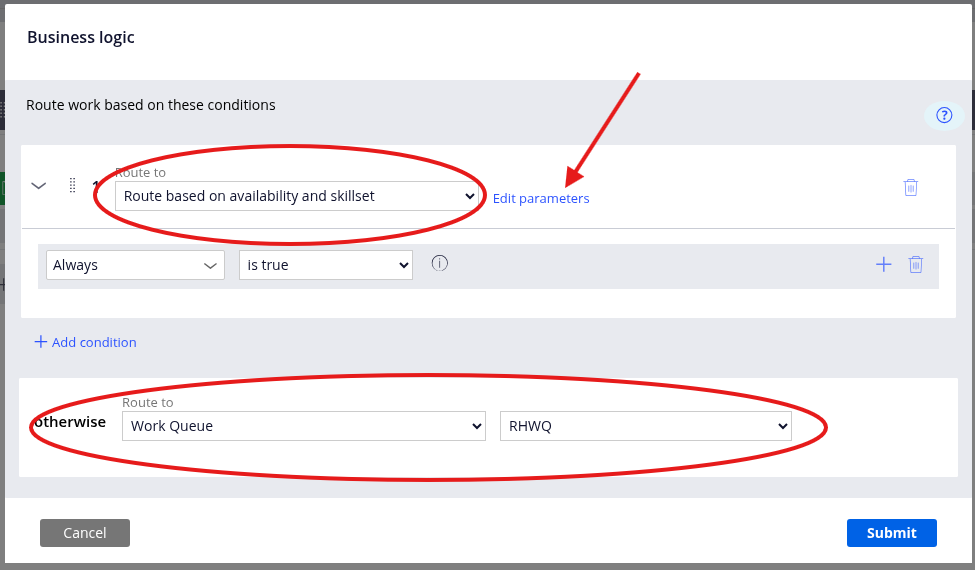
- Define the Logic: Click on the Gear icon and set the logic to Route based on availability and skillset. This leverages the out-of-the-box routing activity, typically a variant of
ToSkilledWorkbasketor a similar modern configuration. - Set Parameters: Specify the target
Work group(RH@MyRoutingApp) and the requiredSkill("Recruitment" with a level of 8). The "Required" checkbox must be selected. - Add a Fallback: Set the
otherwisecondition to route to a designated work queue (e.g.,RHWQ). This is a crucial best practice to prevent tasks from getting stuck if no operator is available or meets the criteria.
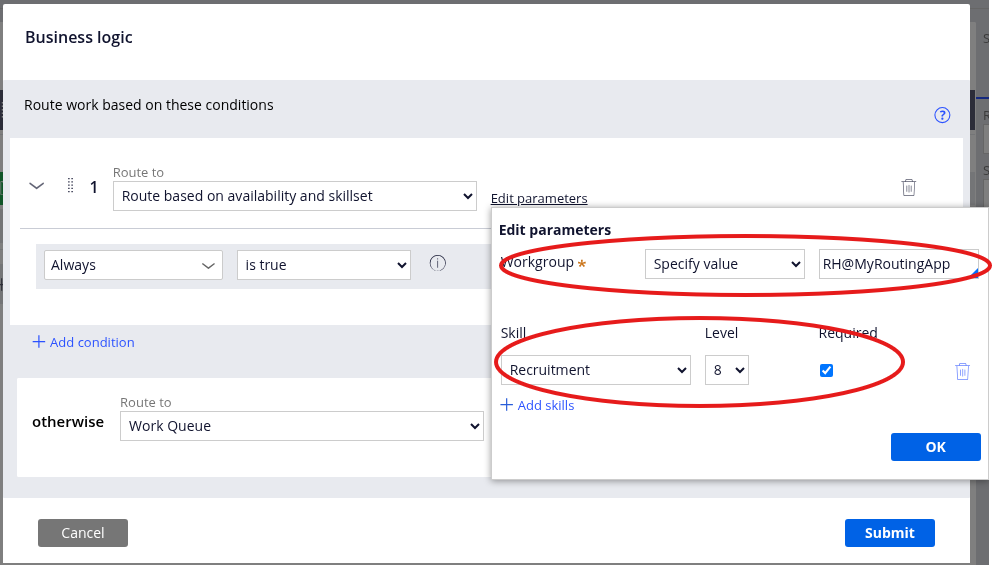
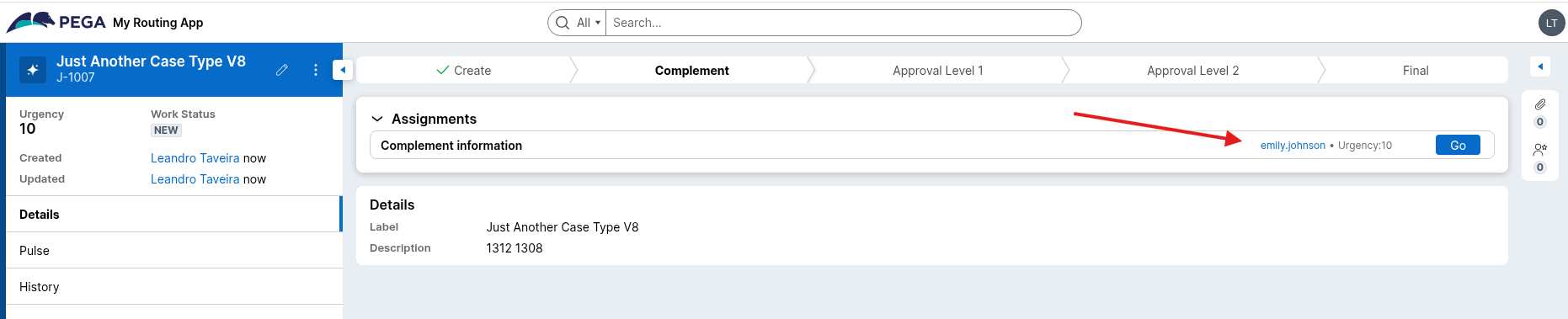
In the example above, the assignment is routed to Emily Johnson, as she is the only available operator in the RH@MyRoutingApp work group with a "Recruitment" skill of 8 or higher.

3. Advanced Routing with Workload Balancing
This method refines skill-based routing by introducing a workload metric. It first identifies all operators who meet the required skill criteria and then assigns the task to the one with the lightest current workload, measured by the number of open assignments in their worklist.
Why choose this method? This is perfect for teams of similarly skilled individuals (e.g., managers, senior analysts, or a service desk team) where the primary goal is to maintain high productivity and prevent any single person from becoming a bottleneck. It promotes fairness and maximizes throughput by ensuring work is distributed evenly. You would use this when you want the best available person to get the task without overloading them.
Implementation Steps:
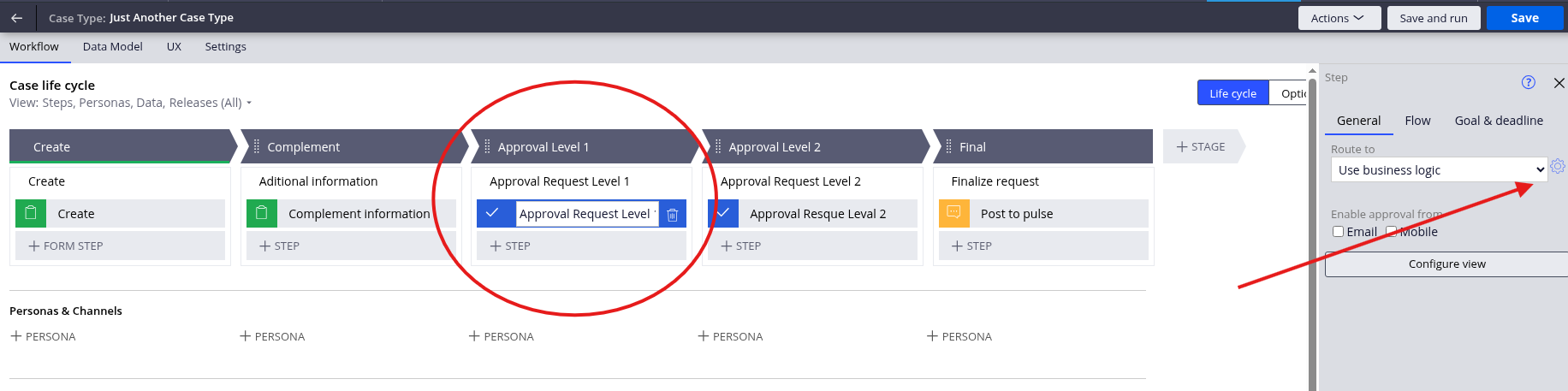
- Select the Step: In the case type, select the assignment step (e.g., "Approval Request Level 1").
- Choose Business Logic: Set the Route to field to Use business logic.
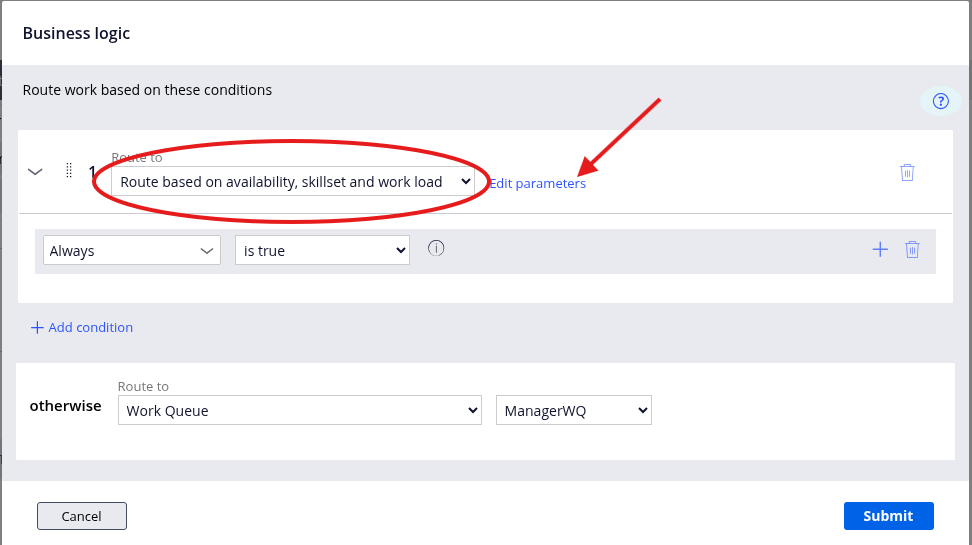
- Define the Logic: Click on the Gear icon and set the routing to Route based on availability, skillset and work load.
- Set Parameters: Configure the
Work group(Manager@MyRoutingApp) and the desiredSkill("ApprovalLevel1" with a level of 10). Theotherwiseroute is set to theManagerWQ.
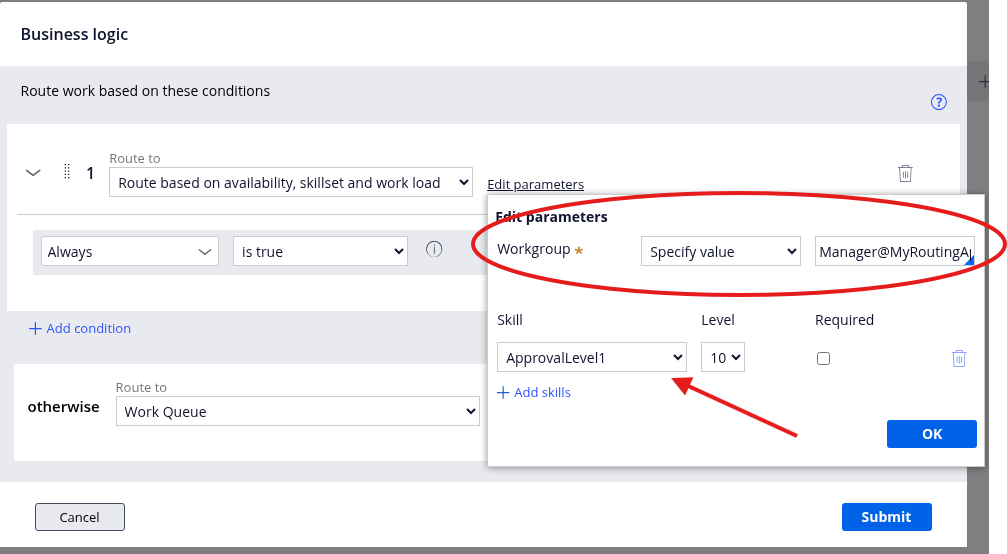
This configuration evaluates both Laura and Michael, finds they are both highly skilled, and then assigns the task to the one with fewer open assignments in their worklist, ensuring an equitable distribution of work. First I added some cases directly to Michael Carter. Then I added the skill to Laura Mitchell; once I create a new assignment, it was routed to her.

4. Directing Assignments to a Work Queue (no skill required)
This is the simplest and most flexible routing method, sending an assignment directly to a shared team backlog.
Why choose this method? Direct-to-queue routing is the best choice for general, non-specialized tasks that any member of a team can perform. It decouples the work from a specific individual, providing maximum flexibility. This model is highly effective for high-volume, standardized tasks where the goal is simply to get the work done by a member of the responsible team.
Implementation Steps:
- Select the Step: Navigate to the assignment step (e.g., "Approval Request Level 2").
- Choose Work Queue Routing: In the step's configuration panel, set the `Route to` field directly to Work Queue.
- Select the Queue: Select 'Work Queue', then select the target queue (e.g., DiretorWQ) from the dropdown.
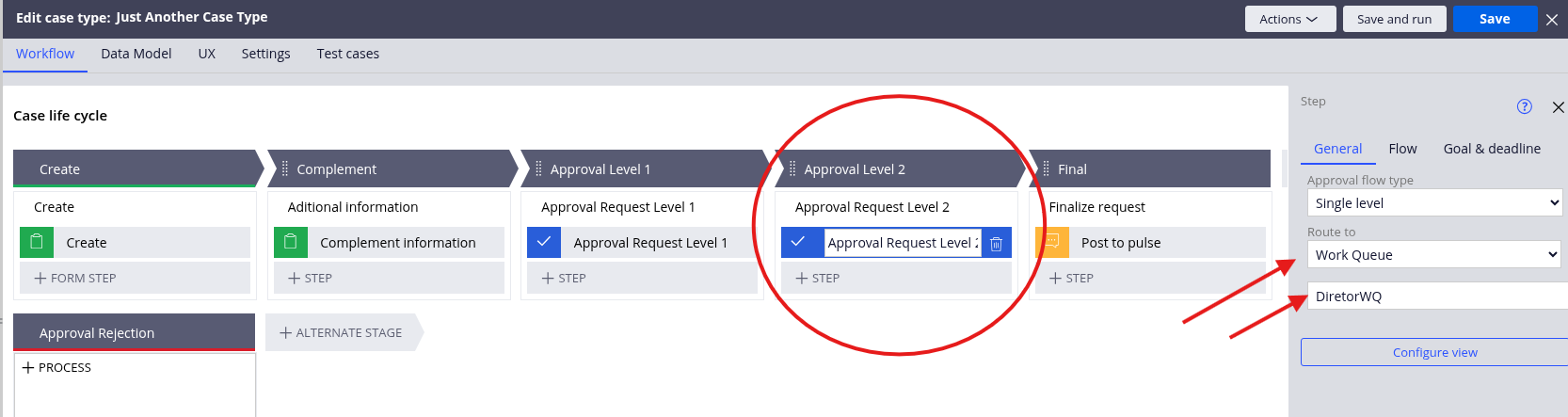
When the case reaches this step, the assignment is placed in the DiretorWQ. Any operator with access to this queue can then take ownership of the task using the Get Next Work feature.
5. Key Differences Summary
| Aspect | Availability & Skillset | Availability, Skillset & Work Load | Direct Assignment |
|---|---|---|---|
| Considers workload | No | Yes | No |
| Assignment logic | Random among qualified operators | Assigns to operator with lowest workload | Routes to specific operator's worklist |
| Best for | Specialized skill matching | High-volume, balanced distribution | Known operator, specific responsibility |
| Prevents overload | No | Yes | No |
| Performance focus | Right skills, right task | Right skills + balanced efficiency | Right person for the task |
6. Recommendation
Choose the first method (availability and skillset) when your primary objective is ensuring specialized skills are matched to work items and workload balance isn't a concern. Choose the second method (availability, skillset, and work load) when you need to maintain operational efficiency through balanced workload distribution, especially in high-volume environments where preventing operator burnout is essential for sustained productivity.
Hope this clarifies the differences and helps you make the right choice for your implementation! Let me know if you need any additional details or have questions about configuring either of these routing methods.
Conclusion
Effective routing is fundamental to optimizing your Pega applications for both operational efficiency and user satisfaction. Throughout this article, we've explored some essential routing strategies that address different business scenarios: skill-based routing for specialized expertise, workload-balanced routing for equitable task distribution, direct-to-work-queue routing for team flexibility.
Understanding when and how to apply each routing method enables you to design workflows that not only match work to the right resources but also maintain sustainable workload levels and clear accountability. Skill-based routing ensures complex tasks reach qualified experts, while workload balancing prevents bottlenecks and burnout in high-volume environments.
As you implement these routing configurations in your Pega applications, remember that the right choice depends on your specific business context: the nature of the work, the structure of your teams, the volume of assignments, and your operational priorities.
References
-
Intelligent routing - Pega Platform Documentation
https://docs.pega.com/bundle/platform/page/platform/app-dev/intelligent-routing.html -
Assigning tasks to users - Pega Platform Documentation
https://docs.pega.com/bundle/platform/page/platform/case-management/assigning-tasks-users.html -
Defining work routing settings for an operator - Pega Platform Documentation
https://docs.pega.com/bundle/platform/page/platform/app-dev/defining-work-routing-settings.html -
Automated and intelligent work assignment with Get Next Work - Pega Platform Documentation
https://docs.pega.com/bundle/platform/page/platform/case-management/get-next-work-logic-selecting-next-assignment.html -
Skill-based routing - Pega Documentation Glossary
https://docs.pega.com/bundle/glossary/page/glossary/s/glossary-s.html -
Configuring custom routing logic for Assignments - Pega Platform Documentation
https://docs.pega.com/bundle/platform/page/platform/case-management/configuring-custom-routing-logic-assignments.html -
Routing work to Users - Pega Academy
https://academy.pega.com/topic/routing-work-users/v4 -
Case routing - Pega Academy
https://academy.pega.com/topic/case-routing/v3 -
Push routing and Pull routing - Pega Academy
https://academy.pega.com/topic/push-routing-and-pull-routing/v1 -
Get Next Work feature - Pega Academy
https://academy.pega.com/topic/get-next-work-feature/v4