
Question

HomeServe
GB
Last activity: 24 Apr 2025 13:22 EDT
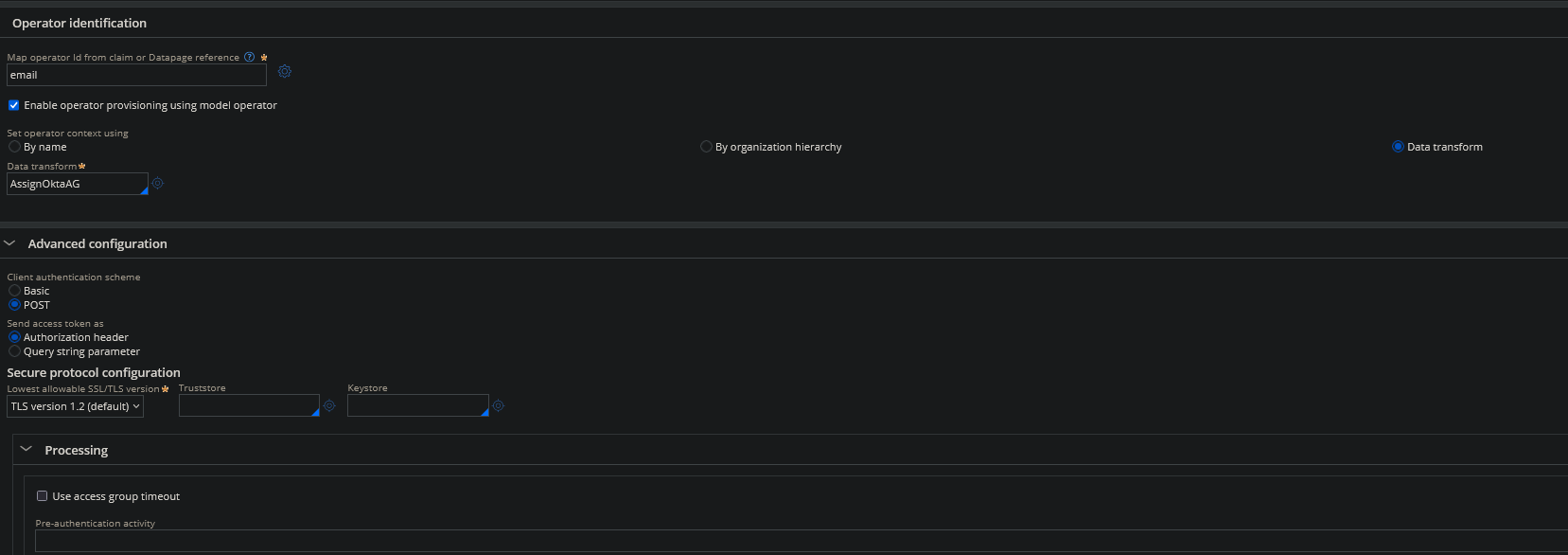
How can I reference OIDC claim attributes in the operator data transform?
Inside the AssignOktaAG data transform as shown.
Updated: 25 Apr 2025 4:53 EDT

Pegasystems Inc.
GB
Updated: 24 Apr 2025 11:12 EDT
HomeServe
GB
@MarijeSchillern Hi Marjie,
The above solution of assigning via curly brackets does not seem to work.
I am trying to pass the claim into a datapage but it doesnt seem to work as expected.
Param.ClaimTitle = {profile}
Param.ModelOperatorName = D_FetchModelOperator[Title:Param.ClaimTitle].ModelOperator
Above is the scenario im trying to utilise it in.
However when I pass Param.ClaimTitle through the datapage it is just returning {profile}

Capgemini
NO
@MatthewR3806 I hope you are mapping the claims to a clipboard property in the "Mapping" tab of the Authentication Service rule. If not, map it to the appropriate property, which will be resolved in an unauthenticated session. I haven't tried accessing them from the data transform. Check once whether those properties are accessible in the data transform context. But they will be available in the PostAuthentication activity context; you can set them to the OperatorID page there.
@MatthewR3806
are you able to access the MSP GenAI Buddy? Please see if the answer helps you.
https://support.pega.com/support-doc/using-pega-genai-knowledge-buddies
https://support.pega.com/support-doc/my-support-portal-home-page
References:
https://docs.pega.com/bundle/platform-241/page/platform/security/identity-mapping.html
https://docs.pega.com/bundle/platform/page/platform/security/create-oidc-sso-authentication-service-app-studio-creating.html
⚠ This is a GenAI-powered tool. All generated answers require validation against the provided references.
To reference OIDC claim attributes in an operator data transform, you need to use curly braces notation
{claimName}around the claim attribute names. This syntax allows you to directly access the claims received from your OIDC provider (Okta in this case).Here's how to implement this in your AssignOktaAG data transform:
@MatthewR3806
are you able to access the MSP GenAI Buddy? Please see if the answer helps you.
https://support.pega.com/support-doc/using-pega-genai-knowledge-buddies
https://support.pega.com/support-doc/my-support-portal-home-page
References:
https://docs.pega.com/bundle/platform-241/page/platform/security/identity-mapping.html
https://docs.pega.com/bundle/platform/page/platform/security/create-oidc-sso-authentication-service-app-studio-creating.html
⚠ This is a GenAI-powered tool. All generated answers require validation against the provided references.
To reference OIDC claim attributes in an operator data transform, you need to use curly braces notation
{claimName}around the claim attribute names. This syntax allows you to directly access the claims received from your OIDC provider (Okta in this case).Here's how to implement this in your AssignOktaAG data transform:
{claimName}{email}When configuring your AssignOktaAG data transform (which should be set with "Applies To" class of
Data-Admin-Operator-ID), you can map claims to operator properties like this:OperatorID.pyEmail = {email}OperatorID.pyFirstName = {given_name}OperatorID.pyLastName = {family_name}OperatorID.pyAccessGroup = {primaryGroup}OperatorID.pyAccessGroupsAdditional = {groups}If your OIDC provider returns array values (like for groups or roles), you can reference specific elements:
OperatorID.pyAccessGroup = {groups[0]} // First group in the arrayYou can also use claims in more complex expressions:
OperatorID.pyUserIdentifier = {sub} + "@" + {domain}Be sure that your AssignOktaAG data transform is properly referenced in your OIDC authentication service configuration, as shown in your screenshot.
For this to work properly, make sure the claims you're referencing are actually being sent by your Okta OIDC provider. You may need to configure your Okta application to include these claims in the token.
References:
Creating an OIDC SSO authentication service in App Studio
Identity mapping
Configuring operator provisioning for an OpenID Connect SSO authentication service