

Issue
The variant of case status badge cannot be configured for specific status values.
Symptoms and Impact
The keyword-to-variant mapping is fixed and cannot be customized. For example, a custom status such as Resolved-Manipulated would display as green because the keyword ‘Resolved’ is mapped to the Success badge variant.
Steps to reproduce
Change the status of a case and view the styling of the badge at run time.
Root Cause
The mapping between the variant used and the status uses a keyword mapping that is hard coded in the Constellation core JS code. The variant shown is determined by the first matching keyword in the following priority order.
Pending – pending
Warning – fail, cancel, reject, withdraw, revoke, stopped, warn
Info – open, hold, info, new
Success – resolved, completed, success
Urgent – blocked
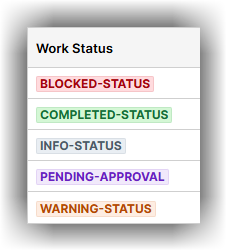
The below screenshot illustrates different default or Out-of-the-box styles for the variants.
Solution
There is no workaround for mapping different keywords to different badge variants as this is hard coded.
To change how the status displays, you have two options:
- Use a status string that includes one of our recognized keywords.
- Explore a custom implementation using the Status Badge component from the Constellation DX Components UI Gallery, which allows more control over how statuses are styled and presented.
An enhancement request has been entered for your issue but has not yet been assigned to a specific release. This Known Issue will be updated with release details when the enhancement for this issue is available.
Good to know
Changing the colour of the status badge variants from the default colour
Badge variant colors are configured under components.badges.status in the theme JSON, using each variant’s background and foreground key.
For more information, click Design tokens in Constellation