

Issue
After updating to Pega Infinity™ '25, scheduled reports are no longer executing as expected.
Symptoms
Scheduled reports fail to run after Pega Platform is updated to Infinity ‘25.
Error encountered in logs
- com.pega.platform.executor.jobscheduler.scheduler.JobExecutionException: Job Scheduler [pyUpdateScheduledReportsWithCurrentTimezone] activity [pyUpdateScheduledReportsWithCurrentTimezone] execution marked as failed with message [Missing stream key property pyStreamName].
- <pxErrorMessage>Unable to open an instance using the given inputs: pxObjClass = "Rule-Shortcut", pyCategoryName = "XXX", pyOwnerType = "X", pyOwner = "X", pyShortcutName = "XXX"</pxErrorMessage> <pxErrorDateTime>20260316T070012.814 GMT</pxErrorDateTime>
Steps to reproduce
Pre-update:
-
Schedule reports.
Post-update to Pega Platform 25.1:
-
Run scheduled reports.
-
Reports are no longer processed correctly, and tasks are removed from the queue.
-
Existing recurring reports are incorrectly marked as 'Completed' rather than 'Scheduled'.
Root Cause
Job scheduler pyUpdateScheduledReportsWithCurrentTimezone was implemented in Pega Infinity '25 to handle daylight saving time adjustments. As a result of a defect, newly created reports are not scheduled accurately. The job scheduler cleans up and recreates scheduled entries, converting times to GMT instead of maintaining local time zone (eg CET).
This is a product limitation which requires a local change.
Solution
The following hotfix exists for users on Pega Platform 25.1.2:
- HFIX-D1204
This fix:
- Disables the scheduler by default and sets the access group context in the scheduler
- Changes pyupdatescheduledreportswithcurrenttimezone to prevent the cross applications issues.
Users on other Pega releases can avoid the Issue by using the below local change:
1. Disable the pyUpdateScheduledReportsWithCurrentTimezone job scheduler:
- Navigate to the job scheduler configuration in your Pega environment.
- Locate job scheduler pyUpdateScheduledReportsWithCurrentTimezone.
- Save the pyUpdateScheduledReportsWithCurrentTimezone scheduler to the application ruleset for all affected applications and disable it to prevent execution and avoid the error.
2. Manually execute the pyUpdateScheduledReportsWithCurrentTimezone activity:
If users run the pyUpdateScheduledReportsWithCurrentTimezone activity from one application, then the access group used is the one from the current application and it will schedule all the reports without application context even though name of one report is displayed in UI screen. If the shortcut used is from another application, the access group and the current ruleset list is not available in the current application and it will cause the issue
This manual retrigger needs to be done by a specific operator, and they may either have access only to a single application or multiple applications.
If the operator has single access groups/applications:
- Run the pyUpdateScheduledReportsWithCurrentTimezone activity manually to re-trigger the scheduled reports.
If the operator has multiple access groups/applications:
Either:
-
Create a dedicated operator with only one access group and run the activity per application. Perform the same for all applications.
Or:
-
the Job Scheduler into each application’s ruleset and change the context to Specify access group and provide respective access group so that each app has its own job scheduler. Perform the same for each application/access group.
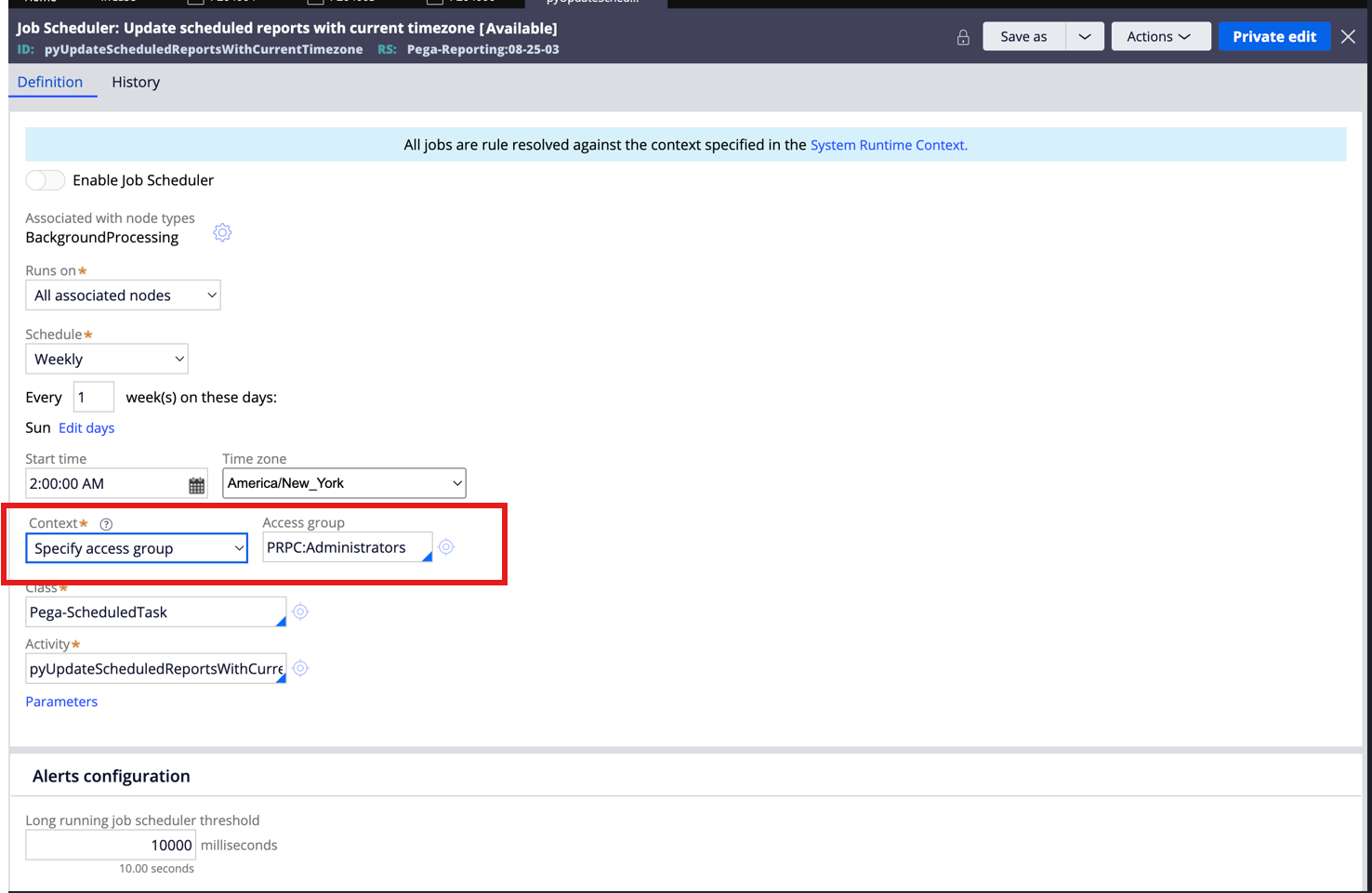
3. Carry out a final check for reports that still show status 'Scheduled' but display dates older than current date:
Occasionally users will find reports that have status 'Scheduled' but display historical dates older than current date. Reports in this condition cannot be executed manually and will generate an error.
For reports found in this state, follow the below steps:
-
In the header of Dev Studio, click > > .
-
In the Task name column, click the label of the scheduled task that you want to update.
-
At the bottom of the PX-ST-Task Number tab, click .
-
Update the task scheduling form and change the date schedule to a valid, future time and date.
-
At the bottom of the tab, click .
-
Run the report manually, and it should execute successfully.
References
Withdrawn and deprecated features
Withdrawn support for user-defined functions in staging and production environments