

Issue
In Pega Platform™, when multiple pills are selected in a multi-select field, pressing the keyboard delete key removes the last pill added rather than the highlighted pill.
Symptoms and Imact
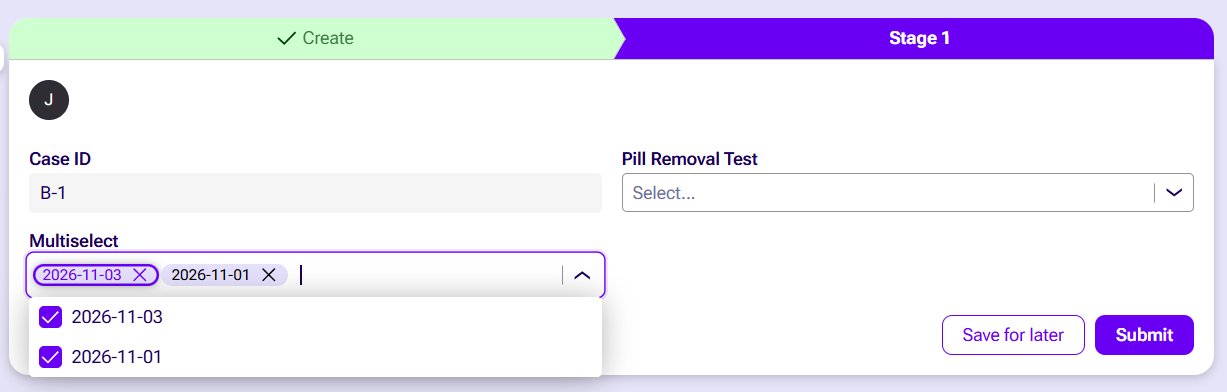
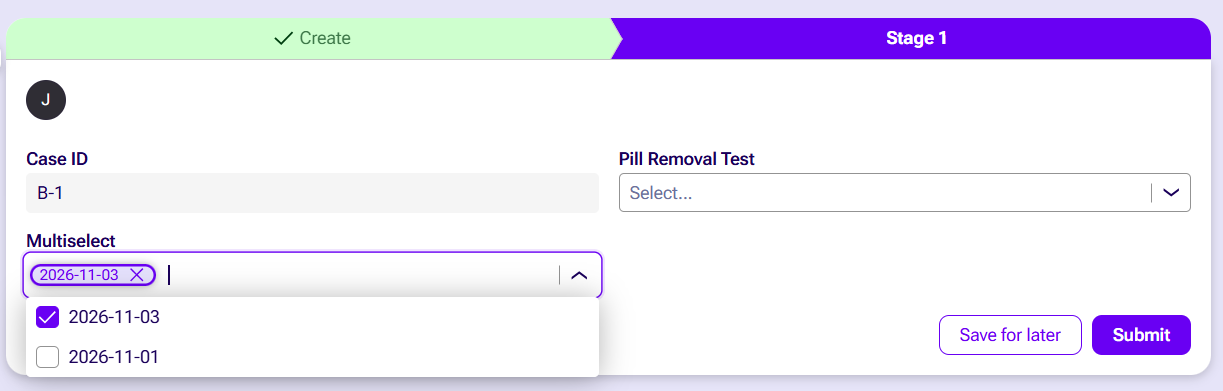
When a keyboard user highlights a pill in a multi-select field and presses the delete key, the system removes the last pill in the list instead of the highlighted one.
This behavior affects all multi-select dropdown fields in the application. Users who rely on keyboard navigation cannot selectively remove individual values without opening the dropdown and manually deselecting options, which reduces accessibility compliance with WCAG 2.0 Keyboard Access standard 2.1.1.
Steps to Reproduce
- Navigate to the multiselect dropdown.
- Make multiple selections so there is more than 1 pill in the input container.
- Highlight the first pill within the container by using your arrow keys.
- Click 'Backspace' to delete the pill you currently have selected
- Result: The pill that is selected remains, and the last pill in the container is deleted instead.
Root Cause
This is a product defect. The deletion logic in the multi-select control does not respect the currently highlighted pill. Regardless of which pill has focus, the system always removes the last pill added to the list.
Solution
The issue will be fixed in upcoming patch releases.
References
Accessibility in Pega > Keyboard shortcuts
Pega Customer Service accessibility features