

Issue
HTML entities in user input cause null pointer exceptions when using Agent Prompts in Pega GenAI/Agentic AI functionality.
Symptoms and Impact
- Agent prompts fail to process user questions containing HTML-encoded characters like “"”, “&”.
- Agent prompts become non-functional.
- Uses encounter exceptions on the pompt:
- ‘"NullPointerException in SafeURL.put(key,value)’
- Activity 'pzSendMessageWrapper' failed to execute; Java Exception: java.lang.IllegalArgumentException
Steps to Reproduce
- Access Agent Prompts functionality in Pega GenAI/Agentic AI
- Enter a question containing HTML entities (e.g., ", (, ),)
Example:
What can cause an error like: “Problem invoking function: pega_rules_utilities.pzGetContext--(PublicAPI,ClipboardPage), A null or empty handle has been specified in the database "open by handle" method
- Submit the prompt Observe null pointer exception error
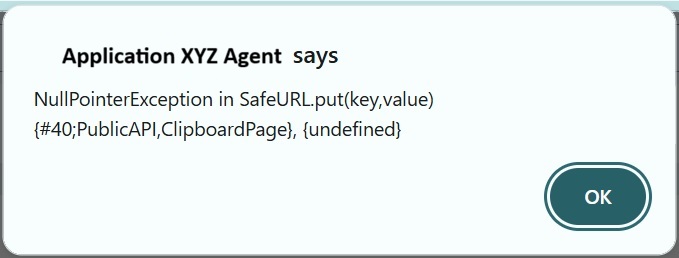
- Workaround Verification: Remove HTML entities from the same question and resubmit.
Example:
What can cause an error like: "Problem invoking function: pega_rules_utilities.pzGetContext--(#40;PublicAPI,ClipboardPage#41;), A null or empty handle has been specified in the database "open by handle" method
Root Cause
The issue occurs when HTML-encoded content (containing entities like ", &, etc.) is passed to the pzGetContext utility function used by Agent prompts. The function fails to properly decode HTML entities before using them as database handles, resulting in null pointer exceptions. The issue is specific to traditional agent UI and happens only when user prompt contains HTML input.
Solution
This has been resolved in Pega Platform release 25.1.3 where user input request is encoded to base64 and the request is decoded in pzSendMessageWrapper.
A Platform level fix for the upcoming release is also planned.
In the interim, follow a local change:
Remove HTML entities from user input before submitting to Agent Prompts. For example:
- Change " to "
- Change ( to (
- Change ) to )
References
Best practices for creating Agents and Tools