

Issue
Users see OAuth2 token decryption failures while creating OAuth2 client token.
Symptoms and Imact
- Users observe that the authentication profile is unable to revoke the active access token for the client specified.
- While using OAuth2, there is a decryption failure, for example:
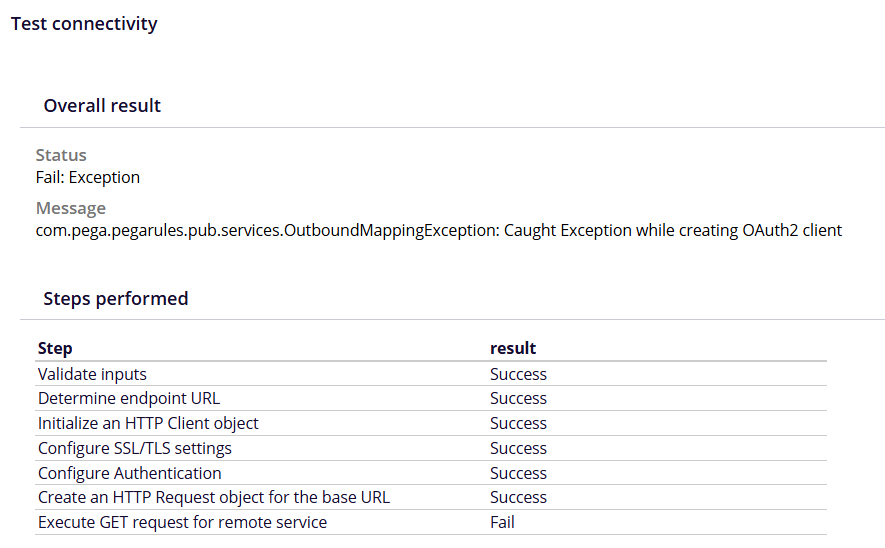
com.pega.pegarules.pub.services.OutboundMappingException: Caught Exception while creating OAuth2 clientCaused by: com.pega.pegarules.pub.PRRuntimeException: cryptography operation failed, mode:2Caused by: javax.crypto.BadPaddingException: Error closing stream
Steps to Reproduce
1. Log into the environment with the existing authentication profile.
2. Open relevant API data page.
3. Run the data page with the required parameters and observe the error.
4. Open the connector for this data page.
5. Run test connectivity and observe the error.
Root Cause
This is a bug. The column lengths of pyAccessToken and pzRefreshToken in pr_data_token are not large enough. The database column length limit of 4000 characters results in the truncation of the encrypted access token. This truncation prevents successful decryption of the token, leading to failures in the integration APIs.
This issue is found in environments where Hazelcast (HZ) is disabled. From Platform '25 onwards there is no HZ, so the issue is seen in releases before the fix: 25.1.1 and 25.1.2. In releases before Pega Platform '25, it affects applications where HZ is disabled.
Solution
To address this issue we need to increase the database column length and correct existing truncated token entries to ensure proper decryption.
The following local change will work for all other databases:
- Increase the pyAccessToken column to 8000 characters and increase the pzRefreshToken column to 4000 characters in the pr_data_token table.
- Truncate the pr_data_token table.
The issue is due to be fixed in upcoming Pega Platform releases.