

Issue
The data-test-id attribute is missing from the Document Object Model (DOM) elements in the Work portal after updating to Pega Platform™ 25.1.3, affecting UI element identification and automation.
Symptoms and Impact
After updating to Pega Platform '25.1.3 release, users observe that the data-test-id attribute, is missing from all inspected elements within the Work portal's DOM.
This absence disrupts automated testing scripts that depend on these identifiers, leading to failures in test validation and increased difficulty in locating UI components.
Steps to reproduce
- Log in to the Work portal.
- Navigate to any page like cases or dashboard.
- Right-click on any UI element and click Inspect.
- Check the DOM structure of the selected element.
data-test-id attribute is missing from all inspected elements in the DOM.
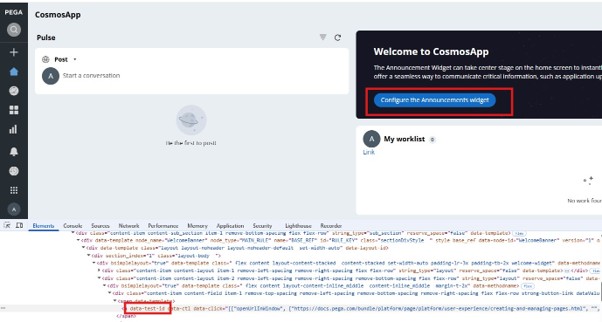
Expected Result:
data-test-id attribute value should be present for identifiable UI elements.
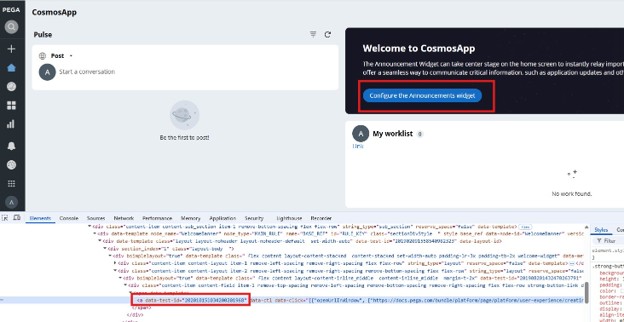
Root Cause
In Pega '25.1.3, the data-test-id attribute rendering is permission-gated and requires the PegaRULES:TestID role to be present in the user's access group. Without this role, the attributes are not populated in the DOM, even though the platform version supports test automation features.
This is not a regression introduced by the '25.1.3 patch itself, but rather an environmental configuration gap that becomes apparent when automation testing is attempted on portals.
Solution
Add the PegaRULES:TestID role to the user's access group. This change enables the data-test-id attribute to render correctly in the DOM, restoring functionality for your UI automation scripts and test validation processes.