
Question

TCS
IN
Last activity: 5 Dec 2016 4:51 EST
Disable the monitoring nodes in AES
We have 2 AES system, one for DEV and other for TEST.
I am new to AES, my senior created AES in DEV and configured few environments for monitoring.
There is a requirement to configure one of the performance env in TEST, so I have refreshed the AES DEV database to AES TEST database.
As part of post refresh sanity, I have cleared the unwanted nodes/agent schedules in TEST. But still I could see the nodes in TEST that are already configured in AES DEV.
Can anyone please help in clearing the nodes that are configured for DEV in TEST? I believe i need to enable config changes/delete records from database.
Accepted Solution

Pegasystems Inc.
US
Pegasystems Inc.
IN
Hi Karthick,
Please follow the below link. I hope it can resolve your issue.
https://collaborate.pega.com/question/aes-71-how-temporarily-disable-node-system-monitoring
Best Regards
Saran Kumar Kolla
Accepted Solution
Pegasystems Inc.
US
Hi Karthick,
In the Pega 7 envioronment (monitored nodes and AES are Pega 7 and AES 7.1.7 or 7.2)
To permanently remove the nodes from the Dev environment, you merely change the endpoint soap url for the AES server in the Predictive Diagnostic Cloud landing page on each monitored node you wish to repoint.
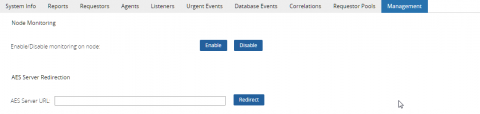
Alternately you can use AES to point the monitored node to a new AES system using the Management tab for the node on the enterprise health landing page.
Pegasystems
IN
The same AES system can monitor multiple environments provided each environment uses a different system name to unique identify its set of nodes.
TCS
IN
Thanks everyone guys, This is answered and resolved..
Hi Karthick,
In the Pega 7 envioronment (monitored nodes and AES are Pega 7 and AES 7.1.7 or 7.2)
To permanently remove the nodes from the Dev environment, you merely change the endpoint soap url for the AES server in the Predictive Diagnostic Cloud landing page on each monitored node you wish to repoint.
Alternately you can use AES to point the monitored node to a new AES system using the Management tab for the node on the enterprise health landing page.