Discussion

Pegasystems Inc.
CA
Last activity: 29 Nov 2025 0:03 EST
Constellation Landing Page - Display Data from Work and Assign-WorkBasket tables
Use Case Description:
In business applications built with Pega and utilizing the Constellation UI architecture, users often need to view a consolidated list of cases (Work objects) along with their current assignments. This means combining data from both the Work table (which stores general case data) and the Assign-Workbasket or Assign-WorkList tables (which store assignment-specific data, such as to whom and where the case is assigned). Presenting this unified information enables users to quickly assess case status, workload, and take necessary actions.
Challenge:
The pxPages has limitations within the Constellation UI framework. This restricts the ability to configure a view with Work and Assignment tables. As a result, there is a need for an alternative way to combine and display relevant case and assignment data.
Proposed Solution:
Approach 1:
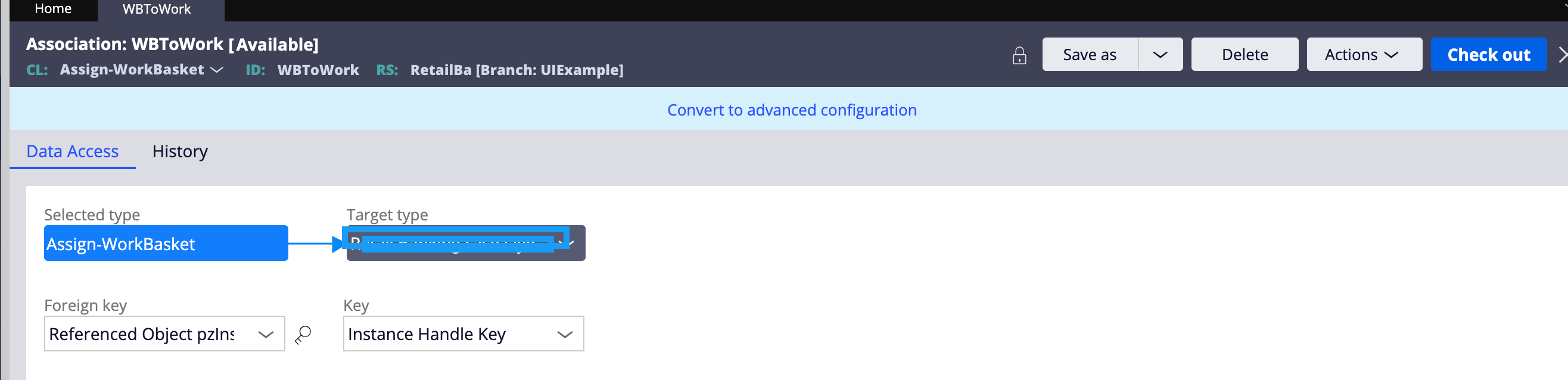
Step 1: Create an association rule Assign-WorkBasket and Work table
Step 2: Configure the necessary properties in the Report Definition (as shown in the screenshot below)

Step 3: Configure the authoring in the View to display properties from both the Work table and the Assign-WorkBasket.
Apporach 2:
To address this limitation in Constellation, the alternative approach is to use Response Data Transforms,
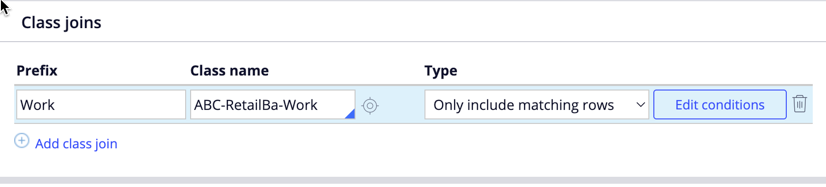
Step 1: Start by creating a report definition in the Assign-WorkBasket class. In this report, set up a join with the Work table. This configuration enables you to fetch relevant fields from both tables in a consolidated report, as demonstrated in the screenshot provided.
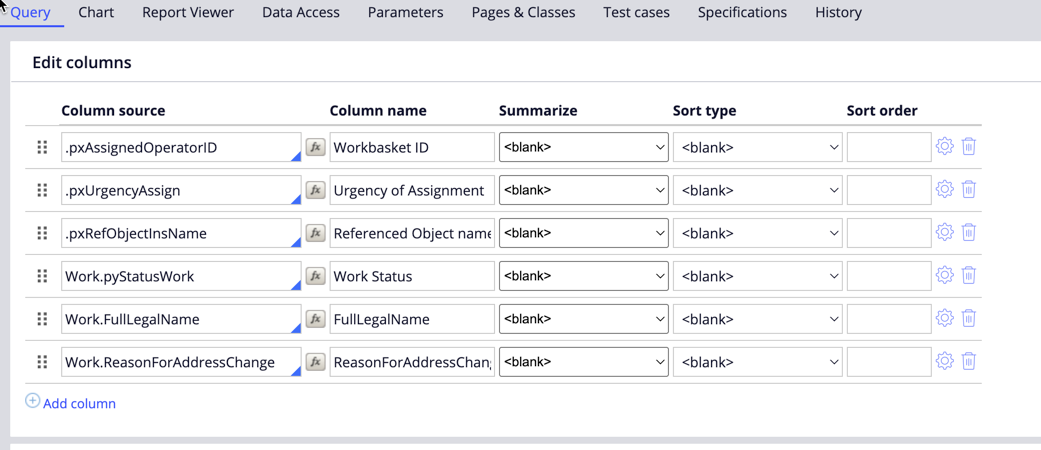
Step 2: After the report is set up, create a data page that uses this report definition as its data source. The data page acts as a channel to retrieve and structure the combined data, making it accessible throughout your application. At this stage, you should also create a Response Data Transform, which will process the data once it is retrieved.
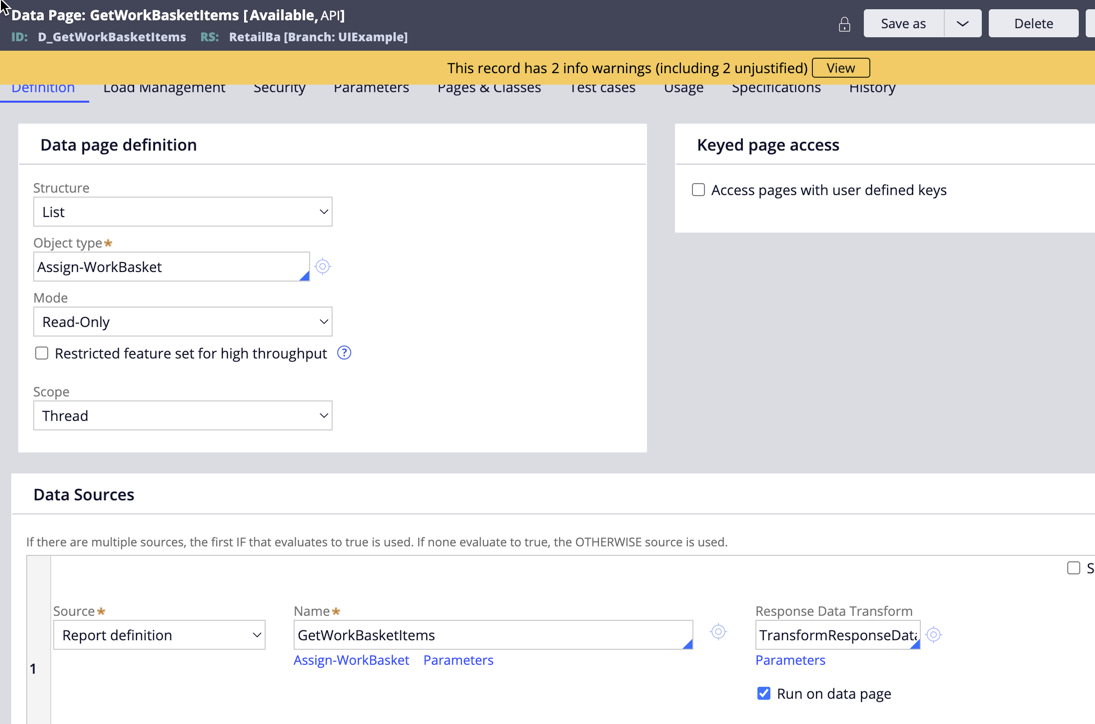
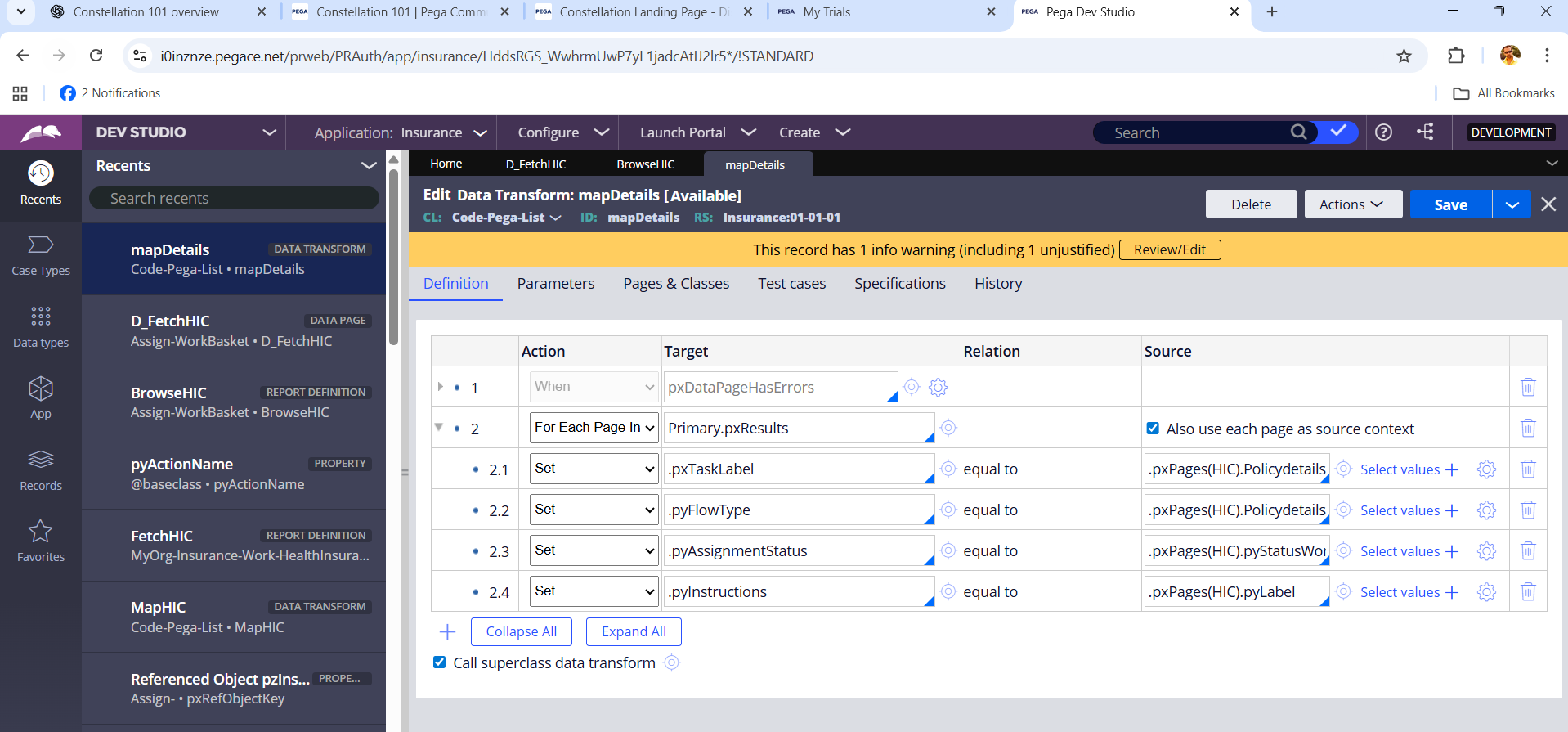
Step 3: Within the Response Data Transform, carefully map the properties pulled from the joined report to the corresponding properties in your application. This ensures that data from both the Assign-WorkBasket and Work tables is accurately assigned and readily available for display in the user interface. Visual guidance for this mapping is available in the screenshot below.

Step 4: Proceed to create a landing page in your application, and configure it to use the Data Page you have just set up. This landing page will serve as the main interface where users can view the consolidated information.
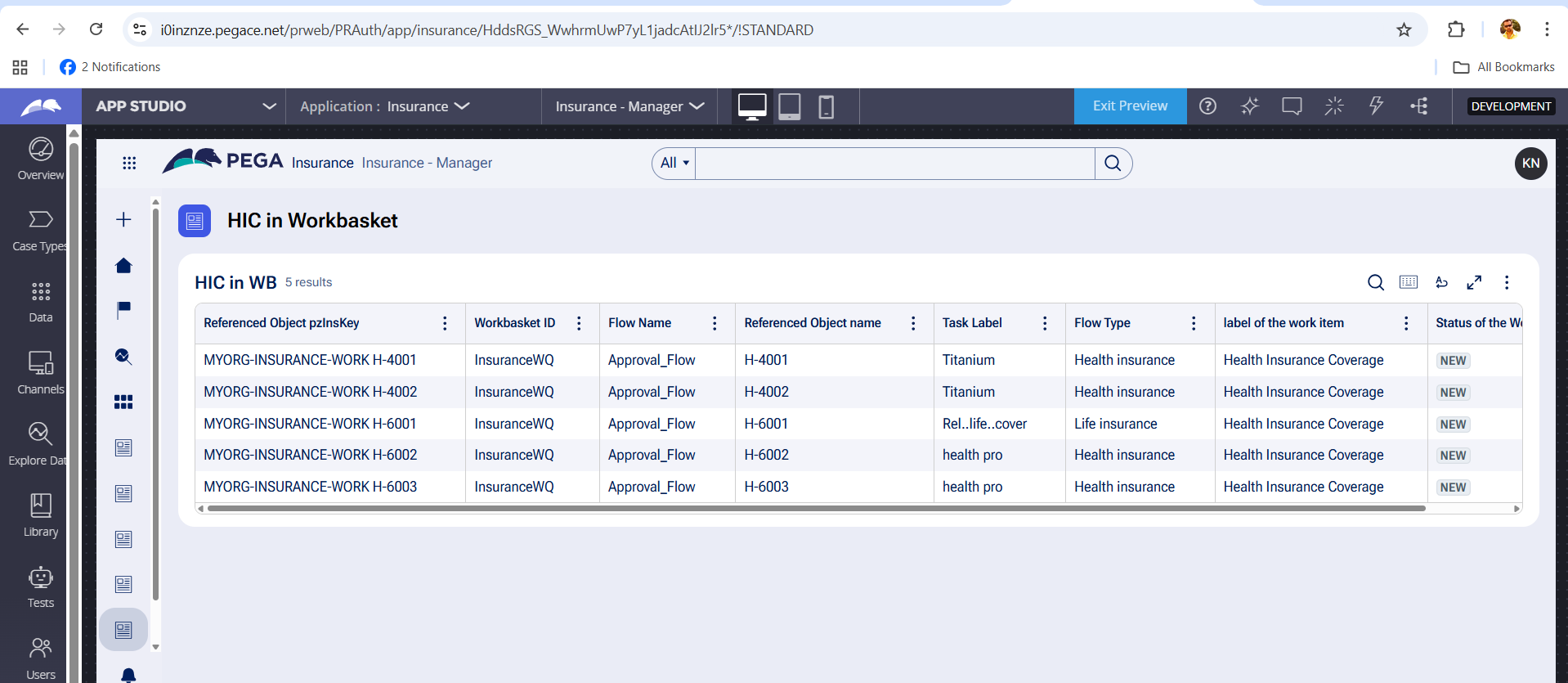
Step 5: Finally, configure the columns on the landing page to display the specific fields and data points that are most relevant for your users. This customization helps ensure that the information is presented in a clear and user-friendly manner.
By implementing these steps, you can successfully display integrated data from multiple tables within Constellation, thereby delivering a comprehensive view to users even in scenarios where pxPages functionality is unavailable. This approach not only addresses current limitations but also enhances the overall user experience by making all necessary information accessible in one place.
Constellation 101 Series
Enjoyed this article? See more similar articles in Constellation 101 series.

UNUM Group
US
@RameshSangili: Does the column filter work correctly for the properties set via Data transform ? I believe when we apply column filter its running against the report definition .
In above ex: if we apply column filter for "pyAssignmentStatus" not equal to "Resolved-Cancelled" , then the values would still be set via Data Transform and it would show up in the table ?
Pegasystems Inc.
CA
@Adithya_A Yes, that's correct. The column filters may not be applied to the joined table.

Pegasystems Inc.
IN
Thanks @RameshSangili , This really helps! One query: can we use this approach for a huge list? Will it impact performance if there are thousands of cases?
Pegasystems Inc.
CA
@Sainath Kokala
Ideally, Assign-Workbasket should be minimal, as these are transactional data during the case processing. Moreover, Constellation uses progressive loading to pull the records from the table. I hope it will be OK, but I will advise you to do a performance Test if possible before deploying to Production.
Credera
GB
@RameshSangili I had a requirement to display the following details: Case ID, Assigned Operator or Assigned Work Queue (either one), Urgency, and Work Status.
To achieve this, I created a Report Definition in the Work class, joining both the Worklist and Workbasket tables. I then used a Response Data Transform to map the properties from the joined report (pxPages) to the corresponding properties in the application.
Question:
Has anyone implemented this use case differently? If so, could you share your approach or any alternative methods you’ve used?
Pegasystems Inc.
CA
@Arunkum@r Are you facing any issues with your implementation? or looking for better alternatives?
Credera
GB
@RameshSangili The current approach works fine, but feel free to explore alternatives if any are available.
Updated: 13 Jun 2025 16:01 EDT
UNUM Group
US
@Arunkum@r we also used the same approach of creating the report in work class rather than assign class as we had lot of work columns to be shown , you can use association rules to add case id from assign-class , associations rules do show up in the app studio authoring views , with associations you dont need to use any post processing data transform in the data page
Credera
GB
@Adithya_A thanks for the response
Ford motors
US
@Adithya_A , But .pxPages reference is not possible with associations on assign table. Right?
UNUM Group
US
@palanirajp2159 Yes , regular joins/subreports wont work as we have use .pxPages which is not possible to refer in constellation views , but with Associations you dont need to refer .pxPages
Ai4process
GB
We don’t need a response data transform if we use associations instead of joins. This allows us to see all the properties configured in RD, including association properties in the table configured on the landing pages.
Capgemini
IN
@RameshSangili we followed the same approach using response DT but it created lot of performance issues and client said big NO in the first demo itself.
Enter your organization name
US
Hi, @RameshSangili
We followed approach 2 which does not work in 24.2.2.
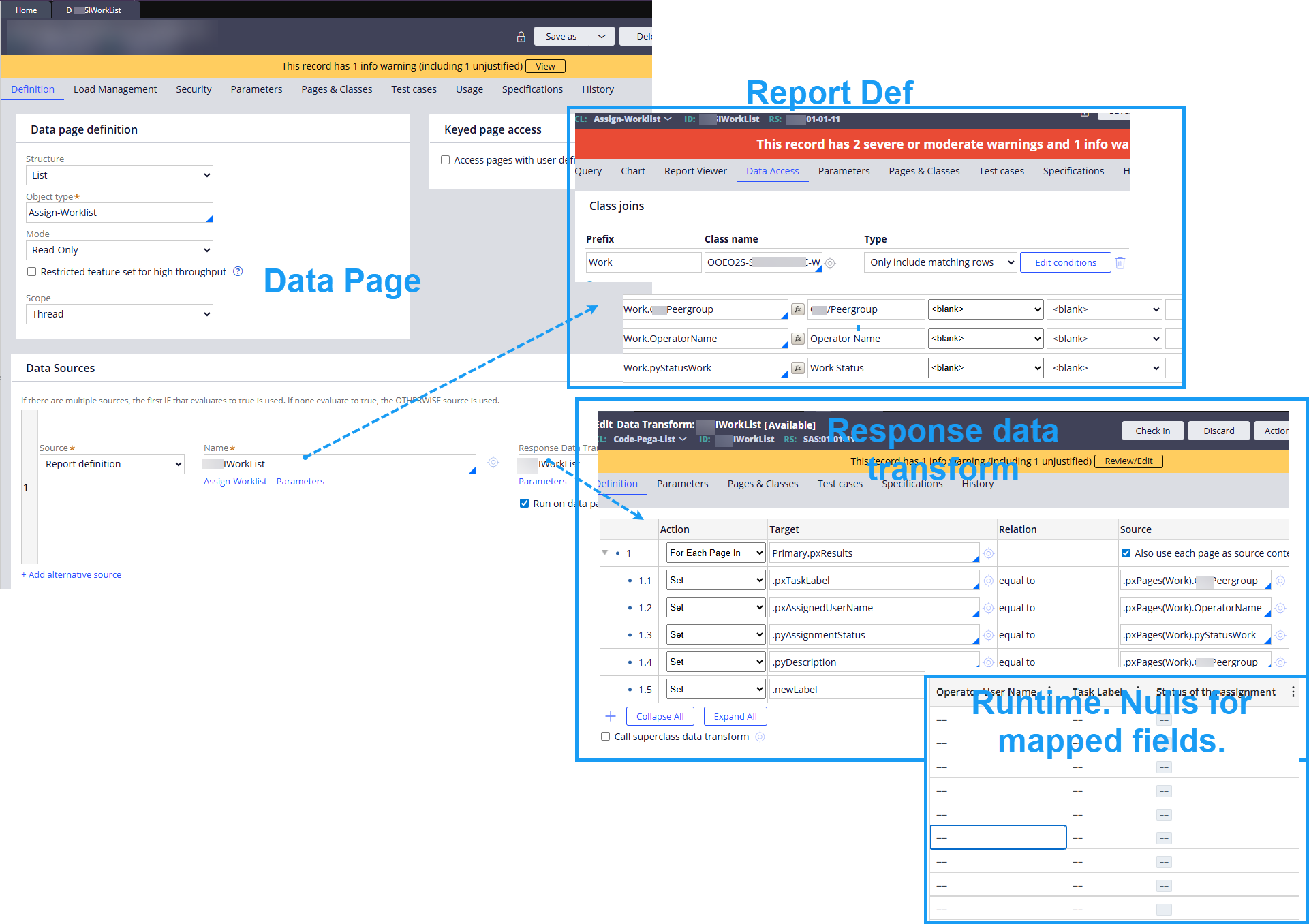
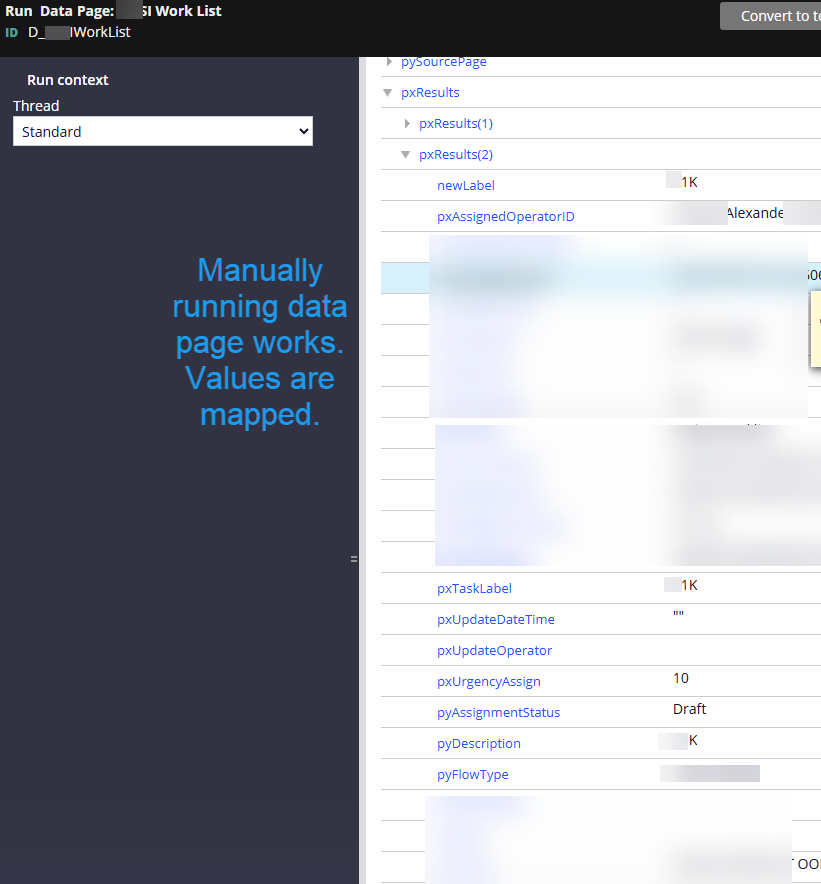
There exists the possibility that we have a configuration error, but our setup seems to be exactly like yours. Running the Data Page manually (from designer studio) shows the correct values for the mapped fields, but the list view at runtime shows null for the mapped fields. Just letting you know. :-) See screenshot.
DP calls RD. RD joins to work table. DP uses response DT. At runtime, null values for mapped fields.
Running Data Page manually correctly shows data.
bitsinglass
IN
@A2178Same behaviour for me. After create a D page with join, when trying to configure list view, joined class properties not showing to select.Then i exposed properties and included in report. After that it was showing to select in list view. But runtime , response DT properties where not showing , it was blank like exactly above.
Computer Science Corporation
IN
I tried this approvach.
1. data page source from assign-workbasket report
2.Report has a join with work class. Added few work class properties also like Alias.Workclassproperty .
Note: In response data transform--> left side mapping of properties should be the one which appears when you add the column in the list view. If you give some new properties like pyWord, pyAdviceText that will not work because they are not appearing when you try to add columns in the list view configuration. In the below screen shot last 4 columns are taken from the work table.