
CPM Menu not showing right arrow on Menu item
Hi,
My client recently upgraded to CPM 7.1.3. After the upgrade, they are seeing an issue with the right arrow not showing up on menu items with a sub menu.
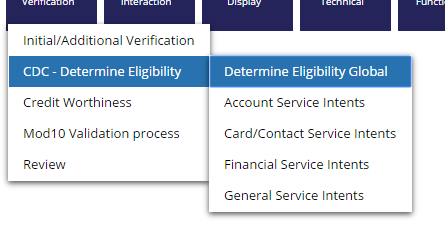
Looking at the browser source, the class name for the menu div is "menuBarSub" but the classes defined in the cpm-override css in PegaAppCA: 07-13-02 sets the arrow based on the class "cpm-menuBar"


Is this a bug or should I be doing something different to fix the issue?
Thanks!
Accepted Solution

Pegasystems Inc.
US

Pegasystems Inc.
US
Glen,
So the style format is "Standard" and has the right image paths. I did some further digging. It works well if you use a menu control. However the bug happens when you create an action to show a menu for any given event.
Both the options use the same style format. However the html generated is quiet different.
overriding the style #ItemRight{display:none} to display:table-cell fixes the issue.
Thanks
Ranjit
It's a Bug. Previous versions of CPM used a lot of custom CSS styles prefixed with cpm-
However you shouldn't need to resort to the cpm-overrides CSS file to fix this. The menuBarSub styles should be in the Skin that you can style.
My guess is its not pointing to an image or the image it is pointing to doesn't have the correct path - e.g. desktopimages/somearrow.png
You should be able to click on the Grear icon to open and find the image (or an image), which is likely to be in webwb/somearrow