
Discussion

Tech Mahindra
Last activity: 18 Mar 2015 15:14 EDT
How to access to the solution application.
Hello,
At "Source Your Data with Data Pages" of "Data Model", I have downloaded "Keyed Data Page.zip" from Excercise page.
And I have uploaded "DataPage.zip" to PRPC from the menu 'Design Studio' - 'Application' - 'Distribution' - 'Import'.
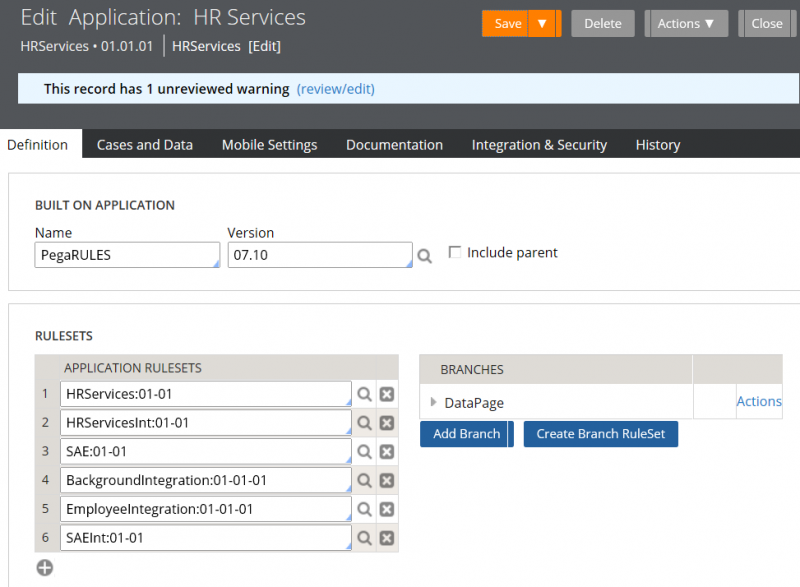
And after that I added the "DataPage" branch under HRServices 01.01.01.
But I couldn't find DataPage application in the Application menu.
I have tried to produce ACCESS GROUP "DataPage:Administrators".
But I got error like this;
How can I access to the application "DataPage"?
What is the correct way to do that?
Please let me know the process by step by step.
Does somebody have any suggestions?
Thank you.
Pegasystems Inc.
US

Pegasystems Inc.
US
You will still be using the HRServices application however you have applied the DataPage branch to the HRServices application which will force those rules to be resolved. Here is a screenshot of the HRServices application with the DataPage branch applied, make sure to save the application rule.
Here is what your ruleset stack will look like in your Operator Profile, select Administrator > Profile to verify:

You can test the application by creating a new Candidate case.
Sean
"Data Page" is not the name of an application, and it does not have its own access group.
The data page in the exercise is an element of the HRServices application. Once you added the solution as a branch ruleset, you had done everything you needed to do to view the solution.