
Discussion

Pegasystems Inc.
NL
Last activity: 25 Jan 2026 12:24 EST
Guide on finding the GenAI Sweet-Spot in your Case Design
A Practical Guide to Pega's Automation Spectrum: Rules, Models, and GenAI
Pega GenAI™ Runtime features unlock capabilities that were previously out of reach, especially where users work with unstructured data or perform deep research. This invites us to revisit existing processes and design for fast, predictable and scalable outcomes.
The real question isn't if we should use AI, but where it delivers the most advantage. At the same time, adding AI for its own sake can create complexity, not value. For Pega professionals, this is a critical distinction. Our goal is to streamline processes, using the right tool for the right task.
Guiding Principle:
Rules where you can, user actions where you must, and AI and GenAI where it increases leverage.
With this approach, you use GenAI to handle ambiguity, synthesis, and reasoning, and Users remain in control for exceptions and compliance.
What this article covers
- How to pick the right mechanism for each step
- How to identify the GenAI sweet spot for your business need
- How to choose between GenAI features
This guide focuses on getting work done inside a Pega case lifecycle. Although data integration, security, governance and reporting are essential, they are out of scope here.
To design an application, start with a Pega Blueprint. There is excellent information available on this through the Blueprint Delivered™ Expert Circle.
Choose the mechanism by step, not for the whole process.
Break the Case work into discrete steps or decision points and choose the mechanism per step. There’s no need to select one approach for the entire process.
A simple runtime heuristic
- Use Business Rules for: Structured input, deterministic logic, and structured output.
- Use Predictive or Adaptive Models for: Structured input with a probabilistic outcome.
- Use GenAI (or Natural Language Processing) for: Unstructured input that needs a structured output.
- Use GenAI for: Tasks requiring unstructured output or internal planning and reasoning.
- Use a User Step when: User input is required for compliance reasons, input data is inaccessible to the system, or when high-complexity human judgment is unavoidable.
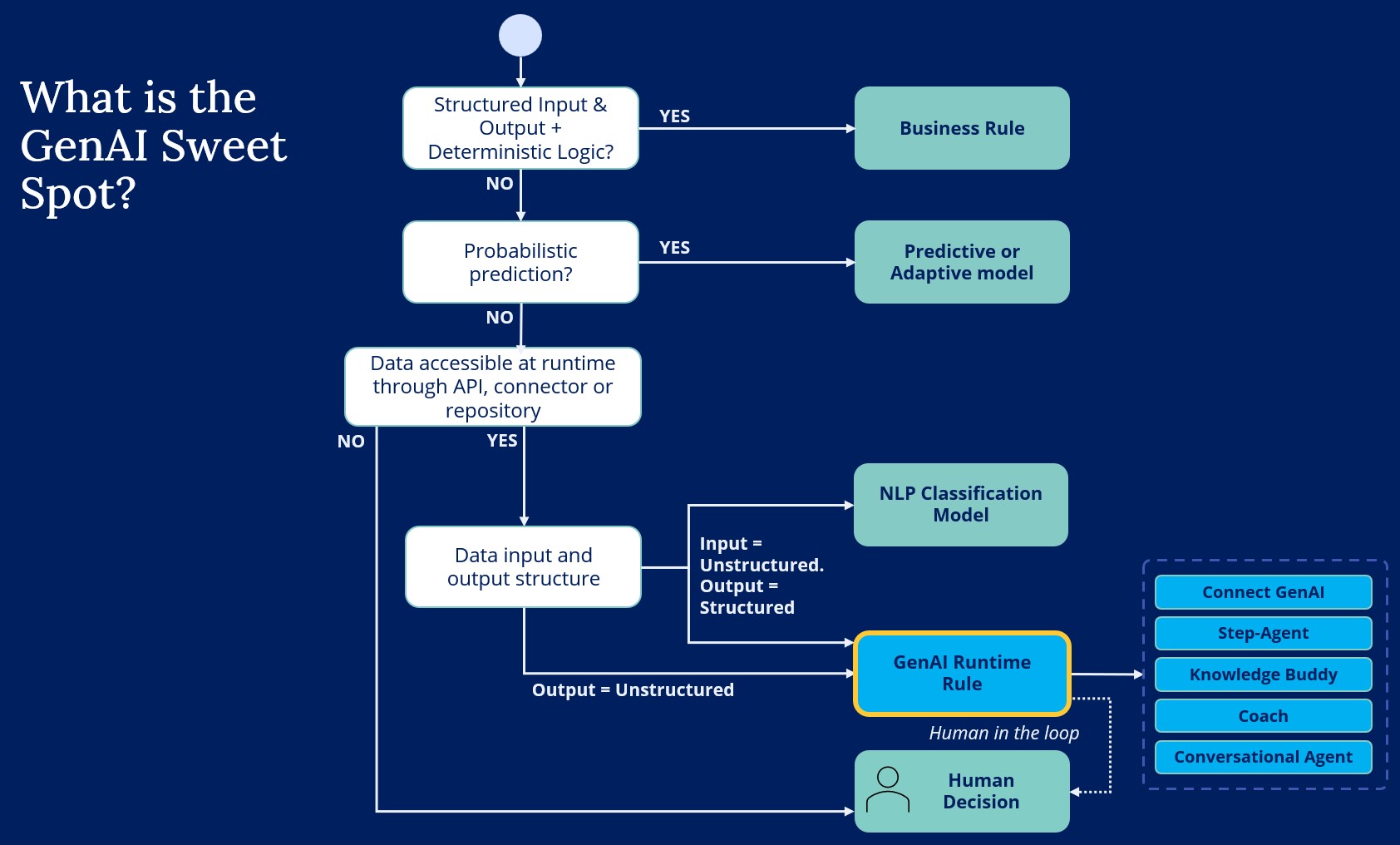
There is rarely a single 'best' way to design a process.
For deterministic tasks with structured data, business rules offer the most direct path to implementation. As process complexity grows to include unstructured data, reasoning, or generative tasks, we move into the GenAI sweet-spot.
Inspecting User steps for further improvements
For steps that need User input, consider if we can find additional automation opportunities:
- Can we support the user by providing a draft output or suggested decision using GenAI?
- Can we decompose human judgement steps further into high-complexity and more automatable parts?
- Can we run AI/GenAI in parallel with human judgment steps to learn from real world data and build confidence for further automation?
- Can we integrate with or modernize legacy systems with limited connectivity options?
Clarifying the overlap between NLP and GenAI
There are many process outcomes we can only automate with GenAI. Writing / summarizing texts, doing analysis tasks that require reasoning, and runtime orchestration of available actions can only be automated with GenAI and Agents.
But, when you need to turn unstructured inputs into structured outputs, you have two viable options in Pega: Classic Natural Language Processing (NLP) models and Pega GenAI Runtime features. Both can deliver outcomes like sentiment analysis, categorization, tagging, entity extraction, and intent detection.
The right choice depends on the unique constraints and needs of your process.
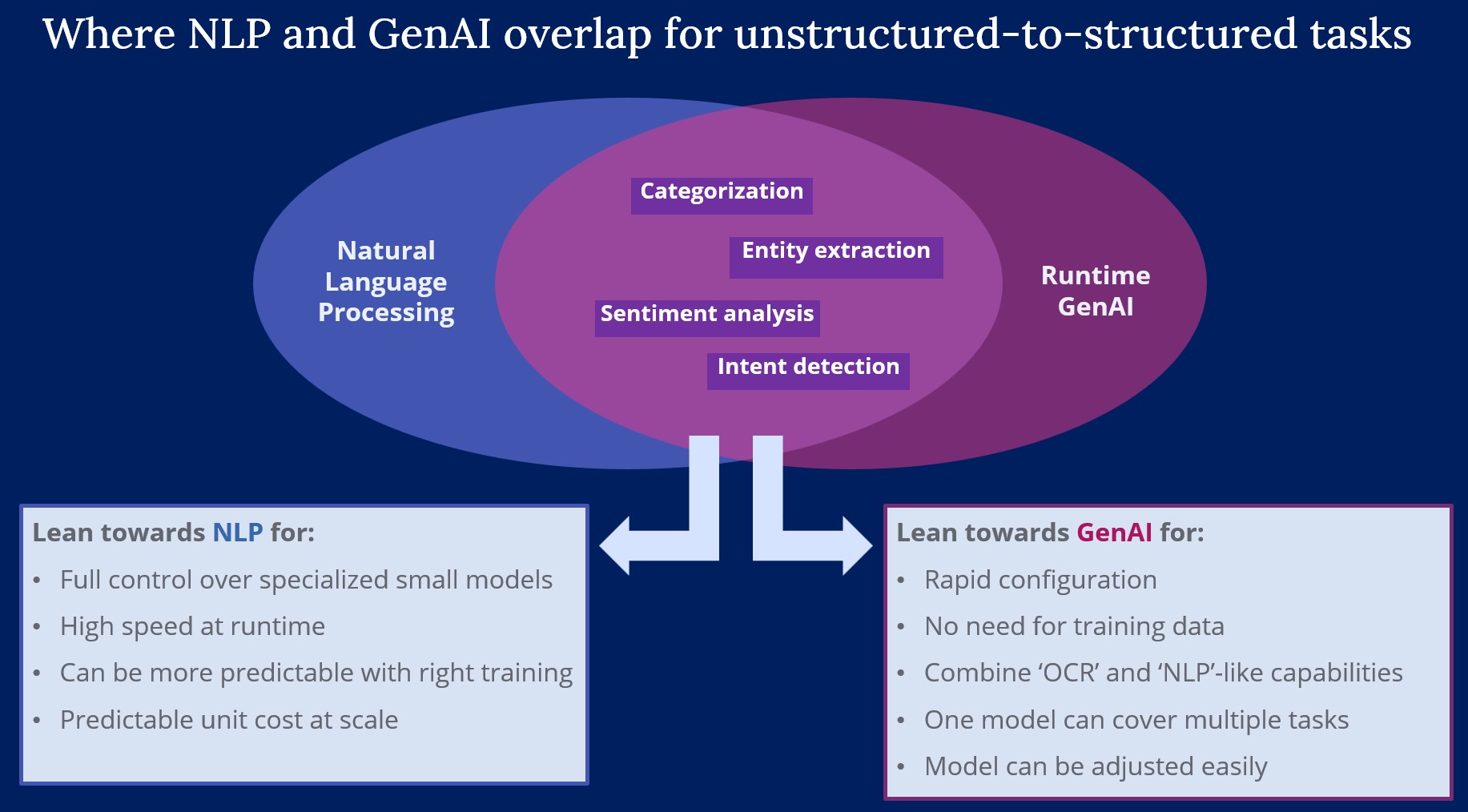
NLP models:
Strengths
- Fast outcomes and predictable costs at runtime
- Predictable behavior once your taxonomy and entities are stable
- Can run locally in your Pega environment through Prediction Studio
Tradeoff to manage
- Need for curated, labeled data and defined outcome entities and taxonomies can mean setup is time consuming
- Training required per language
- Retraining required when outcome options change or drift is detected
When to prefer NLP
- High-volume use cases where throughput and unit cost dominate
- Stable categories and entity schemas available
Pega GenAI:
Strengths
- Rapid setup using prompt instructions without the need for training data
- Flexible across many tasks with the same LLM model
- Easy to adapt when outputs change by updating prompt instructions and validators
- Because GenAI can also interpret documents and images, you can combine traditional Optical Character Recognition (OCR) behavior and NLP-like behavior in one single LLM call.
Tradeoffs to manage
- Variable latency per LLM call that scale with token size
- Some response variability is inherent to GenAI use
- Runtime costs scale with volume
When to prefer GenAI
- Speed to value of the solution is important
- Runtime latency is acceptable or can be moved to background processing
- Early-stage use cases or use cases with evolving requirements
- Long-tail or open-ended inputs that are hard to label upfront
- For any other type of unstructured data handling which NLP cannot perform, such as text generation, summarization, conversational interactions, etc.
Next level choice: Which GenAI Feature to use?
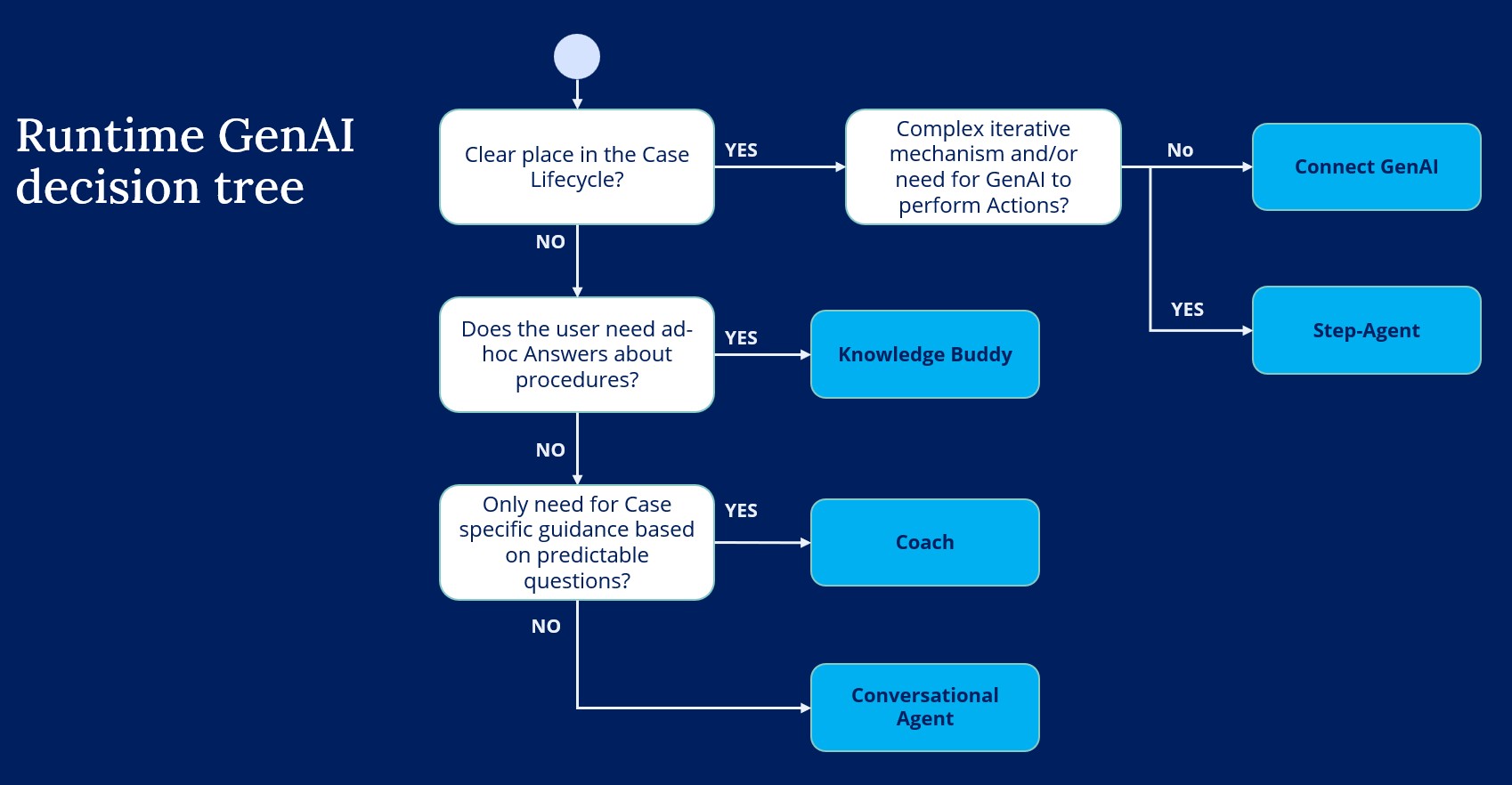
If your business need is in the GenAI Sweet-spot zone, then it is time to pick the right Pega GenAI feature.
I am focusing here on the main building blocks for using GenAI through Pega Platform. Many other GenAI-driven features which you will see in Pega Platform and in the Strategic Applications use one or more of these building blocks as the underlying mechanism.
GenAI Connect
A case step that sends a well-formed prompt to an LLM, then maps the response to your Case data model. Supports text, images, and documents. Read more on GenAI Connect here
Use when
- The GenAI interaction happens in a predictable place in the Case Lifecycle
- The task is clearly scoped with defined inputs and a clear output schema.
- Input data is available in the Case data model.
Step-Agent
GenAI orchestration with tools inside the case lifecycle. The Agent can reason, call tools to retrieve information or to take actions, loop, and produce a result the Case can consume. Read more on Step-Agents here
Use when
- The GenAI interaction happens in a predictable place in the Case Lifecycle
- You need iterative reasoning or multiple tool calls.
- The Agent must perform actions, not just retrieve data.
Knowledge Buddy
Knowledge retrieval inside Pega applications, answering from indexed sources such as manuals and work instructions.
Read more Pega Knowledge Buddy here
Use when
- The task is to find and apply written guidance to produce answers.
- Typically aimed at knowledge information and not at customer specific details.
Coach
Contextual guidance for a user working on a Case, with preset follow-up questions and access to Case data and other Data Pages.
Read more about GenAI Coach guidance here
Use when
- Users need ad-hoc, targeted guidance tied to the current Case context.
- You want curated questions rather than free-form conversation.
Conversational Agent
An interactive Agent the user can chat with, with access to data and tools as configured.
Read more about Conversational Agents in your UI here
Use when
- Knowledge Work is exploratory or unpredictable. We do not know that this work will be needed in a specific part of the process.
- The Agent needs to research, reason, and possibly perform actions on behalf of the user.
Relationship between Step-Agents and Conversational Agents
Step-Agent and Conversational Agent share the same Agent Rule type. Once you use such an Agent rule inside of your Case Lifecycle, it is a Step-Agent. If you use an Agent Rule in a Conversational Widget, it acts as a Conversational Agent.
This means you could reuse the same Agent rule for both a Conversational Agent and a Step-Agent.
As best practice, scope tools narrowly for Step-Agent behavior and more broadly for Conversational Agents where user questions are less predictable.
Practical example: claim processing
Let’s look at a simplified Auto Claims process to see how the different types of features would operate in unison.
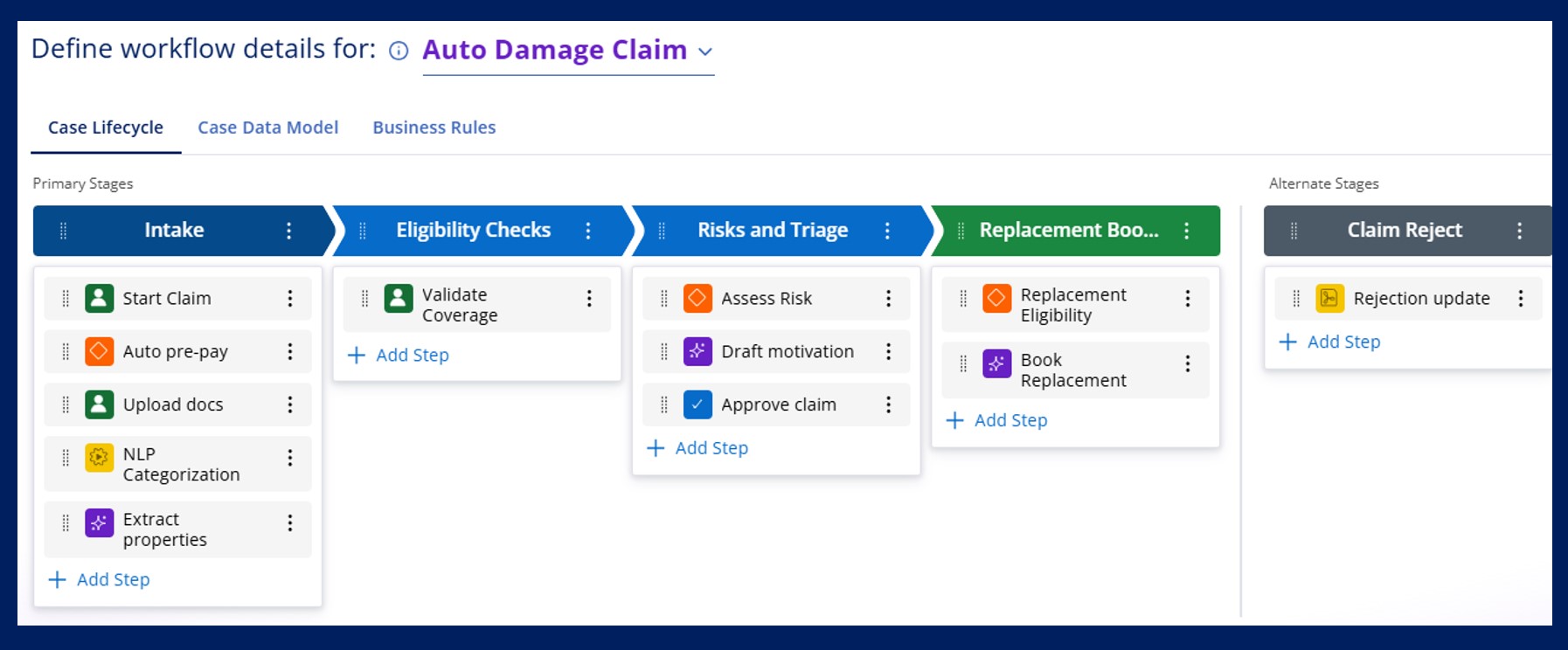
- Intake
- Customer logs into the application and captures basic details of their claim. If they are in gold or platinum tier and the claim amount is below 500 Euro, the claim is auto-prepaid pending investigation.
► Business Rule (Decision Table). - The customer submits the First Notice of Loss, photos of the vehicle, a police report, and a repair estimate.
► NLP Classification identifies document types.
► GenAI Connect extracts key fields into Case properties.
Note how NLP and GenAI are combined here: NLP handles the high-volume, stable task of document type identification, while GenAI performs the more nuanced task of extracting specific information.
- Customer logs into the application and captures basic details of their claim. If they are in gold or platinum tier and the claim amount is below 500 Euro, the claim is auto-prepaid pending investigation.
- Eligibility checks
- Analyst validates coverage and policy limits. Currently this data is stored in a Legacy application that is not accessible to the Pega application yet.
► User swivel-chairs to look up this information manually.
- Analyst validates coverage and policy limits. Currently this data is stored in a Legacy application that is not accessible to the Pega application yet.
- Risks and triage
- Assess fraud risk and total loss probability using historical outcomes and claim attributes.
► Predictive or Adaptive model (Process AI) produces scores that drive routing and SLA. - Decision to accept or reject the claim and provide a motivation.
► GenAI to provide a draft motivation,
► User is in control for the final version by editing or approving. - To assist the user in this human judgment, they can consult a guidelines and previous jurisprudence archive.
► GenAI Knowledge Buddy provides answers to questions from within the Claims application.
- Assess fraud risk and total loss probability using historical outcomes and claim attributes.
- Replacement booking
- If the user is in the Platinum plan, the customer is eligible for a temporary replacement vehicle.
► Business Rule (When Rule). - If the customer is eligible, the application will autonomously reach out to three rental companies in the area, request quotes, select a suitable option, and inform the customer about the details of the replacement vehicle.
► Step Agent with tools: (Quote retrieval tool, Quote comparison calculator, Contract Signing, Email generator) and stop conditions and guardrails.
- If the user is in the Platinum plan, the customer is eligible for a temporary replacement vehicle.
I've shared my approach for deciding if your business need is in the GenAI Sweet-spot zone, and how to select the right Pega GenAI feature for your desired outcome or behavior.
Does this resonate with you, or do you have a different approach to selecting the right tool for the right job? Let me know, I am always happy to hear other perspectives and refine my own!

Pegasystems Inc.
IN
@Tim Straatsma-This is well documented approach - excellent guidance on selecting right GenAI feature.