
Question

IBM
CN
Last activity: 1 Jul 2023 4:54 EDT
Flow drawing: Hard to adjust connector direction
Flow drawing: Hard to adjust connector direction
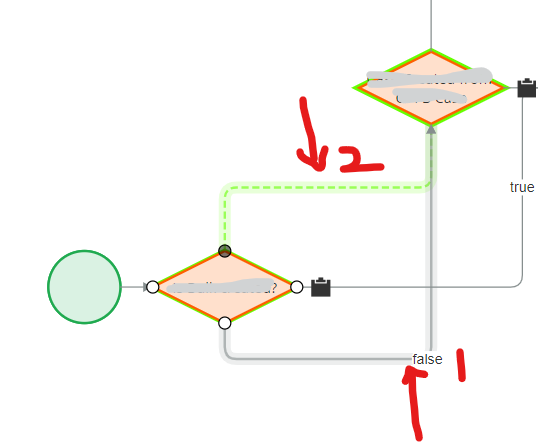
Refer to below pic:
the flow: As is: the "false" connector of 1st decision box is in location 1
To be: I want to change this connector to location 2.
After I drag end point to show dotted line in location 2, once I release my mouse button, it's still in location 1.
May I know how to adjust this? It appears so hard to adjust the connector direction/location in flow design.

NCS Pte. Ltd
SG
IBM
CN
If you want to change the existing connectors, click the appropriate small white circles to move it to the required edge. Please also try to adjust the location of the shapes.
---- Yes I tried above to change existing connectors. However unless I am lucky enough, I can not let the connector line go through my expected direction. Even the dotted line show my expected direction during my drag, however it's lost once I release my mouse button.
Pls note my Pega version is 8.6.6, not a latest version.
I hope there is no functional issues in your current diagram. Please let us know if you are facing any functional issues.
--- no functional issues. Just the flow chart display issue.
Nationale Nederlanden
NL
I've got the same experience. The only solution I can see is to delete the connection and redraw it. It is not a nice way of working as you want to keep the flows clear.
IBM
CN
@Michielv2743 sometimes delete a connection with several setting and redraw will cause I need redo the setting on the new connector.
May suggest to enhance the flow designer to add "waypoint" on the connector like drawio so that we control the connector direction.
Hi @MaxonL16591286: I don't see a limitation in the system to do this. Once you hover over the decision shape, you can create connector for it's edges and can connect to the other shapes. If you want to change the existing connectors, click the appropriate small white circles to move it to the required edge. Please also try to adjust the location of the shapes.
I hope there is no functional issues in your current diagram. Please let us know if you are facing any functional issues.
Thanks.