
Question

Lantiqx
Lantiqx
IN
Lantiqx
Posted: Feb 2, 2025
Last activity: May 13, 2025
Last activity: 13 May 2025 12:20 EDT
Mapping Data source to Data Collection in Pega Knowledge Buddy
Hi Team,
I have created the data collection and data source in the knowledge buddy application but when I am creating the buddy I am not able to see the response attributes to that collection and source.
Adding the image for the reference.
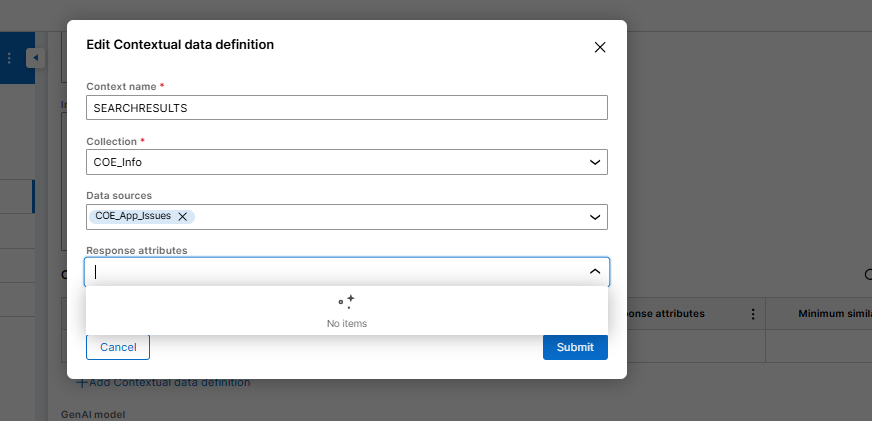
Please help me out with the issue.
Regards,
Mamatha Adiraju
***Edited by Moderator Rupashree S. to add Capability tags***
To see attachments, please log in.
Posted: 10 months ago

MOD
Pegasystems Inc.
GB
@MAMATHA Adiraju are you still experiencing this issue?
Can you please provide details of the Knowleve Buddy version you have installed and which KB Implementation method you are using?
Did you check the Troubleshooting Knowledge Buddy documentation?
Below is our GenAI-tool answer: (Check the Reerences used carefully)
Troubleshooting Steps
Here's a step-by-step approach to resolve your issue:
@MAMATHA Adiraju are you still experiencing this issue?
Can you please provide details of the Knowleve Buddy version you have installed and which KB Implementation method you are using?
Did you check the Troubleshooting Knowledge Buddy documentation?
Below is our GenAI-tool answer: (Check the Reerences used carefully)
Troubleshooting Steps
Here's a step-by-step approach to resolve your issue:
1. Verify Data Sources Configuration
2. Check Response Attributes Selection
3. Verify Data Collection and Data Source Linkage
4. Check Advanced Settings
5. Verify Access Roles
Common Causes for Missing Response Attributes
The most common reasons why response attributes might not appear include:
References:
Creating a Knowledge Buddy
Contextual data definitions
Data Collections in Pega Knowledge Buddy
Troubleshooting Knowledge Buddy integration