

Issue
When configuring SSO-based authentication in Pega Platform using SAML or OIDC, operators are often required to receive dynamic Access Group and Work Queue assignments at login based on attributes provided in the identity provider (IdP) assertion.
Users often look to use the Post Authentication Activity by default when implementing this behavior, which frequently results in inconsistent and/or undesired behavior.
This article explains why Work Queue assignments may fail to apply during login in this pattern, and how to correctly configure the Authentication Service to ensure both Access Groups and Work Queues are dynamically assigned on every login.
Symptoms and Impact
The following symptoms indicate this configuration issue:
- Access Group is not updated on the first login. User needs to login a second time for it to take effect.
- Work Queues are not assigned to the operator after a successful SSO login, even though the configuration attempts to copy them from a Model Operator.
- If a Work Queue was manually assigned to the operator prior to SSO login, the Get Next Work functionality does not operate correctly after login.
- Access Groups are assigned correctly, but Work Queue assignments are missing or inconsistent.
Root Cause
This unexpected behavior occurs because there is a distinction between mapping the Access Groups and the Work Groups.
Access Group properties (pyAccessGroup and pyAccessGroupsAdditional) need to be configured prior to the Post Authentication Activity.
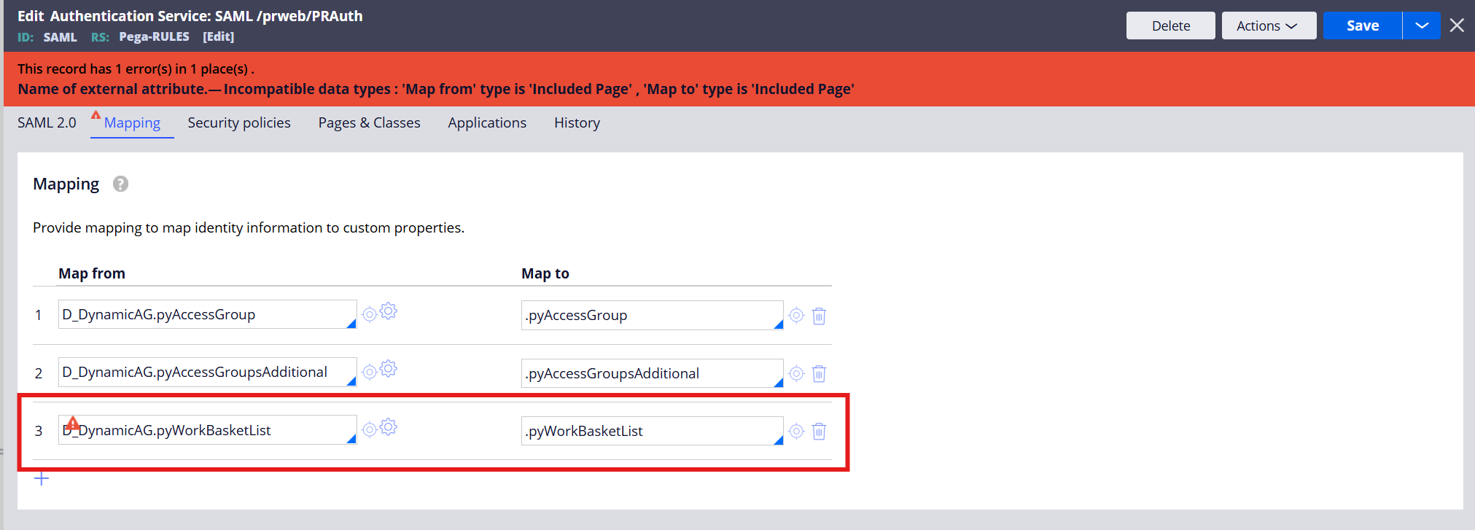
Additionally, there is a limitation on the mapping tab such that you cannot map a page list to a page list. This limitation does not exist for value lists.
The Mapping tab in the SAML SSO Authentication Service supports only scalar (single-value) property types. The pyWorkBasketList property, which holds Work Queue assignments on the operator record, is of type Page List — a complex, multi-valued property. Page List properties cannot be mapped from the Mapping tab and must be handled separately.
When Work Queue mapping is placed in the Mapping tab (or in a Data Transform called at authentication time from that tab), the assignment fails because the platform cannot resolve the Page List structure in that context.
Below shows the error that pops up when attempting to assign a Page List to a Page List from within the mapping tab.
The following platform constraints apply and are documented in the official Pega Platform documentation:
- The properties pyAccessGroup, pyAccessGroupsAdditional, pyOrganization, pyOrgDivision, and pyOrgUnit must be set before the Post Authentication Activity executes. These must be configured via the Mapping tab, the Model Operator, or a provisioning Data Transform — not in the Post Authentication Activity.
- The Access Group of an operator cannot be changed in a Post Authentication Activity for an SSO Authentication Service.
- The Post Authentication Activity executes on every login. Operator provisioning only runs once if clients attempt to dynamically set Access Groups there via a Data Transform.
- The Mapping tab executes on every login, making it the correct location for properties that must be dynamically updated at each authentication event.
Solution
Separate the Access Group mapping from the Work Queue mapping, placing each in its correct execution context within the Authentication Service.
Step 1 — Configure Access Group mapping on the Mapping tab
Create a Data Page of class Data-Admin-Operator-ID to execute custom logic via a custom Activity or Data Transform (for example, a Decision Table that resolves IdP group identifiers to Pega Access Group names) and then map the result:
D_<YourDataPage>.pyAccessGroup → .pyAccessGroup
D_<YourDataPage>.pyAccessGroupsAdditional → .pyAccessGroupsAdditional
Reference the respective SAML or OIDC data pages to access the details from the IdP within the custom logic:
- For SAML, use D_SAMLAssertionDataPage to access attributes from the IdP.
- For OIDC, use D_pzSSOAttributes to access claims from the IdP.
Make sure that this custom data page is accessible to the unauthenticated browser requestor type.
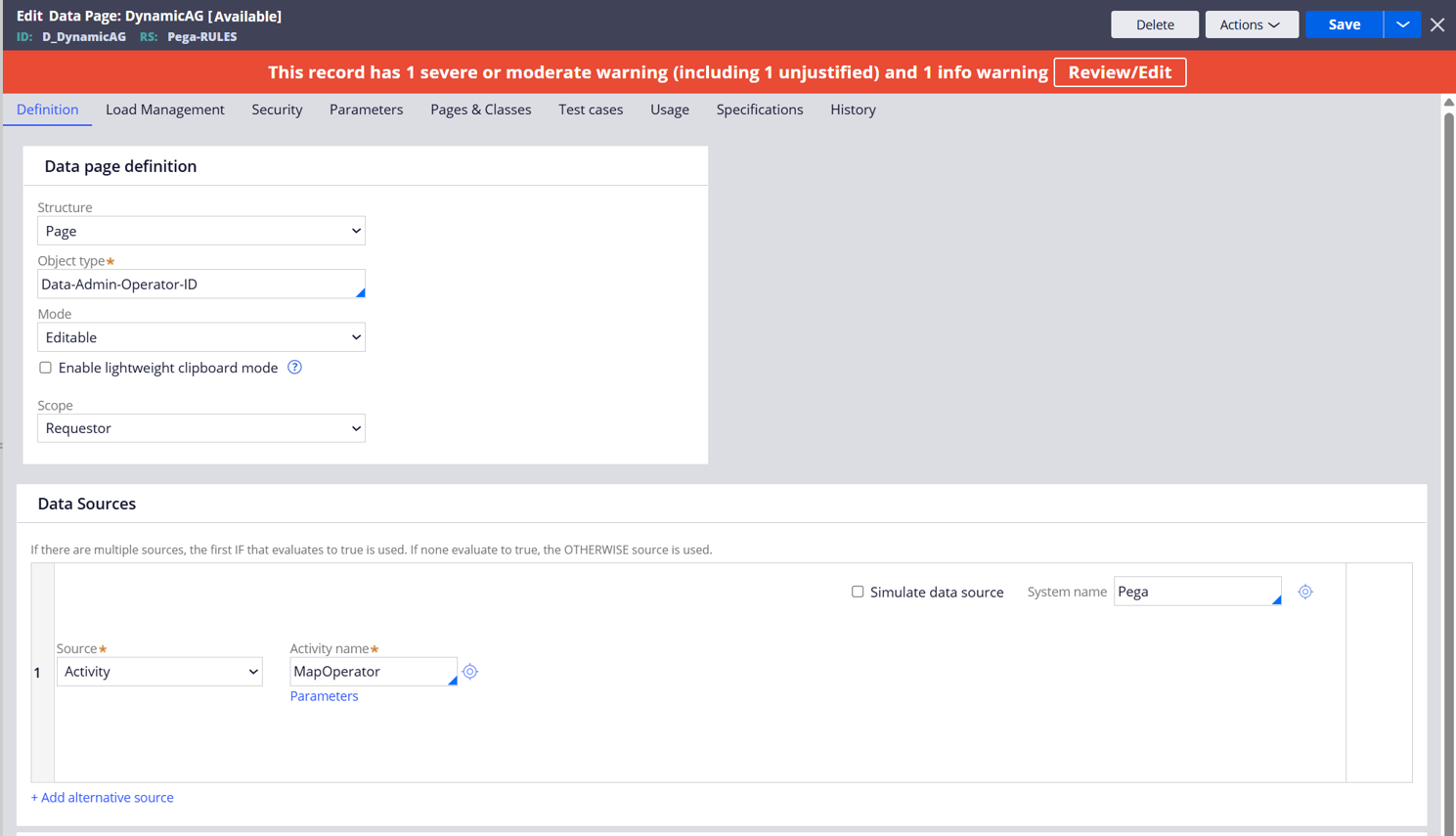
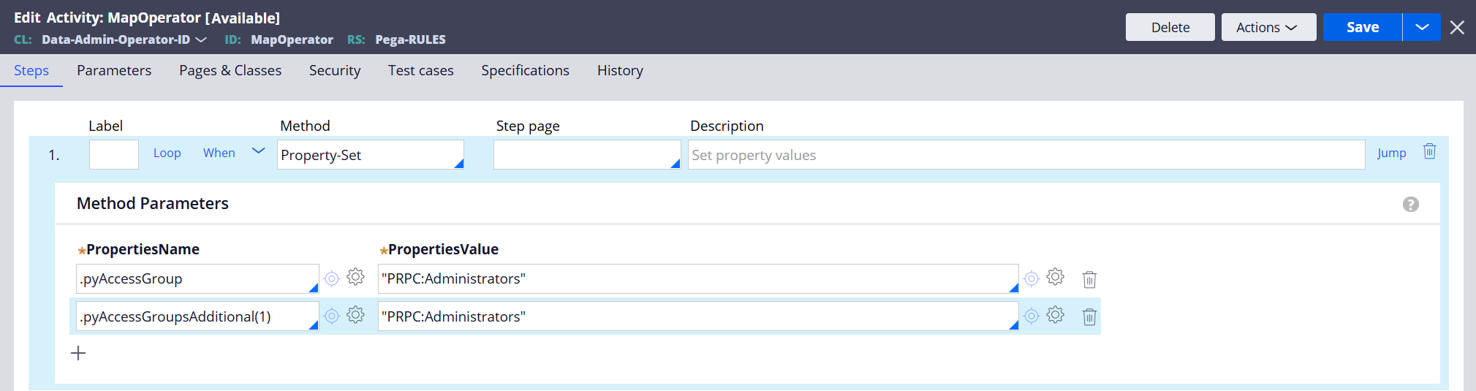
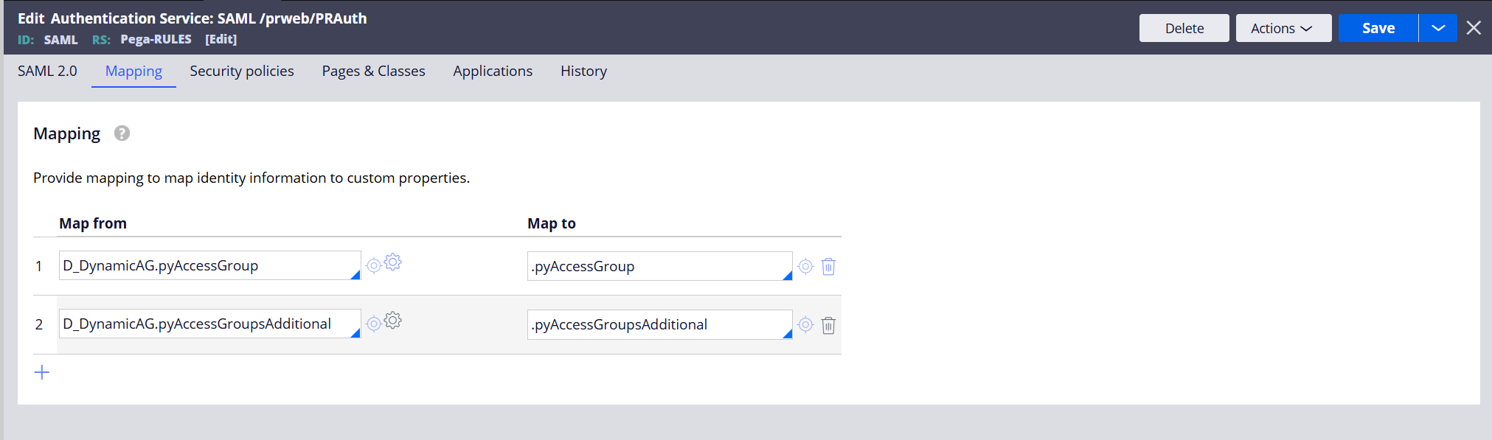
The attributes/claims can already be mapped statically from those data pages by placing the attribute/claim in curly brackets for example, {email}).
For details see Mapping operator information for a SAML SSO authentication service.
Step 2 — Configure Work Queue mapping in the Post Authentication Activity
Because pyWorkBasketList is a Page List property, it cannot be populated dynamically from the Mapping tab. Move all Work Queue and Work Group assignment logic to the Post Authentication Activity.
In the Post Authentication Activity:
- Read the appropriate IdP attributes or resolve them using a Decision Table or Data Page.
- Populate pyWorkBasketList with the appropriate Work Queue entries (Page List structure).
- Populate pyWorkbasket (the default Work Queue) as required.
To configure the Post Authentication Activity on the Authentication Service:
- In Pega Infinity™ Studio, open the Authentication Service.
- On the SAML 2.0 tab, expand the Advanced configuration settings section.
- In the Post-authentication activity field, enter the name of your activity. The activity must have its Applies To class set to Code-Security and must be accessible to the user's default Access Group at the time of login.
- Click Save.
Refer to the sample activity pySSOPostAuthenticationActivity as a starting reference for structuring the activity.
Step 3 — Verify the Post Authentication Activity ruleset visibility
Ensure that the Post Authentication Activity is included in a ruleset that is accessible to the authenticated user's default Access Group. If the activity is in a higher version of the application than the user can access at login, it will not execute without generating an error. Add a Log-Message step as the first step in the activity (set to InfoForced) to confirm the activity is being reached during a test login.
Verification
After applying the configuration changes:
- Log in using SAML SSO as a test user.
- Confirm that the correct Access Groups appear on the operator's profile.
- Confirm that pyWorkBasketList is populated with the expected Work Queue entries.
- Confirm that Get Next Work returns work items correctly.
- Log out and log in a second time to verify that Access Group and Work Queue assignments are applied consistently on repeat logins.
References
Configuring operator provisioning for a SAML SSO authentication service
Specifying preauthentication and postauthentication activities for a SAML SSO authentication service
Mapping operator information for a SAML SSO authentication service
Configuring SSO login authentication with a SAML identity provider