
Pega Smart Investigate for Payments -Parse transform rule not reading Tag 20 from Swift message
We need to read the reference from either tag 20 or 21.
SwiftMessage_past20_21 Parse transform rule not reading Tag 20 from swift message.
Please let us know any other transform rule to read if the swift message has only tag 20.?
Accepted Solution
Updated: 18 Dec 2023 9:36 EST

Pegasystems Inc.
GB
Updated: 27 Nov 2023 7:12 EST
Pegasystems Inc.
GB
@cmkmurali according to the following support article this issue can be resolved with a workaround:
Case creation from SWIFT message fails in Prod with some TAG20
I can see that you logged another S.I support ticket off this question Pega Smart Investigate for Payments 8.6 any hotfixes available (INC-A26085).
cc @kumas10
Pega Smart Investigate for Payments 8.6 Implementation Guide
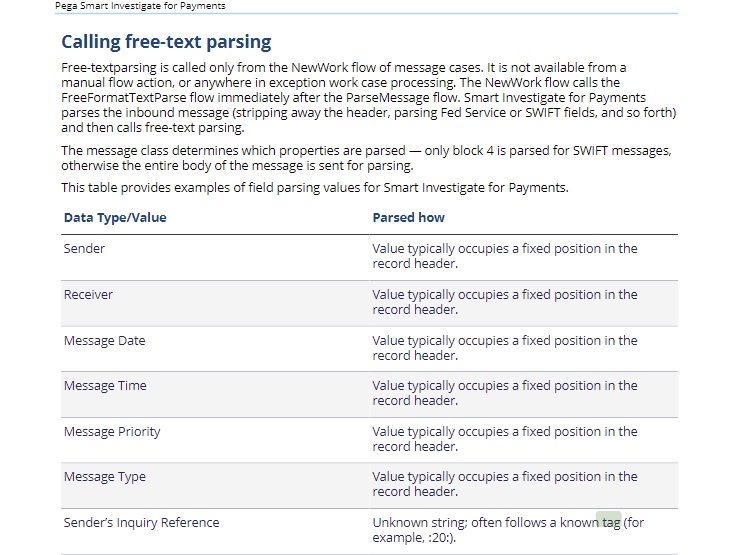
I believe from internal research that blocks in message are mandatory for Pega 8.x release. If you need help to implement a custom logic to parse message without blocks then this will need to be looked at by our support team.
For this Tag 20 issue, please can you log a support incident via the MSP and let us know the INC id so that we can help track the issue?

TCS
QA
@MarijeSchillern INC-A26687 is raised Tag 20 issue.
Accepted Solution
Updated: 18 Dec 2023 9:36 EST
Pegasystems Inc.
GB
@cmkmurali the support ticket has been resolved with the following explanation having been provided to you:
"Smart Investigate WILL NOT use the transaction reference in field 20 of inbound message to allow a search since field 20 is the message senders reference NOT a field to be used to hold the transaction reference of the payment being investigated.
Client's expectation was that if field 21 is not populated, the data in field 20 would be used to proceed with transaction search and create case. This is not how the system is designed.
Only data in field 21 and 79 can be used to perform transaction search and finding a single unlinked transaction is a mandatory requirement for SI to automatically complete processing of the M-case and create full investigation case. Smart Investigate WILL NOT use the transaction reference in field 20 of inbound message to allow a search since field 20 is the message senders reference NOT a field to be used to hold the transaction reference of the payment being investigated.
@cmkmurali the support ticket has been resolved with the following explanation having been provided to you:
"Smart Investigate WILL NOT use the transaction reference in field 20 of inbound message to allow a search since field 20 is the message senders reference NOT a field to be used to hold the transaction reference of the payment being investigated.
Client's expectation was that if field 21 is not populated, the data in field 20 would be used to proceed with transaction search and create case. This is not how the system is designed.
Only data in field 21 and 79 can be used to perform transaction search and finding a single unlinked transaction is a mandatory requirement for SI to automatically complete processing of the M-case and create full investigation case. Smart Investigate WILL NOT use the transaction reference in field 20 of inbound message to allow a search since field 20 is the message senders reference NOT a field to be used to hold the transaction reference of the payment being investigated.
It is contrary to Swift usage guidelines for field 20 to be a copy of any previously used Field 20. If the inbound Field 20 is identical to a transaction that had that same Field 20 - this is incorrect use of the MTn99 Field 20 value, which must "contain a reference assigned by the sender to unambiguously identify the message" - i.e. it must be a unique reference, and not repeat a reference used to identify, uniquely, a previously submitted transaction.
Solution description:
Client was advised that Smart Investigate WILL NOT use the transaction reference in field 20 of inbound message to allow a search since field 20 is the message senders reference NOT a field to be used to hold the transaction reference of the payment being investigated.
Pega team agree that there is some processing issue in that even when we have successfully found a transaction reference in :79:, when :21: is missing SI fails to perform a transaction search - however if there is no transaction reference identified in :79:, we would never create an exception case as finding either a single unlinked transaction or existing case is the mandatory exit criteria for automated message processing.
We have raised a bug internally BUG-843328 for the issue where a transaction is not being searched when transaction reference is found in field 79.
If client wishes to override this behaviour and create exception cases without finding transactions or existing cases - this is something they would have to do locally.
Client was advised to ensure field 21 is populated and that should be fine in finding the transaction."
I will proceed to mark our GCS team analysis as Accepted Solution.
@cmkmurali the support ticket has been resolved with the following explanation having been provided to you:
"Smart Investigate WILL NOT use the transaction reference in field 20 of inbound message to allow a search since field 20 is the message senders reference NOT a field to be used to hold the transaction reference of the payment being investigated.
Client's expectation was that if field 21 is not populated, the data in field 20 would be used to proceed with transaction search and create case. This is not how the system is designed.
Only data in field 21 and 79 can be used to perform transaction search and finding a single unlinked transaction is a mandatory requirement for SI to automatically complete processing of the M-case and create full investigation case. Smart Investigate WILL NOT use the transaction reference in field 20 of inbound message to allow a search since field 20 is the message senders reference NOT a field to be used to hold the transaction reference of the payment being investigated.
@cmkmurali the support ticket has been resolved with the following explanation having been provided to you:
"Smart Investigate WILL NOT use the transaction reference in field 20 of inbound message to allow a search since field 20 is the message senders reference NOT a field to be used to hold the transaction reference of the payment being investigated.
Client's expectation was that if field 21 is not populated, the data in field 20 would be used to proceed with transaction search and create case. This is not how the system is designed.
Only data in field 21 and 79 can be used to perform transaction search and finding a single unlinked transaction is a mandatory requirement for SI to automatically complete processing of the M-case and create full investigation case. Smart Investigate WILL NOT use the transaction reference in field 20 of inbound message to allow a search since field 20 is the message senders reference NOT a field to be used to hold the transaction reference of the payment being investigated.
It is contrary to Swift usage guidelines for field 20 to be a copy of any previously used Field 20. If the inbound Field 20 is identical to a transaction that had that same Field 20 - this is incorrect use of the MTn99 Field 20 value, which must "contain a reference assigned by the sender to unambiguously identify the message" - i.e. it must be a unique reference, and not repeat a reference used to identify, uniquely, a previously submitted transaction.
Solution description:
Client was advised that Smart Investigate WILL NOT use the transaction reference in field 20 of inbound message to allow a search since field 20 is the message senders reference NOT a field to be used to hold the transaction reference of the payment being investigated.
Pega team agree that there is some processing issue in that even when we have successfully found a transaction reference in :79:, when :21: is missing SI fails to perform a transaction search - however if there is no transaction reference identified in :79:, we would never create an exception case as finding either a single unlinked transaction or existing case is the mandatory exit criteria for automated message processing.
We have raised a bug internally BUG-843328 for the issue where a transaction is not being searched when transaction reference is found in field 79.
If client wishes to override this behaviour and create exception cases without finding transactions or existing cases - this is something they would have to do locally.
Client was advised to ensure field 21 is populated and that should be fine in finding the transaction."
I will proceed to mark our GCS team analysis as Accepted Solution.