
Question

Gurunanak Institute of Technology
IN
Last activity: 11 Nov 2024 6:15 EST
How to configure a requirement where only one checkbox can be selected, and the checkbox details display on the next page?
Brief about how I created the records and checkbox:
1) I created a data type called "Policy"(cofigured the source) in which I entered fields like insure,insurer Id etc.
2) In the step of the casetype called "Registration" I used data relationship called "query" and "list of records" where I chose "D_PolicyList".
3) Later I went into Section of user Interface and added a new column where I set the label as "Select Policies" and under that I added a checkbox with property created using crosshair symbol i.e. "IsSelected"(boolean).
I can't see multiple rows to set their checkbox as disable on condition.
Requirement 1: The user must select one and only one checkbox
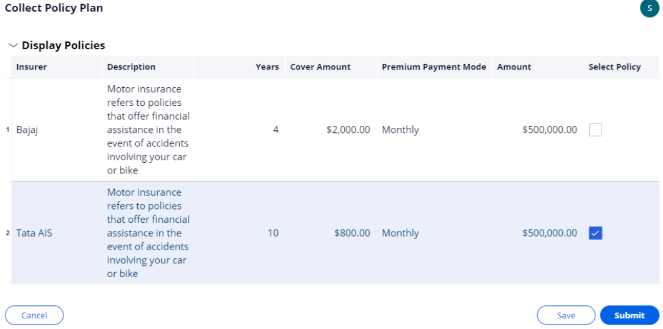
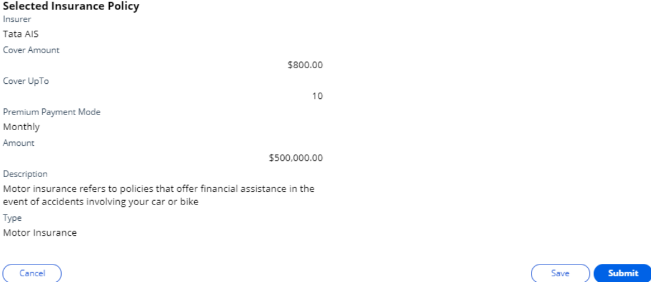
Requirement 2: The selected chekbox details must be displayed in the next step
***Edited by Moderator Marije to change type from Pega Academy to Product; update capability tags***

SAB Bank
SA
Gurunanak Institute of Technology
IN
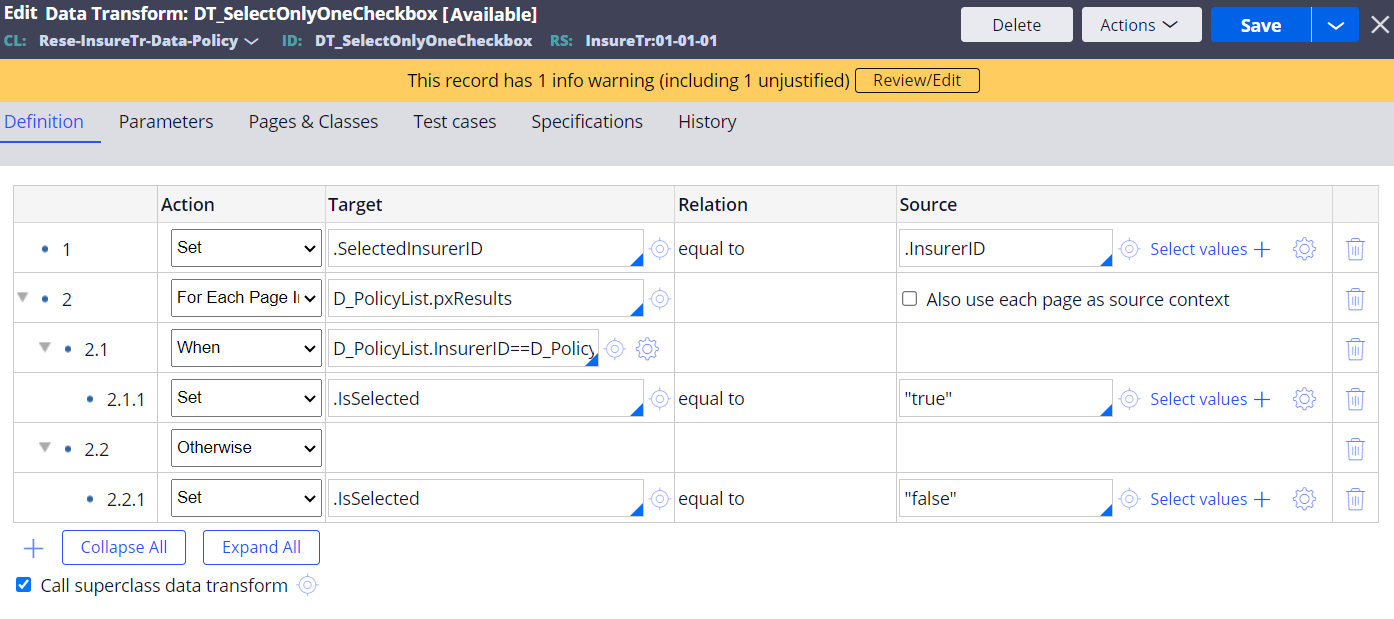
@Sofiyaan Thank you for responding. This is the data tranform I used in the action set of the checkbox.Where, I added a new property called SelectedInsurerID in the same class as InsurerID. But this doesn't seem to work when I save and run. I'm still able to select the rest of the checkboxs. please suggest changes.
Requirement 2: I have never used the Indexinpage.Can you please demonstrate how to configure the same?
And, the data tranform is created in the data class. But, In the flow action of the process in the case type is in work class.
SAB Bank
SA
Hi @neelimakonasani , to make it further simple for clearing all checkbox, you wont need to have when conditions to check which of the page should have the true enabled, instead just place only one when condition on top of your data transform that should check if user have enabled the checkbox - .IsSelected==true ,
if so then in child step of when condition - you can loop through the list & you can set IsSelected to false for all pages in that list & you can add another step outside of your loop , that should set IsSelected=true [ as you are on the context of primary page already]
and this data transform you need to call on action set of checkbox - on change - refresh this section & call the DT inside it.
instasmart software solutions
NL
Hi @neelimakonasani,
1st Requirement:
you can achieve this by using the disable condition on the checkbox use the below when condition
In When Rule 1st step:
.IsSelected== False
2nd step:
@countInPageList("true",".IsSelected",D_PolicyList.pxResults)
keep this logic (1) AND (2).
Call this When condition in the Disable option of the Checkbox. This when condition will disable the checkbox after the first selection
2nd Requirement:
In Data Transform loop on the Data page and inside the loop keep .IsSelected == true when expression, inside this step copy the details to new page list and show the new page list details in the next screen.
Step1: For Each Page in: D_PolicyList.pxResults
Step2: When .IsSelected==true
Step3: Append to NewPagelist(Create a page list in same class of the Data Page)
Explanation: Looping on the D_PolicyList.pxResults, whenever the .IsSelected Property is true then the particular result is copied to the NewPagelist.
Show the NewPageList in the next screen in readonly.
Let me know this solution works or not.
Thanks,
Lakshman.
Hi @neelimakonasani ,
For Requirement 1 : For achieving only one policy can be selected , one way to achieve this is on change of checkbox if value is true then explicitly setting the IsSelected to false in all pages of that list except the current page context.
For Requirement 2 : In post processing of flow action [Policy selection screen] , call the data transform to identify the page that has IsSelected to true (You may use IndexInPageList to get index of that page ) & copy it to another page [Lets say SelectedPolicy] and you can show the data in next step screen based on context of this page SelectedPolicy
Do share your thoughts incase above do not meet your requirement.