
Question

Evonsys (PVT) LTD
Evonsys (PVT) LTD
LK
Evonsys (PVT) LTD
Posted: May 23, 2023
Last activity: Sep 4, 2023
Last activity: 4 Sep 2023 11:53 EDT
Closed
Fields With not working properly. only development section
Hi Team,
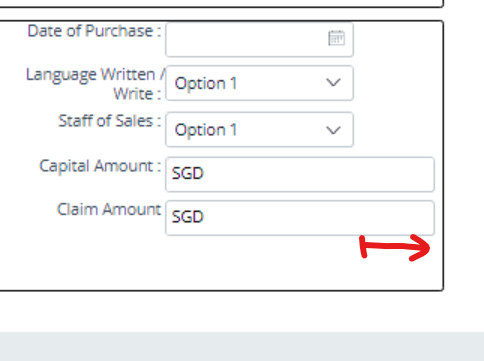
when I add currency box and dropdown in the development section will appear like SC1, but in the preview section it will be appear like SC2 ,
i will attached my cell property for currency box screenshot (SC3)
SC1
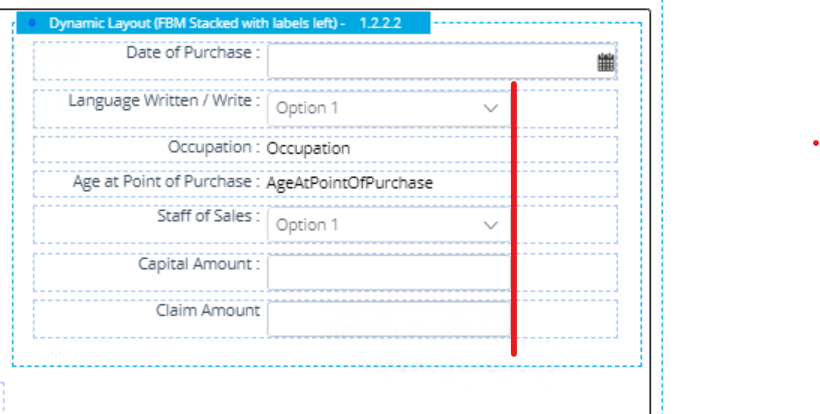
SC2
SC3 (Cell property)
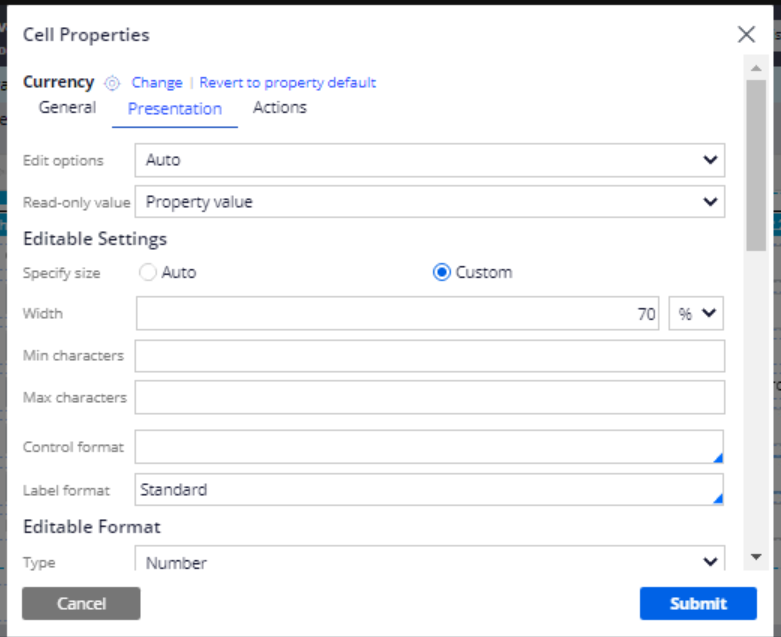
When I add width as any number it will affect only development section, but preview section not will change.
I want to help to resolve this problem
Thank you.
***Edited by Moderator: Bhavana S to add capability tags***
To see attachments, please log in.
Posted: 2 years ago

MOD
Pegasystems Inc.
GB
Posted: 2 years ago
Evonsys (PVT) LTD
Evonsys (PVT) LTD
LK
Hi @MarijeSchillern. appreciate your answer, Thank you.
@Eranda10274 To resolve the issue with the currency box and dropdown appearing differently in the development and preview sections, you can try the following steps:
If the issue persists after trying these steps, there might be other factors affecting the appearance of the currency box and dropdown in the preview section. In such cases, it is recommended to consult with a Pega expert or support team for further assistance.
Please provide the INC id here to help us track it.
This answer came from a Pega gen-AI assistant using the below references. As a Support Center moderator, I reviewed the answer and references for accuracy:
@Eranda10274 To resolve the issue with the currency box and dropdown appearing differently in the development and preview sections, you can try the following steps:
If the issue persists after trying these steps, there might be other factors affecting the appearance of the currency box and dropdown in the preview section. In such cases, it is recommended to consult with a Pega expert or support team for further assistance.
Please provide the INC id here to help us track it.
This answer came from a Pega gen-AI assistant using the below references. As a Support Center moderator, I reviewed the answer and references for accuracy:
Setting advanced presentation options for controls
Configuring Currency fields