

Constellation Localization not working
Hi all,
for our application we need the german translation. It is a constellation react application with Pega Platform v'23.
I did the localization via AppStudio, exported the German language excel file and imported the translated one. The status is on "Resolved".
After that I also imported the Constellation '23 language "jar"-File in DevStudio and it was also imported successfully. When I now added the "DE_de" on the depending operators, not all of the translations are working.
Especially the assignment header is still in English. Do you know what could be the reason for that?
Thanks in advance,
Joshua
Accepted Solution
Updated: 14 Mar 2024 8:38 EDT

Pegasystems Inc.
GB
The localization packs do not provide a complete localization of the portal as there will be a number of application specific translations that will need to be added manually for things like custom views, and data pages. Do you see *any* translations after installing the language pack? For example, I would expect to see days, dates, assignment buttons have the German values if you have imported the German Language pack. For example if I import the pack I see the following for the assignment buttons. If you are seeing similar then it would seem that the localizations from the imported pack are being picked up.

It is worth noting that you should not import the language packs from Pega Marketplace (Constellation '23 language "jar"-File) via the App Studio localization features (which is for creating customizable translation packs), but via the Dev Studio application import feature. It sounds like this is what you did anyway, but I thought it worth mentioning. This is in the pack documentation.
The localization packs do not provide a complete localization of the portal as there will be a number of application specific translations that will need to be added manually for things like custom views, and data pages. Do you see *any* translations after installing the language pack? For example, I would expect to see days, dates, assignment buttons have the German values if you have imported the German Language pack. For example if I import the pack I see the following for the assignment buttons. If you are seeing similar then it would seem that the localizations from the imported pack are being picked up.
It is worth noting that you should not import the language packs from Pega Marketplace (Constellation '23 language "jar"-File) via the App Studio localization features (which is for creating customizable translation packs), but via the Dev Studio application import feature. It sounds like this is what you did anyway, but I thought it worth mentioning. This is in the pack documentation.
As Marije mentioned there are some localization limitations currently including Case status, and Step Labels so if these are what you are referring to as part of the assignment header then you could be hitting these limitations.
Localization limitations (pega.com)
When you initially ran the localization From App Studio did you make any updates to the Excel translation sheet before importing it? When this is initially created the Excel will not have any translations. The expectation here is that you would edit the Excel and add your custom translations to the Translated string de-DE column before importing.
If as appears to be the case from your description you have imported the German language Pack after running the initial localization then I would suggest the following steps.
- In App Studio DELETE the German Translation Pack that is marked as Resolved. NOTE that this does not delete any existing translations but will allow you to generate a new translation pack.
- Create new German translation pack with Re-translate all layers option and download the excel.
- Open this new excel and you should see all the current translations (from imported pack) and also the application custom ones that you can add your own translations to the Translated string de-DE column before re-importing this excel.
Note that the localization rules created need to be synced to the app static service. This is not instant so you may need to wait a few minutes to see the localizations. You can also trigger a sync by saving your application rule.
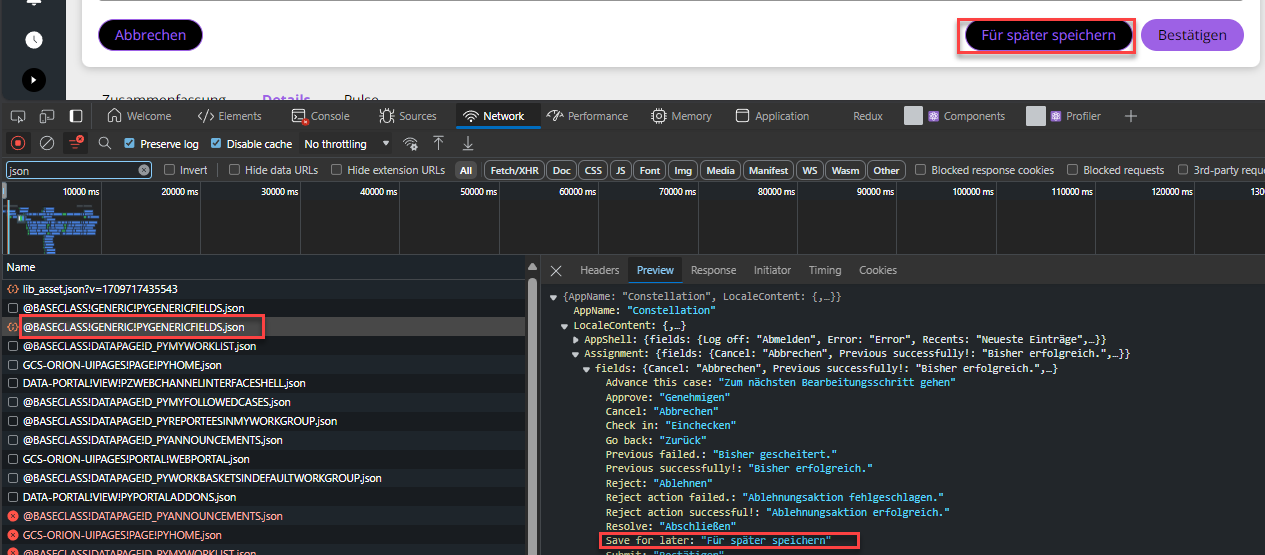
You can check the localizations that are being returned by inspecting the network trace in the browser dev tools for the locales api requests. You will likely see some failed 400 status requests where localization data has not been requested but not found. Some of these are expected, but if you see any relating to your custom application classes then it would suggest the localizations have not been created. Running through the above re-generation of the translation pack steps and completing the blank Translated string de-DE values will correct this.
Troubleshooting localization (pega.com)

Pegasystems Inc.
GB
@JoshuaP9 the documentation only shows the following Limitations when using Constellation with traditional UI
- Localization.
Labels and messages from Constellation Case Types created in the traditional application are not localized.
---> Please log a support ticket via the MSP f you need further help with this. Let us know the INC ref here so we can help track it.
@Marc Alderman @RichardMarsot could either of you comment? Does this need a support incident?
Accepted Solution
Updated: 14 Mar 2024 8:38 EDT
Pegasystems Inc.
GB
The localization packs do not provide a complete localization of the portal as there will be a number of application specific translations that will need to be added manually for things like custom views, and data pages. Do you see *any* translations after installing the language pack? For example, I would expect to see days, dates, assignment buttons have the German values if you have imported the German Language pack. For example if I import the pack I see the following for the assignment buttons. If you are seeing similar then it would seem that the localizations from the imported pack are being picked up.
It is worth noting that you should not import the language packs from Pega Marketplace (Constellation '23 language "jar"-File) via the App Studio localization features (which is for creating customizable translation packs), but via the Dev Studio application import feature. It sounds like this is what you did anyway, but I thought it worth mentioning. This is in the pack documentation.
The localization packs do not provide a complete localization of the portal as there will be a number of application specific translations that will need to be added manually for things like custom views, and data pages. Do you see *any* translations after installing the language pack? For example, I would expect to see days, dates, assignment buttons have the German values if you have imported the German Language pack. For example if I import the pack I see the following for the assignment buttons. If you are seeing similar then it would seem that the localizations from the imported pack are being picked up.
It is worth noting that you should not import the language packs from Pega Marketplace (Constellation '23 language "jar"-File) via the App Studio localization features (which is for creating customizable translation packs), but via the Dev Studio application import feature. It sounds like this is what you did anyway, but I thought it worth mentioning. This is in the pack documentation.
As Marije mentioned there are some localization limitations currently including Case status, and Step Labels so if these are what you are referring to as part of the assignment header then you could be hitting these limitations.
Localization limitations (pega.com)
When you initially ran the localization From App Studio did you make any updates to the Excel translation sheet before importing it? When this is initially created the Excel will not have any translations. The expectation here is that you would edit the Excel and add your custom translations to the Translated string de-DE column before importing.
If as appears to be the case from your description you have imported the German language Pack after running the initial localization then I would suggest the following steps.
- In App Studio DELETE the German Translation Pack that is marked as Resolved. NOTE that this does not delete any existing translations but will allow you to generate a new translation pack.
- Create new German translation pack with Re-translate all layers option and download the excel.
- Open this new excel and you should see all the current translations (from imported pack) and also the application custom ones that you can add your own translations to the Translated string de-DE column before re-importing this excel.
Note that the localization rules created need to be synced to the app static service. This is not instant so you may need to wait a few minutes to see the localizations. You can also trigger a sync by saving your application rule.
You can check the localizations that are being returned by inspecting the network trace in the browser dev tools for the locales api requests. You will likely see some failed 400 status requests where localization data has not been requested but not found. Some of these are expected, but if you see any relating to your custom application classes then it would suggest the localizations have not been created. Running through the above re-generation of the translation pack steps and completing the blank Translated string de-DE values will correct this.
Troubleshooting localization (pega.com)

adept view
NL
"Note that the localization rules created need to be synced to the app static service. This is not instant so you may need to wait a few minutes to see the localizations. You can also trigger a sync by saving your application rule.",
with the above line in your comment , you meant the system should have "ConstellationSvcURL" DSS to be set with the required value and its mandatory ? , I tried localization without this value . I could see the localized rules are getting created but while fetching those jsons I see ERR_EMPTY_RESPONSE and localization didnt work .
Pegasystems Inc.
GB
Which platform version are you using?
In platform versions prior to Infinity 25 (where the Application Static service is deprecated), you must configure the Application Static service and reference it through the ConstellationSvcURL DSS—unless you are running in a Pega Cloud environment, where this service is provisioned automatically. This service syncs localization rules from the platform and serves them to the browser whenever localization is required.
For on-premise installations, ensure that the Constellation Application Static service is installed for all Pega Platform deployments. This should be done using the Pega-provided Docker image, and the service must be referenced via the DSS.
You can review the documentation below for more information on this service.
adept view
NL
We are in Customer Cloud and version is 24.1.3 .
Pegasystems Inc.
GB
Thanks for the clarification.
For client cloud deployment you will also need to deploy the Constellation Application Static service as detailed above.