
[Constellation] Issue when save auto populated read only fields data in view.
Hi All,
We have requirement for load view from data layer in case stage/step and give user an ability to edit and save the data to same data type
As per below image, we have loaded the view from data layer and populating existing data to view. (Data populated to the page type property in pyWorkPage)
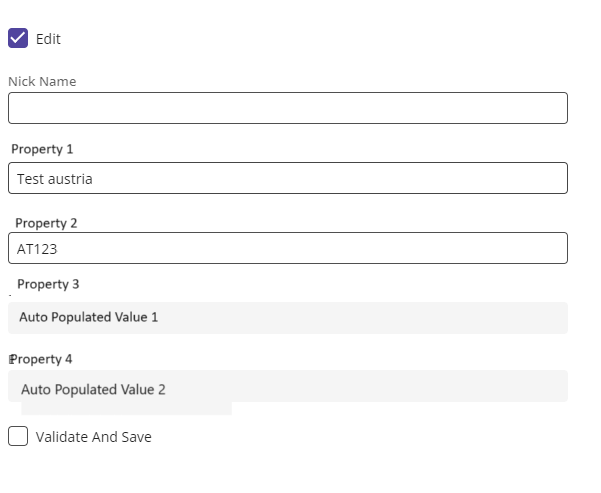
- Once user click on "Edit" check box, Property 1 and Property 2 will become editable and Property 3 and Property 4(both these are read only) auto populated on action in Property 2.
- On click of "Validate and save (Check box for now)" we are trigger data transform to save data to data type in flow action
Issue - these read only fields are not getting save. As we observe values in those fields are empty in page type property on pyWorkPage when we trigger data transform in "Validate and Save" action.
Has someone faced issue with save read only fields after auto populating?
Accepted Solution
Updated: 20 Aug 2025 10:39 EDT

Pegasystems Inc.
GB

Pegasystems Inc.
CA
The workaround would be to store the read-only properties in Post Data transform based on your action in Property 2. Please cnsider using Vadlidate in Flow action and Savable data page to save the record instead of custom "ValidateAndsave".

Evonsys
NL
@RameshSangili Thanks for the reply, let me try this approach.
Accepted Solution
Updated: 20 Aug 2025 10:39 EDT
Pegasystems Inc.
GB
Read only fields are not currently submitted. This is by design and is the same in Traditional and Constellation UI. We are however reviewing this behavior based on previous feedback so this may change in a future release, although I don't have anything further to share on that right now.
One possible solution that I have used is to create a simple hidden input DX Component. This allows you to have both the read only, and hidden editable input in the view which will then mean the value is submitted from the hidden input.
You will see that the input component from the Constellation design system supports a type property that can be set to 'hidden' so you can make this component just by making this one change to the basic Text Input component that is created by the DX Component Builder.
Updated: 20 Aug 2025 10:39 EDT
Evonsys
NL
@Marc Alderman Thanks for the reply and Info, let me try this approach and update
Pegasystems Inc.
GB
Please also see the following article.
Read-only values are not saved in Constellation | Support Center
@NuwanD54
Read only fields are not currently submitted. This is by design and is the same in Traditional and Constellation UI. We are however reviewing this behavior based on previous feedback so this may change in a future release, although I don't have anything further to share on that right now.
One possible solution that I have used is to create a simple hidden input DX Component. This allows you to have both the read only, and hidden editable input in the view which will then mean the value is submitted from the hidden input.
You will see that the input component from the Constellation design system supports a type property that can be set to 'hidden' so you can make this component just by making this one change to the basic Text Input component that is created by the DX Component Builder.
Input | Pega Constellation design system
Constellation DX components (pega.com)