

Overview
This guide outlines the steps to create a report that helps you determine the number of user accounts configured to use Basic Credentials Authentication, and their corresponding last login dates.
Background
Basic Credentials Authentication relies on potentially reused passwords, making it easier to compromise accounts, and it increases the difficulty of monitoring and detecting unauthorized access. To reduce these risks and enhance control and compliance requirements, transition user accounts that are configured to use Basic Credentials Authentication to Single Sign-on (SSO).
Beginning with release of Pega Infinity ‘24.2, Pega has deprecated Basic Credentials Authentication. This should only be used for non-personal operator records, such as [email protected], in emergency situations.
Action to take
Pega Platform has two 2 options to help you follow industry best practices. You can configure an external Identity Provider (IDP) using either option:
- SAML 2.0 Configuring SSO login authentication with a SAML identity provider
- OIDC 2.0 Configuring SSO login authentication with an OpenID Connect identity provider .
Utilizing an external IDP improves your security and will help meet compliance requirements for your Pega applications.
How to create a report?
1. Create a report on the 'Data-Admin-Operator-ID' class within your ruleset.
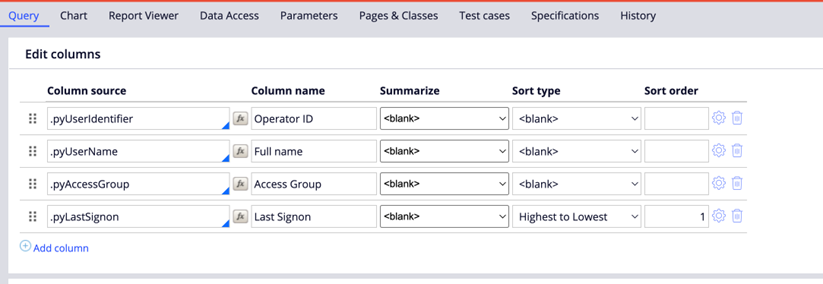
2. Select the following columns for your query:
- .pyUserIdentifier: Operator ID
- .pyLastSignon: Operator last sign-on time
- .pyUserName: Full Name
- .pyAccessGroup: Default Access Group
3. Sort the results by 'pyLastSignon':
4. Add the following filter conditions:
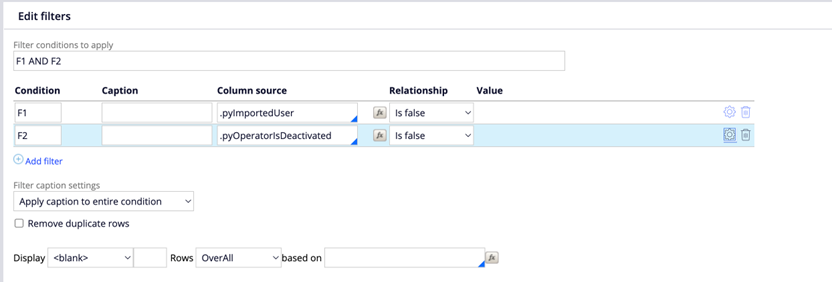
- .pyImportedUser: False
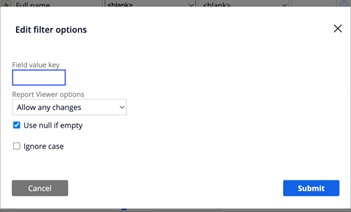
- .pyOperatorIsDeactivated: False. Additionally, enable the 'Use null if empty' condition for this filter.
5. Apply an 'AND' condition for both filters.
6. Save and run the report.
Frequently Asked Questions
To enhance the security of our product and reduce the risk associated with storing account passwords, starting from version 24.2, we announced that the basic credentials authentication service type is deprecated in this release.
This document will address the most frequently asked questions regarding the deprecation of the Basic Credentials Authentication service type.
| Question | Answer |
|---|---|
| What does it mean when a feature is deprecated in Pega Platform? |
Deprecated features no longer undergo active development and have limited support because of enhancements or lack of adoption; future releases do not support deprecated deployment options. While these features and deployment options continue to work for the current release, avoid their use in new deployments. Pega maintains deprecated features for several software versions to provide time to adopt fully supported features to achieve your business needs. Withdrawn features are no longer available in Pega Platform. Pega announces a withdrawn feature in the release, in which Pega removes the feature from the Pega Platform code. Source: https://docs.pega.com/bundle/platform/page/platform/release-notes/deprecated-features.html |
| I am currently using Basic Credentials Authentication. What does that mean for me? |
Basic credential authentication will continue to be available for out-of-the-box operator records, such as [email protected], as well as for other operator records needed at the start of projects when Single Sign-On (SSO) is not available or in other legitimate use cases. However, this functionality will not be enhanced. Using an external Identity Provider (IDP) for authentication offers several advantages that improve both security and user experience. By utilizing industry-standard protocols like SAML 2.0 and OIDC 2.0, organizations can implement robust authentication mechanisms that minimize the risk of password-related vulnerabilities. External IDPs often incorporate advanced security features, such as multi-factor authentication and adaptive security measures, to enhance the protection of user accounts. Additionally, using an IDP can streamline the login process by enabling SSO, which allows users to access multiple applications with a single set of credentials. This approach not only simplifies user management but also enhances overall productivity by reducing the need for users to remember and enter multiple passwords. Ultimately, integrating an external IDP aligns with best practices for secure identity management while improving user convenience. Clients can continue to use basic credentials for these operator records, as Pega does not plan to remove that code base. However, stronger authentication services are anticipated for logging into higher environments. The type of authentication service is configured in the Authentication Type field when creating a new authentication service. Great news, Pega platform has 2 options available to help you follow industry’s best practices. You can configure an external Identity Provider (IDP) using either option: |
| What about Service accounts used by the platform? | Service account operations will remain unaffected since the feature is still available. However, when integrating with external systems, we advise switching to OAuth 2.0, ideally using an external Identity Provider (IDP). For more information, see: OAuth 2.0 client registrations |
| Will Pega continue to act upon new security vulnerabilities found in Basic Authentication in future? | Pega continuously assesses new threats and vulnerabilities, implementing industry-recognized secure practices throughout the software development lifecycle. All critical and high vulnerabilities are addressed promptly in accordance with Pega policy, ensuring ongoing action on security issues. |


@RupashreeThis report does not check which authentication service they use to login. The report pulls all non-SSO operators, but they can use PRAuth platform authentication service and login using Username and password. I assume that is still supported and not deprecated.