
Question

Combinatie Bovemij Mn Services BV
NL
Last activity: 10 Jul 2024 1:27 EDT
Can you add and see an activity in the calendar of sales automation?
Is it possible to see the activities you create in Sales Automation in the calendar?
Now you can see the appointments in the shared calendars but you can't see the tasks in the shared calendar. But can you add the activities in the calendar.
Accepted Solution
Updated: 10 Jul 2024 1:27 EDT

Pegasystems Inc.
US

Pegasystems Inc.
GB
@PuckRas , you can add and view activities in the calendar of Pega Sales Automation. The calendar gadget allows you to create appointments and tasks directly from the calendar. However, only the appointments can be viewed in the shared calendars section, not the tasks. The shared calendars section displays the calendars that other users have shared with you, with color coding for each calendar. You can select specific users whose events you want to view. Events are color coded to indicate whose calendar an event is from.
⚠ This is a GenAI-powered tool. All generated answers require validation against the provided references.
@Mahesh can you add anything here?
Updated: 5 Jul 2024 4:46 EDT
Combinatie Bovemij Mn Services BV
NL
@MarijeSchillern Thank you Marije, but activities you can't see in the calendar. Only your tasks and appointments. Activities are different then tasks.
Pegasystems Inc.
GB
@PuckRas I have asked our Sales Automation SME's (including @Mike Scheffler ) to provide a possible workaround here.
Accepted Solution
Updated: 10 Jul 2024 1:27 EDT
Pegasystems Inc.
US
Hey @PuckRas, thank you for asking. You can add activities to the Calendar Gadget, here's a description how to achieve this.
The steps describe the easiest approach with the least changes, but all Calendar Gadget configuration rules are available and declared as extensions, hence they can be modified as desired.
Note: all applied changes are available in the attached branch CalGadget <CalGadget_20240709T145854_GMT.zip>. Also, image upload doesn't work reliably, so screenshots are uploaded as attachments.
Step 1 - ensure that the relevant rules are available and correctly specified
The configuration requires specific data pages – in some cases they might already exist, otherwise you are required to create them:
- D_ActivityList - List containing all customer activities for a specific user (using RD ActivityList)
- D_Activity – page containing a customer activity instance (using lookup)
For details related to this example of customer activities, please verify the rules in the mentioned branch.
Step 2 – update Declare Expression CalendarComponentMetaData
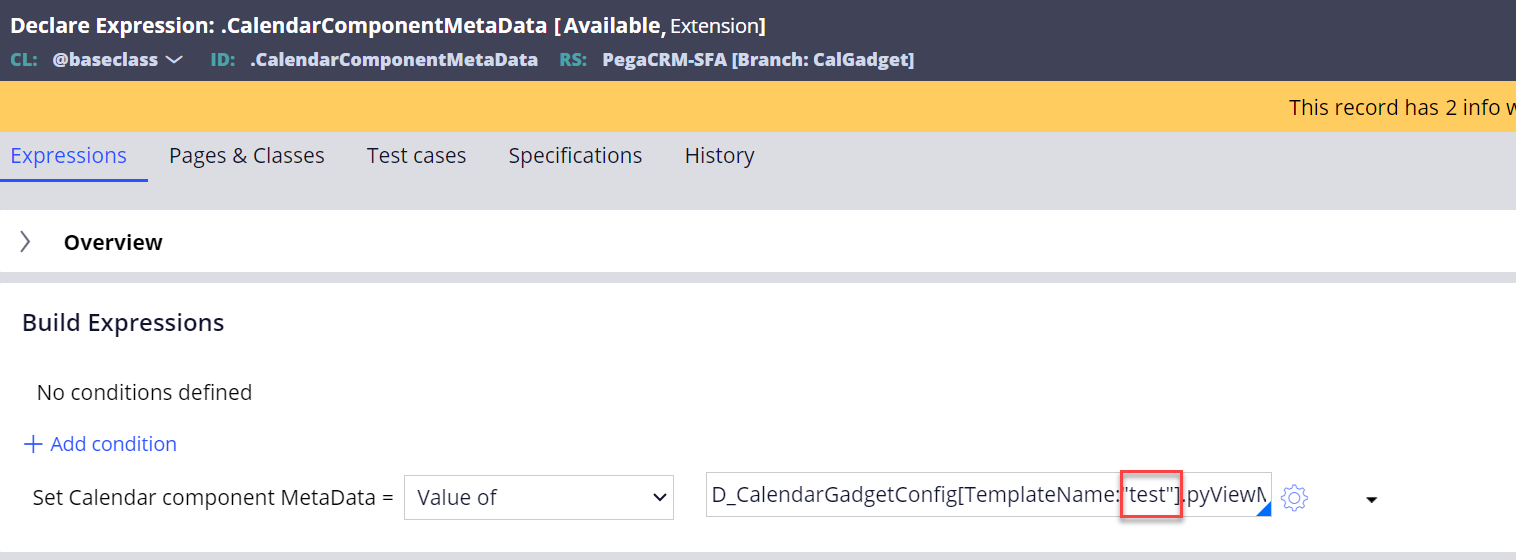
Hey @PuckRas, thank you for asking. You can add activities to the Calendar Gadget, here's a description how to achieve this.
The steps describe the easiest approach with the least changes, but all Calendar Gadget configuration rules are available and declared as extensions, hence they can be modified as desired.
Note: all applied changes are available in the attached branch CalGadget <CalGadget_20240709T145854_GMT.zip>. Also, image upload doesn't work reliably, so screenshots are uploaded as attachments.
Step 1 - ensure that the relevant rules are available and correctly specified
The configuration requires specific data pages – in some cases they might already exist, otherwise you are required to create them:
- D_ActivityList - List containing all customer activities for a specific user (using RD ActivityList)
- D_Activity – page containing a customer activity instance (using lookup)
For details related to this example of customer activities, please verify the rules in the mentioned branch.
Step 2 – update Declare Expression CalendarComponentMetaData
This is used later in the Calendar Gadget template configuration.
Step 3 – Configure the Calendar Gadget template
- Open the user portal as a sysadmin or sales ops.
- Select Tools in the left navigation.
- Under Personalize select Calendar gadget.
- Click Add to create a new template.
- Add the entries as shown the screenshots:
- <CGConfig 1.png><CGConfig 2.png>
The configuration in the UI should like this now:
<CGConfig UI.png>
Activities are now presented in the Calendar Gadget
<CG Show CustAct.png>
Hope I could help - please let me know if you need further information.
Best regards
Mike
Combinatie Bovemij Mn Services BV
NL
@Mike Scheffler Thank you so much for the workaround solution. That's realy great.
Hey @PuckRas, thank you for asking. You can add activities to the Calendar Gadget, here's a description how to achieve this.
The steps describe the easiest approach with the least changes, but all Calendar Gadget configuration rules are available and declared as extensions, hence they can be modified as desired.
Note: all applied changes are available in the attached branch CalGadget <CalGadget_20240709T145854_GMT.zip>. Also, image upload doesn't work reliably, so screenshots are uploaded as attachments.
Step 1 - ensure that the relevant rules are available and correctly specified
The configuration requires specific data pages – in some cases they might already exist, otherwise you are required to create them:
For details related to this example of customer activities, please verify the rules in the mentioned branch.
Step 2 – update Declare Expression CalendarComponentMetaData
Hey @PuckRas, thank you for asking. You can add activities to the Calendar Gadget, here's a description how to achieve this.
The steps describe the easiest approach with the least changes, but all Calendar Gadget configuration rules are available and declared as extensions, hence they can be modified as desired.
Note: all applied changes are available in the attached branch CalGadget <CalGadget_20240709T145854_GMT.zip>. Also, image upload doesn't work reliably, so screenshots are uploaded as attachments.
Step 1 - ensure that the relevant rules are available and correctly specified
The configuration requires specific data pages – in some cases they might already exist, otherwise you are required to create them:
For details related to this example of customer activities, please verify the rules in the mentioned branch.
Step 2 – update Declare Expression CalendarComponentMetaData
This is used later in the Calendar Gadget template configuration.
Step 3 – Configure the Calendar Gadget template
The configuration in the UI should like this now:
<CGConfig UI.png>
Activities are now presented in the Calendar Gadget
<CG Show CustAct.png>
Hope I could help - please let me know if you need further information.
Best regards
Mike