
Need to change the default header message for Window.confirm() modal pop-up
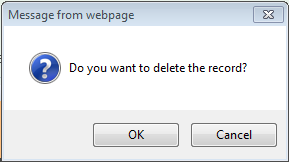
I am using Pega 6.2. I have used a custom control where I am using Window.confirm() as the confirmation modal dialog. According to the requirement I need to change the default header message of window.confirm(). By default It is coming as "Message from webpage", I need to change it to "Confirmation". Is there any way to modify the default header message.
Custom control for deletion of a row in repeat grid with confirmation.
<button title="<pega:lookup property=".pyCaption" value="Delete" />" class="iconDelete" onclick="if(window.confirm('<pega:lookup property=".pyMessageLabel" value="Do you want to delete the record?" />')) { doGridAction(window.event,'DELETE'); return false;}else{return false;}" ></button>
Image,

Pegasystems Inc.
IN
Ernst & Young GDS LLP
IN
Hi,
I have tried the above code to override the default window.confirm in pega 6.2. But It is not calling the function body in execution time. Can you please suggest whether I am doing any steps wrong.
Below is the code I have written in a custom control in Pega,
Hi,
I have tried the above code to override the default window.confirm in pega 6.2. But It is not calling the function body in execution time. Can you please suggest whether I am doing any steps wrong.
Below is the code I have written in a custom control in Pega,
<button title="<pega:lookup property=".pyCaption" value="Delete" />" class="iconDelete" onclick="confirm('hello007',function() {doGridAction(window.event,'DELETE');})" </button>

<script>
window.confirm = function (message, callback, caption) {
    caption = caption || 'Confirmation'
	//alert(message);
    $(document.createElement('div')).attr({
        title: caption,
            'class': 'dialog'
    }).html(message).dialog({
        position: ['center', 100],
        dialogClass: 'fixed',
        buttons: {
            "OK": function () {
                $(this).dialog('close');
                //callback()
                return true;
            },
                "Cancel": function () {
                $(this).dialog('close');
                return false;
            }
        },
        close: function () {
            $(this).remove();
        },
        draggable: false,
        modal: true,
        resizable: false,
        width: 'auto'
    });
};
I think the overriding is not happening, attaching the screen shot of the modal dialog,

Hi,
The window.confirm is a standard function and to change the standard behaviour you have to override the standard function.
According to the Browser implementation is shows the Header and I will suggest not to override it.
But in case Still if you want to do so then you can use below code:
Hi,
The window.confirm is a standard function and to change the standard behaviour you have to override the standard function.
According to the Browser implementation is shows the Header and I will suggest not to override it.
But in case Still if you want to do so then you can use below code: