
Question

Atos Syntel
Atos Syntel
IN
Atos Syntel
Posted: Jun 2, 2017
Last activity: Jun 2, 2017
Last activity: 2 Jun 2017 12:32 EDT
Closed
Solved
Filter caption settings in Report Definition
What is the use of Filter caption settings in Report Definition
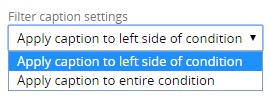
below content from help is not clear.
Filter caption settings
This control lets you specify whether the caption you set for each condition (such as "customer") applies to the left side of the condition ("customer = 'brown'"), or to the entire condition ("customer").
***Updated by moderator: Lochan to add Categories***
Accepted Solution
Posted: 8 years ago

Wipro
Wipro
US
Hi Dilipan,
It is just a caption to display in-place of whole condition or property used for the filter in report browser.
This can be used to display user friendly filter captions instead of application specific technical property descriptions to the user.
-Provide captions for filter conditions in report definition.
-Select "display filter" and "enable filter changes" in report viewer tab.
-Execute the report definition and check the filter section.
You shall be able to recognize the difference
Toggle between the caption options (drop down) and check the difference again.
Hope it helps,
Ananda Bhat