
Discussion

Pegasystems Inc.
NL
Last activity: 5 Feb 2026 8:16 EST
How Form refresh works with Page List properties
Form refresh supports page list properties
Summary
This article describes a new enhancement in the latest Pega Platform release: Form refresh in Constellation Flow Actions now supports referencing page list properties with a defined row value (for example, .SamplePageList(1).ScalarField). This enhancement improves the developer experience by expanding the set of supported Flow Action configurations.
The article explains what changed, how to configure it, and how it behaves at runtime. It also highlights current limitations observed during implementation so that developers can make informed design decisions.
Applies to
- Pega Platform: Infinity 25
- UI architecture: Constellation
- Area: Flow Actions, Page list,Form refresh
What’s new
In previous versions, Form refresh settings in Constellation Flow Actions were limited to scalar and page properties. Referencing page list properties was either unsupported and hampers quick implementation of real life scenarios.
With this enhancement:
- Form refresh now supports page list properties with a defined index, such as:
- .SamplePageList(1).ScalarField
- This enables more dynamic UI behavior when working with structured, repeatable data in Flow Actions.
What is not supported
- Open-valued page list references are still not supported. For example:
- .SamplePageList().ScalarField
Business scenario
To demonstrate this feature, a simple application was created with a case type called Intake. The purpose of the case is to collect information about cars that require maintenance or repairs.
Note:The focus of this article is on the Flow Action configuration used to collect data and trigger form refresh behavior.
Flow Action overview
The Flow Action is used to capture intake details, including car information stored in a page list structure.
Key characteristics
- The UI is built using Constellation
- Data (MaintenanceItems) rendered as page list and pre populated.
- A Form refresh is configured to react to changes in specific field on specific rows of the page list.
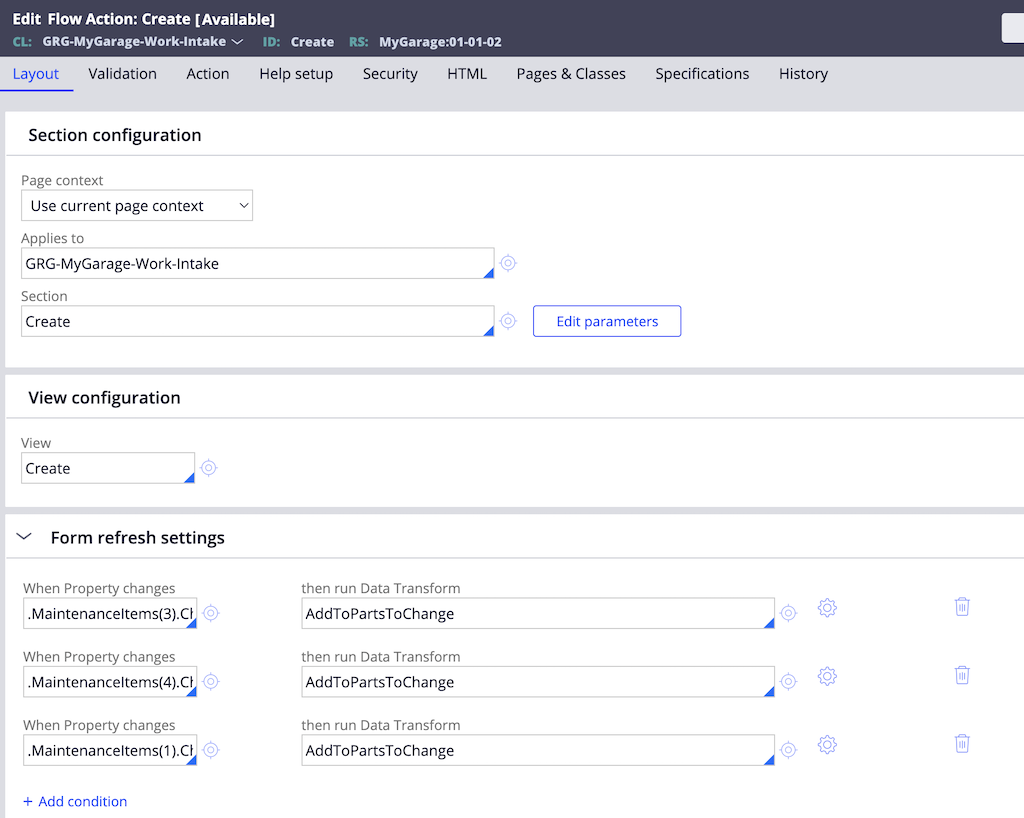
Change condition are set to specific rows (1,3 and 4) and on a specific property “ChangeApproved”.
Runtime behavior
At runtime, the Form refresh behaves as follows:
- When the referenced field inside the page list row changes
- The view is refreshed as expected. With the help of refresh, the view shows the field group which contains part and cost information for approval.
- Please note that the field group header information users dynamic label feature which is also released with the latest Pega platform 25 version
End-to-end demonstration
Limitations and shortcomings
Note: Form refresh supports only scalar properties defined on a specific page list row. References to pages, page lists, or open-valued page list entries are not supported.
1. Static row dependency
Because the row index is hardcoded:
- The configuration assumes the row exists
- Additional validation or guard logic may be required to avoid unexpected behavior when rows are added or removed
2. Scalar property support only
3. Limited flexibility for repeating UI patterns
For repeating layouts or grids:
- The feature does not yet support row-context-aware refresh behavior
- Workarounds may require additional rules or data transforms
Conclusion
The enhancement to support page list properties in Form refresh significantly improves the developer experience in Constellation Flow Actions. While there are still limitations, the feature enables new design patterns that were previously not possible.
Understanding both its capabilities and shortcomings will help developers apply it effectively and avoid common pitfalls.
Constellation 101 Series
Enjoyed this article? See more similar articles in Constellation 101 series.

Pegasystems Inc.
GB
Also worth looking at other options like using Actions to add to Embedded Data Lists, that is another way of modifying data (using pre/post processing)
We have options :)